Leah22311686u2vn
Participant
December 18, 2021
Answered

Some keys on my timeline disappeared

  • December 18, 2021
  • 2 replies
  • 550 views

normally I would have my timeline key things set like this 

but when I made a new project about halfway through editing, half of them just disappeared and now it looks like this

 

I don't know nor use 'Trik Mat' but now I can't open my 3D settings/keyframes since i can't even enable them on a layer.

Please help


(the parts that have just dissapeared)

 

This topic has been closed for replies.
Correct answer P.M.B

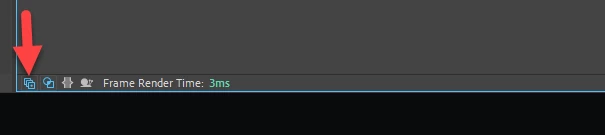
You may have accidentally clicked the switches toggle down at the bottom of the layer panel.


You could also right click anywhere on the top bar (where the switches usually are) choose "columns" and enable switches.  

2 replies

P.M.B
P.M.BCorrect answer
Legend
December 18, 2021

You may have accidentally clicked the switches toggle down at the bottom of the layer panel.


You could also right click anywhere on the top bar (where the switches usually are) choose "columns" and enable switches.  

~Gutterfish
Leah22311686u2vn
Participant
December 18, 2021

oh my god thank you this helped so much ❤️

Community Expert
December 18, 2021

Try resetting your workspace. You can double-click any workspace selected in the Tool Bar and choose Yes or use Window/Workspace/Reset your current workspace to default.


If that doesn't work try resetting your preferences. If you want to keep your current preferences for any reason open Preferences/General/Browse to preferences and rename the file then restart AE. If you don't want to save your current workspace just hold down Shift+Alt/Option+Ctrl/Cmnd when you open AE and choose to reset your preferences.