
Inspiring
May 19, 2021
Answered

sourceRectAtTime box changing height

  • May 19, 2021
  • 4 replies
  • 2595 views

Hi there,

I have a lower third set up with 3 auto-sizing text boxes. The "Company Name" position is tied to the end of "Person Name".
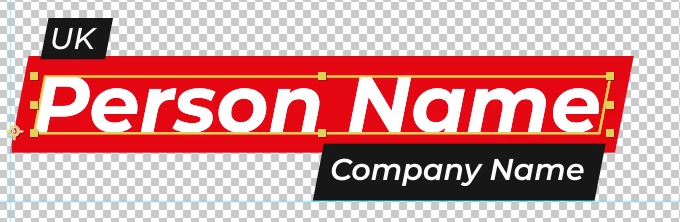
If I use a name that has letters with ascenders and descenders the "Company Name" box gets shifted down and no longer overlaps.
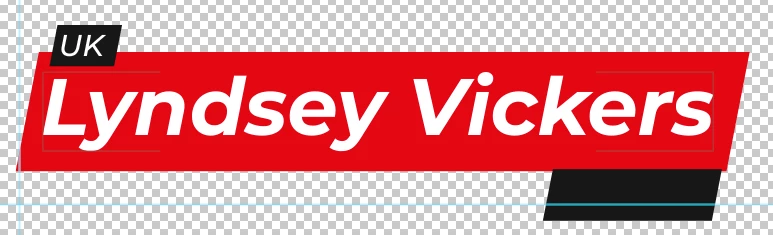
Is there a way I can make it so that the "Person Name" box is always the height of a name with both ascenders and descenders even if it has none?

Expression on "size" property

s=thisComp.layer("Left - Person Name");
w=s.sourceRectAtTime().width;
h=s.sourceRectAtTime().height;

[w,h]

Expression on "position" property

var s=thisComp.layer("Left - Person Name");
var w=s.sourceRectAtTime().width/2;
var h=s.sourceRectAtTime().height/2;
var l=s.sourceRectAtTime().left;
var t=s.sourceRectAtTime().top;


[w+l,h+t];

 Thanks in advanced

This topic has been closed for replies.
Correct answer Kyle Hamrick

No worries! They can be confusing at first. 🙂

So here's your current Size expression:


s= thisComp.layer('Left - Person Name");

w=s.sourceRectAtTime().width;

h=s.sourceRectAtTime().height;

[w,h]


You're creating two variables here, one for width and one for height, which look at the other layer (Left - Person Name) to set those values. 

If you want the height to be a static value instead, just enter a number for h instead of linking it to that other layer's height. So your code might instead look like this:


s= thisComp.layer('Left - Person Name");

w=s.sourceRectAtTime().width;

h=200;

[w,h]


You should be able to see what an appropriate value for h is by looking at a "good" example of this title, or you can just trial and error it a bit until you're happy.


One other alternative would be linking it to a slider control (Effects > Expression Controls) and set the slider to 200 (or whatever number is appropriate here). That would keep it parked at a constant value, but still give you easy access to the number if you needed to make small adjustments manually. Sliders can also be easily passed through as controls in a Mogrt, if that's what you're building here.


Good luck! Let us know if you need any further help.

4 replies

Participant
December 14, 2022

I'm not good at coding, but maybe it's useful to someone who stumbles upon this, you have to set the height based on the font style x height. It ignores ascenders an descenders.

Inspiring
December 15, 2022

I have coincidentally run into the same problem again! Can you explain what you mean by "font style x height"?

Mylenium
Legend
May 20, 2021

Simply replace the "height" related code with a fixed value.


Mylenium

Kyle Hamrick
Community Expert
Community Expert
May 20, 2021

If it's workable to do so, it sounds like you can just set the height at a static value, instead of measuring the text layer.

Inspiring
May 20, 2021

Sorry, I am new to expressions. How do I do that and still have the box width wrap around the text that gets typed in?

Thanks

Kyle Hamrick
Community Expert
Kyle HamrickCommunity ExpertCorrect answer
Community Expert
May 20, 2021

No worries! They can be confusing at first. 🙂

So here's your current Size expression:


s= thisComp.layer('Left - Person Name");

w=s.sourceRectAtTime().width;

h=s.sourceRectAtTime().height;

[w,h]


You're creating two variables here, one for width and one for height, which look at the other layer (Left - Person Name) to set those values. 

If you want the height to be a static value instead, just enter a number for h instead of linking it to that other layer's height. So your code might instead look like this:


s= thisComp.layer('Left - Person Name");

w=s.sourceRectAtTime().width;

h=200;

[w,h]


You should be able to see what an appropriate value for h is by looking at a "good" example of this title, or you can just trial and error it a bit until you're happy.


One other alternative would be linking it to a slider control (Effects > Expression Controls) and set the slider to 200 (or whatever number is appropriate here). That would keep it parked at a constant value, but still give you easy access to the number if you needed to make small adjustments manually. Sliders can also be easily passed through as controls in a Mogrt, if that's what you're building here.


Good luck! Let us know if you need any further help.

Mylenium
Legend
May 19, 2021

Of course you can always add custom padding values as you see fit. You may just need to branch your code and add a filter that checks for these characters in a conditional. The simpler alternative to that may be to have a separate layer of text that contains both the largest letters (presumably some umlaut like Ö and a minor g) and instead of using the actual text box' height you use that layer's height.


Mylenium