
James Ronan
Known Participant
May 21, 2026
Answered

SourceRectAtTime doesn't work with variable fonts

  • May 21, 2026
  • 3 replies
  • 53 views

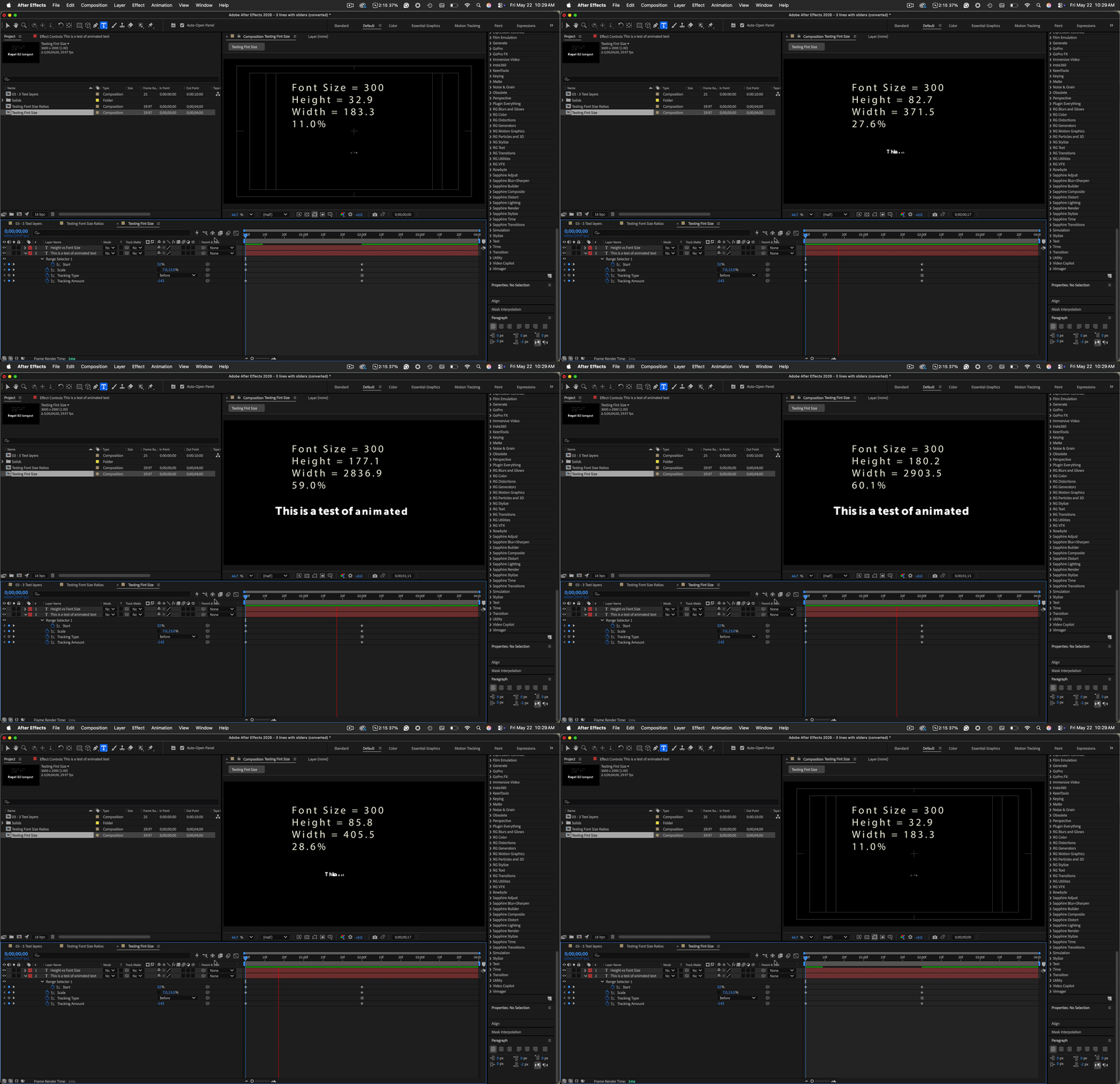
Trying to find a way to calculate the total width of an animated variable font text layer but the sourceRectAtTime properties of a text layer are not updating / taking into account the variable font adjustment. Also in Box Text, variable fonts go outside the box too.

Any help appreciated.
Thanks!
 

    Correct answer Rick Gerard

    Try adding this expression to a text layer above the text layer you want to animate:

    testLyr = thisComp.layer(index + 1)
    FontSize = testLyr.text.sourceText.style.fontSize;
    SRaTHeight = testLyr.sourceRectAtTime().height;
    SRaTWidth = testLyr.sourceRectAtTime().width;

    ratio = SRaTHeight/FontSize*100;
    "Font Size = " + FontSize + "\r" + "Height = " + SRaTHeight.toFixed(1) + "\r" + "Width = " + SRaTWidth.toFixed(1) + "\r" + ratio.toFixed(1) + "%"

    As long as you use text animators instead of scale, this will give you just about everything you need.

    You can also add modifiers to the value by incorporating scale into the expression.

    Hope this helps.

    3 replies

    James Ronan
    Known Participant
    June 1, 2026

    Amazing, this was a great workaround, thanks so much ​@Rick Gerard 

    Nishu Kushwaha
    Community Manager
    Community Manager
    June 4, 2026

    Thanks for getting back and updating the thread. Moving this thread from Bugs to Questions for now.

    Feel free to reach out if there are any other questions.


    Thanks,

    Nishu

    Nishu Kushwaha
    Community Manager
    Community Manager
    June 1, 2026

    Hi ​@James Ronan,


    Did the expert’s suggestion help?

    Let us know.


    Thanks,

    Nishu

    Rick GerardCommunity ExpertCorrect answer
    Community Expert
    May 22, 2026

    Try adding this expression to a text layer above the text layer you want to animate:

    testLyr = thisComp.layer(index + 1)
    FontSize = testLyr.text.sourceText.style.fontSize;
    SRaTHeight = testLyr.sourceRectAtTime().height;
    SRaTWidth = testLyr.sourceRectAtTime().width;

    ratio = SRaTHeight/FontSize*100;
    "Font Size = " + FontSize + "\r" + "Height = " + SRaTHeight.toFixed(1) + "\r" + "Width = " + SRaTWidth.toFixed(1) + "\r" + ratio.toFixed(1) + "%"

    As long as you use text animators instead of scale, this will give you just about everything you need.

    You can also add modifiers to the value by incorporating scale into the expression.

    Hope this helps.