
SourceRectAtTime from multiple layers
Hello! I have a non-trivial task, the solution of which, as it seems to me, can be useful for many motion designers.
The question is:
How can I make an expression for a shape rectangle ("plate") that takes the size and position of not one specific text layer (which is easy to do) but the position and size of several layers (both text and shape) and, depending on their position, would create something like a bounding box around this group of layers with a small margin that can be set through the slider. My Ae version is 2023 v 23.2.1 (build 3)
A few limitations:
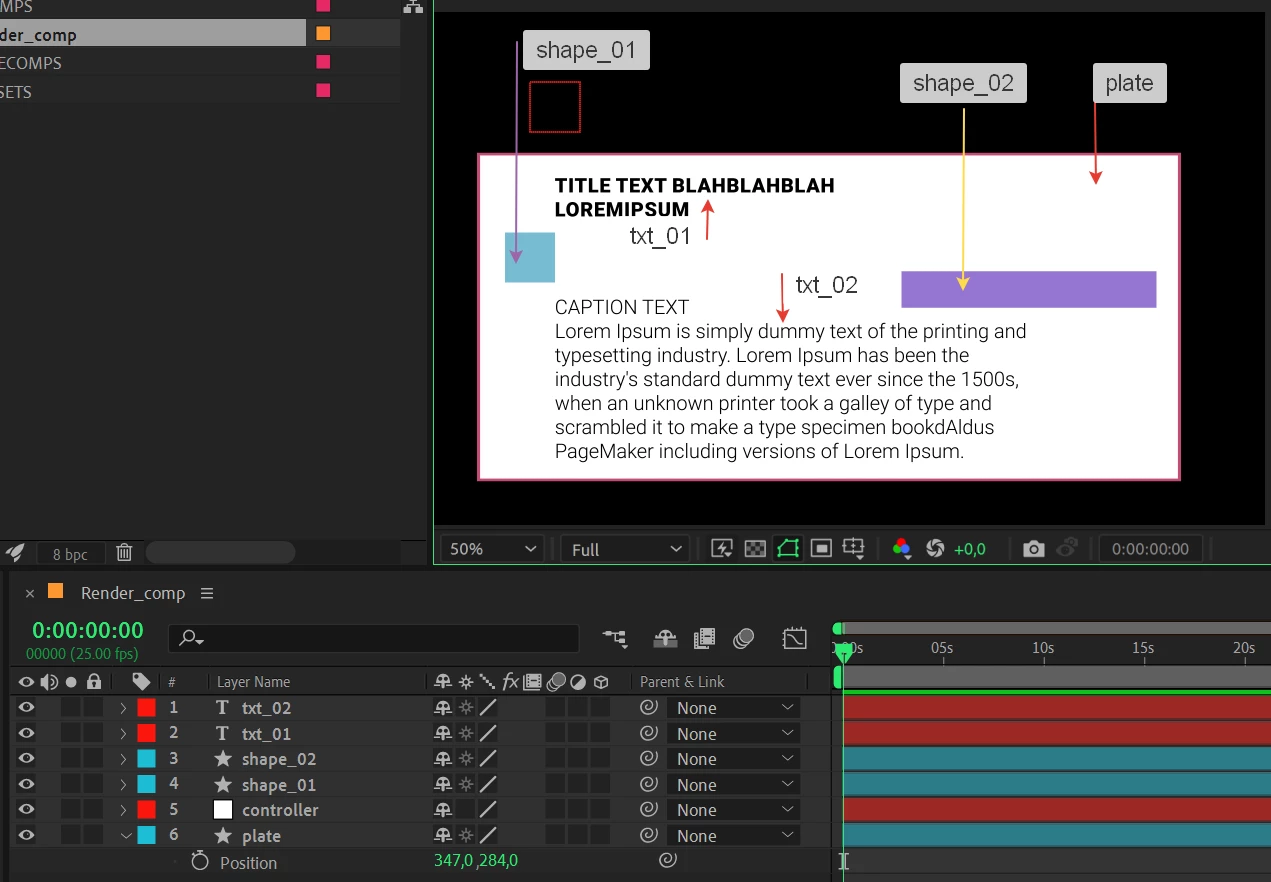
1) the expression must take for the calculation of the bounding box all the layers that are on the layers panel above the controller layer (which is with index No. 5 in the picture that I will attach below).
2) It must take for calculations new layers that will be added above the controller layer
3) It must be applied not to the size property of the rectangle, but to the path property (this means that the Bezier rectangle, not a procedural one). This limitation exists because I do some more manipulations with the background-rectangle (beveling some corners with inTangents and outTangents)
I understand logically (it seems to me) how to solve this problem, but the knowledge of expressions does not yet allow me to write code, and in general I am a humanist and not a techie;)
This is how I see the solution to the problem logically:
1. The expression finds a layer with an index less than the controller layer and starts the calculation from there. That is, a cycle of the form if the index < 5 (or index of a layer with name "controller" wich will be more accurate) then we start the calculations
2. The expression finds the upper bound of the bounding box by finding the layer with the smallest coordinate on the y-axis.
3. Next, the expression finds the layer with the smallest x-coordinate to find the left border of the bounding box
4. The expression takes for the upper left corner of the bounding box the point with coordinates X from point 3 and the Y from point 2
5. This is where the problems begin. in theory, we need to add SourceRectAtTime for each layer, as well as calculate the height between them and their width. Here I do not understand how to build calculations further.
....
X. the expression adds an indent from the slider to the resulting bounding box (this is easy), we can do this through the offset path
I did a simpler solution to a similar problem, the width of the rectangle was adjusted to all layers simply using the width and height sliders (the anchor point was in the upper left corner of the layer), or we can use two nulls for left upper and right bottom corner to manipulate rectangle, but I just want an automated solution.
Here is my scene screenshot and a project file:


 AdChoices