Participating Frequently
November 10, 2015
Question

Speed and influence properties to Bezier conversion

  • November 10, 2015
  • 1 reply
  • 633 views

I'm trying to convert the speed and influence properties of Temporal EaseIn/EaseOut into bezier control points.

Examples:

the linear temporal interpolation would have 0,0,1,1 as the bezier control points.
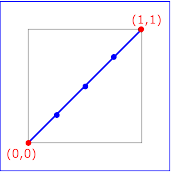
Example keySplines01 -                         keySplines of 0 0 1 1 (the default)

keySplines="0 0 1 1"
(linear interpolation)

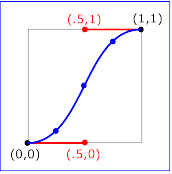
Example keySplines02 -                         keySplines of .5 0 .5 1

keySplines=".5 0 .5 1"

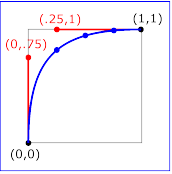
Example keySplines03 - keySplines of 0 .75 .25                         1

keySplines="0 .75 .25 1"

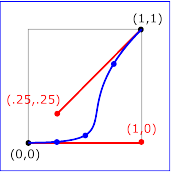
Example keySplines04 - keySplines of 1 0 .25                         .25

keySplines="1 0 .25 .25"

In the similar way, i would like to get the bezier control points for the temporal Easein/easeout . Any way this can be achievable?

Thanks !

This topic has been closed for replies.

1 reply

Legend
November 13, 2015

Pg. 84 of the After Effects CS6 Scripting Guide talks about the read/write availability of keyframe Speed and Influence attributes.

After Effects Developer Center | Adobe Developer Connection

The examples they show are:

//This example assumes that the Position, a spatial property, has more than two keyframes.

var easeIn = new KeyframeEase(0.5, 50);

var easeOut = new KeyframeEase(0.75, 85);

var myPositionProperty = app.project.item(1).layer(1).property("Position");

myPositionProperty.setTemporalEaseAtKey(2, [easeIn], [easeOut]);

//This example sets the Scale, a temporal property with either two or three dimensions. For 2D and 3D properties you must set an easeIn and easeOut value for each dimension:

var easeIn = new KeyframeEase(0.5, 50);

var easeOut = new KeyframeEase(0.75, 85);

var myScaleProperty = app.project.item(1).layer(1).property("Scale");

myScaleProperty.setTemporalEaseAtKey(2, [easeIn, easeIn, easeIn], [easeOut, easeOut, easeOut]);