
Participating Frequently
June 28, 2022
Answered

Speed Graph Handle Curves

  • June 28, 2022
  • 1 reply
  • 653 views

Hey everyone,


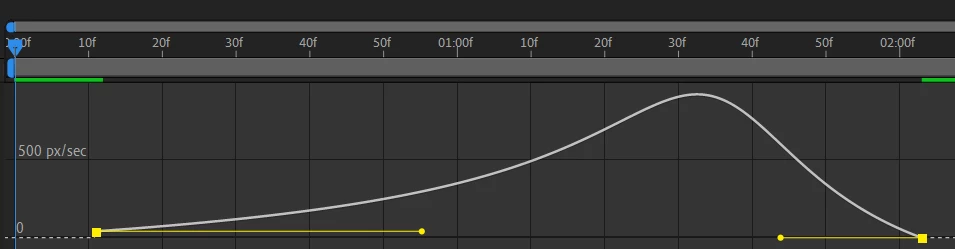
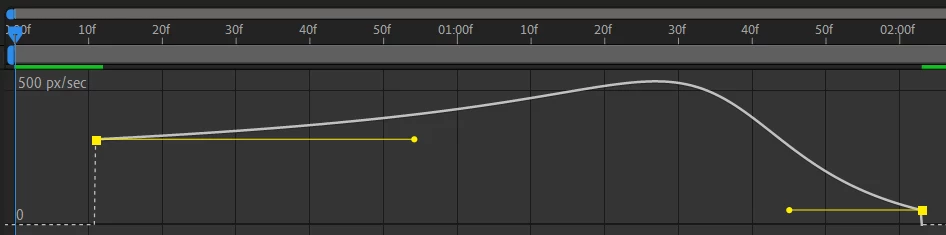
I'm still pretty new to After Effects and I've been practicing with animating AI. files. Something that I'm struggling with is the speed graph. I want to change the curvature of my graph to more of a "S" shape but the key frame handles won't move. The key frame goes up and down but I can't control the curve. 


Here's what I have now:
Here's what happens when I try moving the handles:
The first thing that comes to mind when explaining what I want to do is the pen tool. How you're able to adjust the curves by moving the handles around diagonally and what not. Like this:
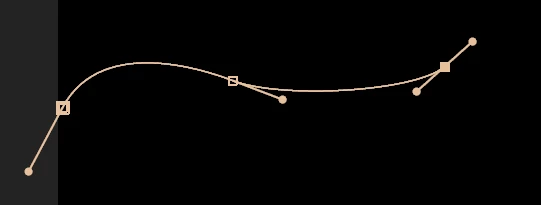
 

My current keyframes are set to easy ease. How can I get the handles to move the same way as a pen tool handle?


This topic has been closed for replies.
Correct answer Rick Gerard

Speed graph handles are not bezier handles. They control the entry and exit speed only. To get the lines to curve the way you want you to have to change the time between keyframes and watch out for spikes in the speed. Maybe this tutorial I did a while ago will help:

My After Effects Quick Tips

1 reply

Rick GerardCommunity ExpertCorrect answer
Community Expert
June 29, 2022

Speed graph handles are not bezier handles. They control the entry and exit speed only. To get the lines to curve the way you want you to have to change the time between keyframes and watch out for spikes in the speed. Maybe this tutorial I did a while ago will help:

My After Effects Quick Tips

KBowbrandAuthor
Participating Frequently
July 6, 2022

Hey Rick,


Sorry for the delayed reesponse, I didn't see the email notification til now. Thank you SO much for sharing your tutorial video. That's exactly why I'm learning video editing, it goes beyond words and pictures most of the time ;).


By the way, you deserve WAY more views and followers on your Youtube channel! Very helpful and to the point.