
Participant
February 24, 2025
Answered

Speed graph to value graph mathematics

  • February 24, 2025
  • 1 reply
  • 537 views

Hello everyone,

I recently stumbled upon this post that was made in 2013: https://community.adobe.com/t5/after-effects-discussions/bezier-curve-conversion-between-value-graph-and-speed-graph/m-p/5741221#M141939 talking about the mathematics for converting speed graphs to value graphs. I found the math to be fairly simple for one dimension, but with multi-dimension calculations, specifically in python, my curve values don't seem correct. The author hagmas provided a solution in which I tried to implement, but it seems incorrect when I run my own numbers.


Python:


import math

x_first, x_last = 0, 100
y_first, y_last = 0, 200
z_first, z_last = 0, 0

duration = 30

x_diff = abs(x_first - x_last)
y_diff = abs(y_first - y_last)
z_diff = abs(z_first - z_last)

x_avg, y_avg, z_avg = x_diff / duration, y_diff / duration, z_diff / duration
avg_speed = math.sqrt(x_avg * x_avg + y_avg * y_avg + z_avg * z_avg)

in_influence, out_influence = 0.50, 0.50
in_speed, out_speed = 200, 0

bezier_in = {}
bezier_in["x"] = 1 - in_influence
bezier_in["y"] = 1 - in_speed / avg_speed * in_influence

bezier_out = {}
bezier_out["x"] = out_influence
bezier_out["y"] = out_speed / avg_speed * out_influence

print(bezier_in, bezier_out)

# result: {'x': 0.5, 'y': -12.416407864998737} {'x': 0.5, 'y': 0.0}


When doing this same scenario in After Effects and reading the graph value from the AEScripts flow plugin, it shows me this graph result:
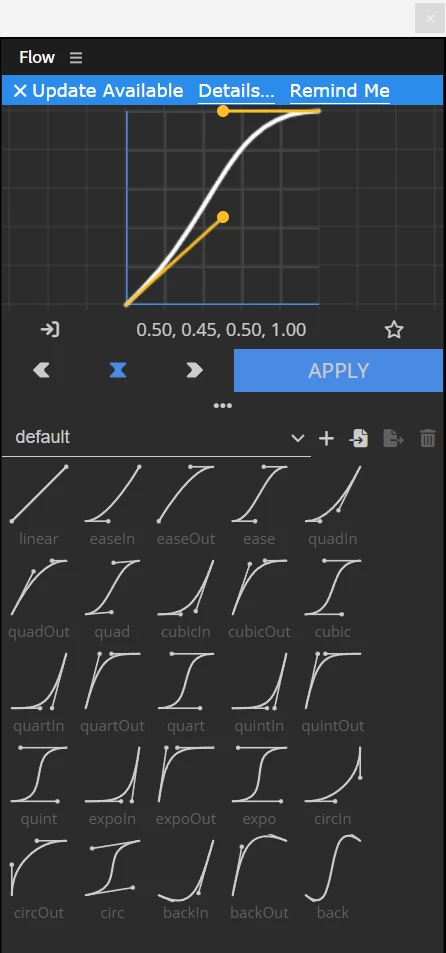
 

The y-value of the left bezier should really be closer to 0.447 for accuracy, but it's being rounded in the plugin. Here is the speed graph view in AE:
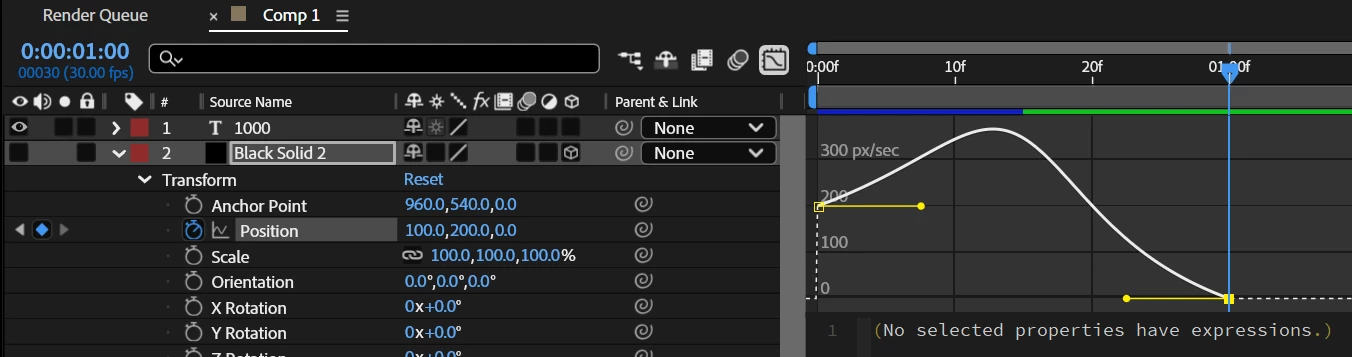
which reflects the scenario where:

x: 0 -> 100 in 30 frames

y: 0 -> 200 in 30 frames

left handle influence: 50%

left handle speed: 200

right handle influence: 50%

right handle speed: 0


Is my python calculations wrong, or am I not utilizing the output correctly to normalize the bezier curve correctly? I would appreciate any help!


Correct answer tate_1038

The issue with converting a speed graph to a value graph in After Effects is mainly about how the motion easing is calculated. The speed graph shows how fast something moves, while the value graph shows the actual position over time.

Your Python code seems to be calculating the average speed correctly, but the Bezier handle values might not be normalized properly. To fix this, make sure you are correctly applying the influence and speed ratios. A common mistake is not factoring in the way After Effects interprets influence percentages. Instead of using direct speed values, try adjusting the Bezier handle’s Y values based on how AE scales easing functions.

Also, double-check that your calculations account for motion in multiple dimensions correctly by using vector magnitude for speed. If the results still look off, manually tweak the influence percentages slightly to match After Effects' expected behavior.


1 reply

tate_1038Correct answer
Participating Frequently
February 26, 2025

The issue with converting a speed graph to a value graph in After Effects is mainly about how the motion easing is calculated. The speed graph shows how fast something moves, while the value graph shows the actual position over time.

Your Python code seems to be calculating the average speed correctly, but the Bezier handle values might not be normalized properly. To fix this, make sure you are correctly applying the influence and speed ratios. A common mistake is not factoring in the way After Effects interprets influence percentages. Instead of using direct speed values, try adjusting the Bezier handle’s Y values based on how AE scales easing functions.

Also, double-check that your calculations account for motion in multiple dimensions correctly by using vector magnitude for speed. If the results still look off, manually tweak the influence percentages slightly to match After Effects' expected behavior.

 
jah_4244Author
Participant
February 27, 2025

Hi tate,

Thank you, I was able to solve this issue. I found out that I was reversing the in influence and out influence, so the results were flipped. In addition, I took into account the max value of each dimension into the bezier handle calculations.