Davros1966
Participant
September 22, 2017
Answered

Spinning dashes around an oval

  • September 22, 2017
  • 2 replies
  • 410 views

Hi,

Im trying to create a spinning oval (Elipse) where the dashes follow a path equal to a trim path, without the trimming part.  Basically that the dashed boarder of the oval   spins.

Can someone help me out?

It would be much appreciated

This topic has been closed for replies.
Correct answer Rick Gerard

Animate the offset value. Just set a couple of keyframes. Your timeline should look something like this:
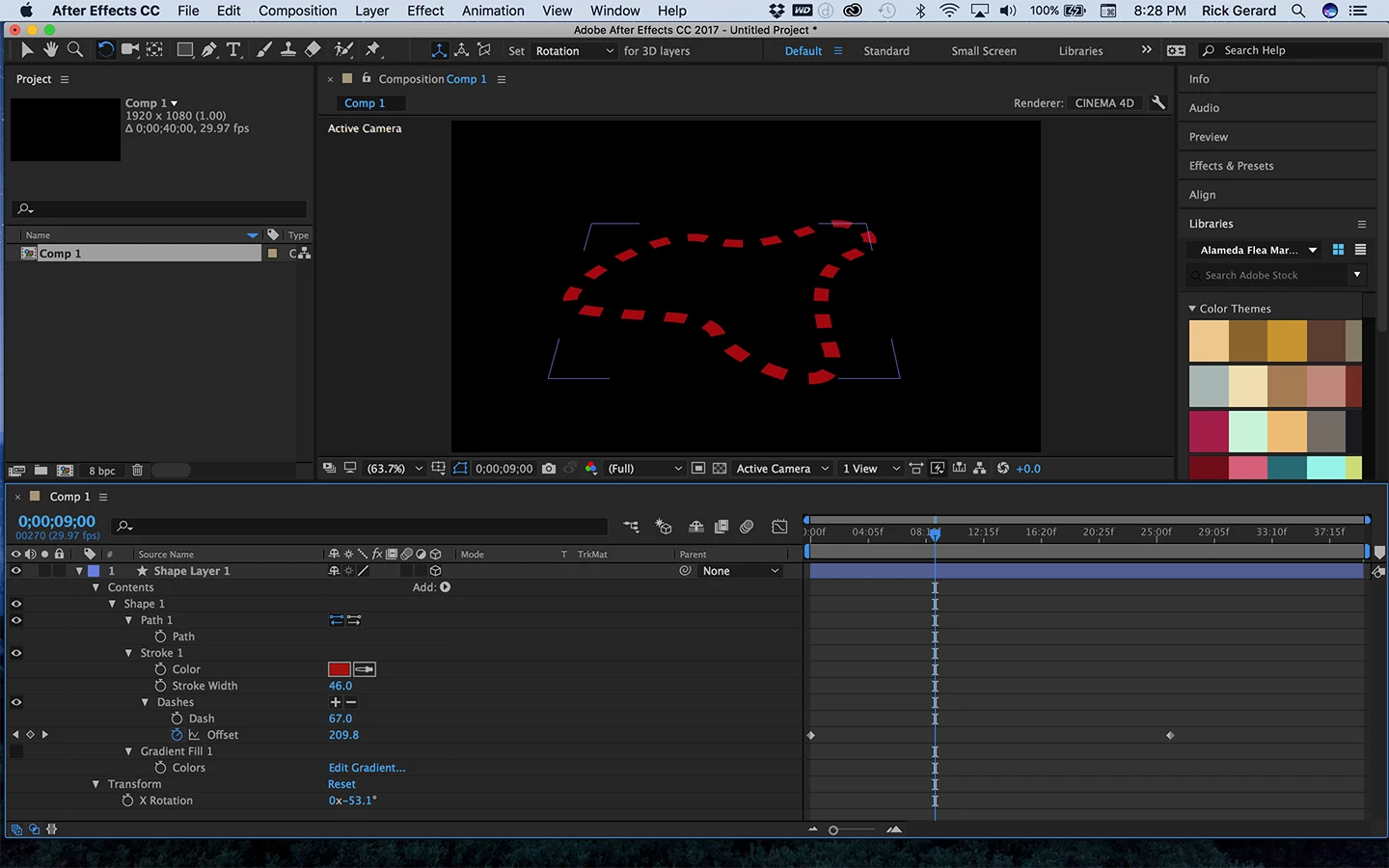
Pay attention to the stroke and offset properties.

You could also add an expression like this to Offset:

time * 400

If you want to reverse the direction you'll run into trouble with big negative numbers so start out with a big positive number like 6000 for the first and then something like 100 for the last. If you are using the expression to get it to move counter clockwise use this expression:

6000 - time * 400

The larger the last number the faster the movement.

2 replies

Davros1966
Participant
September 22, 2017

Rick i pretty much love you right now.

Thank you very much.

Community Expert
September 22, 2017

Add dashes and gaps to get the stroke to look the way you want it to look making sure that the start and ending dash on the first vertex are correct then animate the offset. Nothing to it. You don't use Trim Paths or even have to add an animator, just add dashes or dashes and gaps. Just spin down the stroke properties and you'll see the option to add dashes. Click on the plus and you are 90% done.

Davros1966
Participant
September 22, 2017

Hi Rick, thanks for your swift response.  So far i have arrived at this point.  all i want it to do is spin with the dashed following each other

Rick GerardCommunity ExpertCorrect answer
Community Expert
September 22, 2017

Animate the offset value. Just set a couple of keyframes. Your timeline should look something like this:

Pay attention to the stroke and offset properties.

You could also add an expression like this to Offset:

time * 400

If you want to reverse the direction you'll run into trouble with big negative numbers so start out with a big positive number like 6000 for the first and then something like 100 for the last. If you are using the expression to get it to move counter clockwise use this expression:

6000 - time * 400

The larger the last number the faster the movement.