
Split name of fill property instead of layer name
I usually use a Split() expression to get pieces of a layer name and link a long list of comps to a control layer, but now I'm using one shape layer with fills connected to CSV data. I'm trying to figure out if I can use Split() to pull the title of the Fill propery in the same way I'd pull the layer name but I'm having trouble finding information about it.
This is the expression I use for layer name split:
OnOff = thisComp.layer("1 - CHOOSE TEAM").effect(thisLayer.name.split("_")[0]+"_"+thisLayer.name.split("_")[4])("Checkbox")
if (OnOff==1){100}
else{0;}
This is a screenshot of the shape layer with the Fill property renamed as "NFL_SECONDARY_COLORS_2020_ARZ."
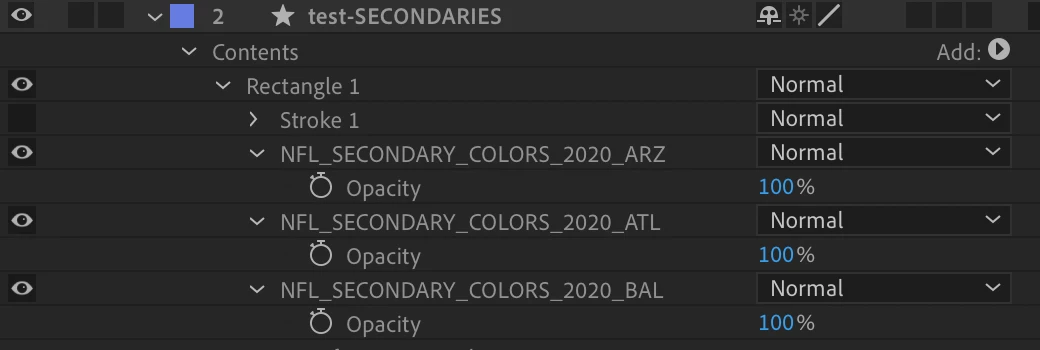
When the layer name is split, it only pulls "NFL_ARZ" and matches that to a checkbox on the control layer.
Looking to do this same exact thing but instead of pulling the layer name, pulling the custom Fill property name that is within the shape layer. This shape layer has a fill layer for every NFL team.
 AdChoices