

Camilo Fontecilla
Participating Frequently
March 20, 2020
Answered

Start object rotation then come to a smooth stop

  • March 20, 2020
  • 1 reply
  • 4482 views

Hello-- fairly new to AE and have been banging my head against the wall trying to implement this. I basically want an object to begin spinning (rotating) from stasis, then achieve rapid rotation and then slowly come to a halt again without reversing direction. The best analogy is probably a propeller. 


I've tried tinkering with time*x, Rotate Over Time and the speed graph, but I can't figure out the stopping. 


Thanks!
This topic has been closed for replies.
Correct answer Mike_Abbott

Read all about it from the 'time Lord' - Mr. Dan Ebberts - here:

http://motionscript.com/articles/speed-control.html


In this situation all you need to do is:

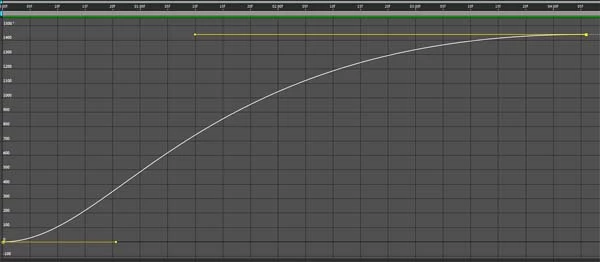
Set an initial kf at 0 degrees for the start of your rotation. Set a final kf at 'n' rotations  for the end of your rotation. Select both kf's and apply easy ease. Open up the graph editor. The second icon from the left at the bottom is a pop up menu. Make sure "Auto select graph type" is selected. This should show the 'value graph' in this case. Click the last keyframe and drag the yellow handle out further to the left to create a more biased 's' shaped curve.

Something like this:

1 reply

Mike_Abbott
Mike_AbbottCorrect answer
Legend
March 21, 2020

Read all about it from the 'time Lord' - Mr. Dan Ebberts - here:

http://motionscript.com/articles/speed-control.html


In this situation all you need to do is:

Set an initial kf at 0 degrees for the start of your rotation. Set a final kf at 'n' rotations  for the end of your rotation. Select both kf's and apply easy ease. Open up the graph editor. The second icon from the left at the bottom is a pop up menu. Make sure "Auto select graph type" is selected. This should show the 'value graph' in this case. Click the last keyframe and drag the yellow handle out further to the left to create a more biased 's' shaped curve.

Something like this:

Camilo Fontecilla
Participating Frequently
March 31, 2020

Hello Mike-- thanks very much for this. I think I was trying to make it far too complicated by using expressions. The keyframe method is much more simple and elegant. 

Mike_Abbott
Legend
March 31, 2020

No problem - speed control with expressions is one of those areas that sounds simple, but as Dan describes in his pdf, it's anything but! 
If you're happy to mark the above answer correct, that would be appreciated.