Answered
Stroke appears around each individual shape despite merge paths
I had 3 separate shapes (Egypt, Sudan and South Sudan) and I wanted to merge them into one shape, so I copy pased them into an empty layer. After that I added "Merge Paths" so these indiviual shapes would become one. When I added a stroke however the stroke wasn't only on the outside of the new shape but also appeared where the indiviual shapes touch eachother. Basically the stroke was treating them like individual shapes and not like one shape, despite the use of merge paths.
I made sure to select "merge" for the mode, not "add" or any of the other options.
How do I get the stroke to appear only on the outside of the new, merged shape?
Here's a screenshot of the layer and the preview: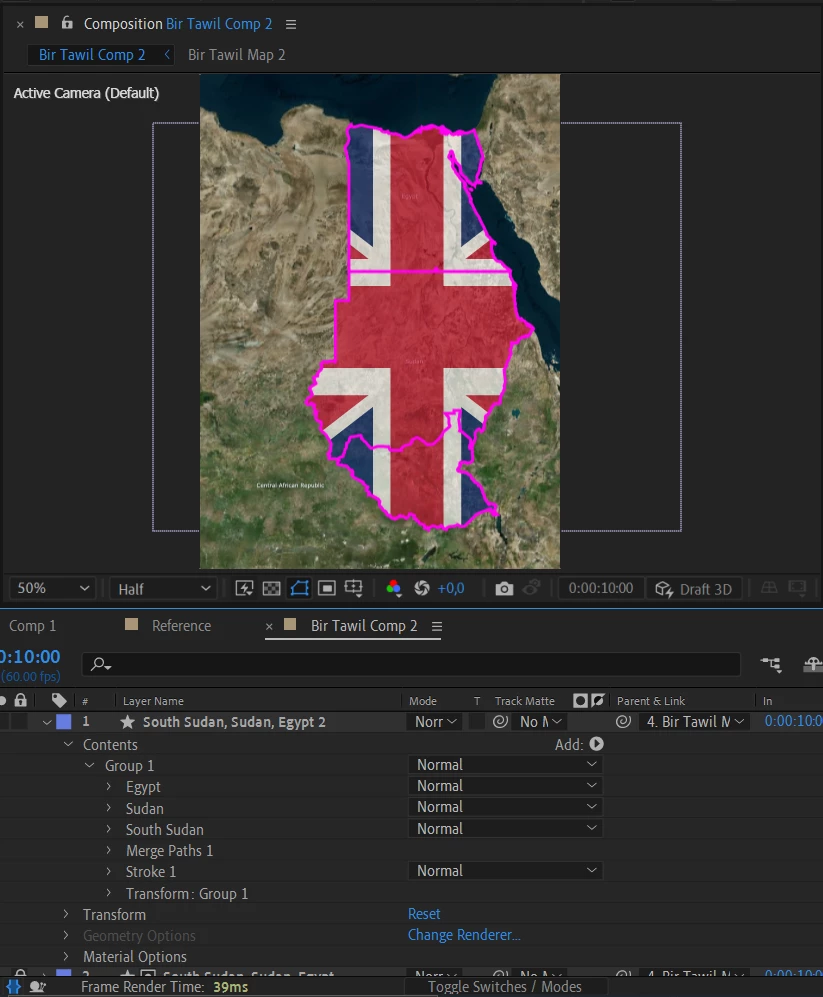
 AdChoices