
Participant
February 24, 2017
Answered

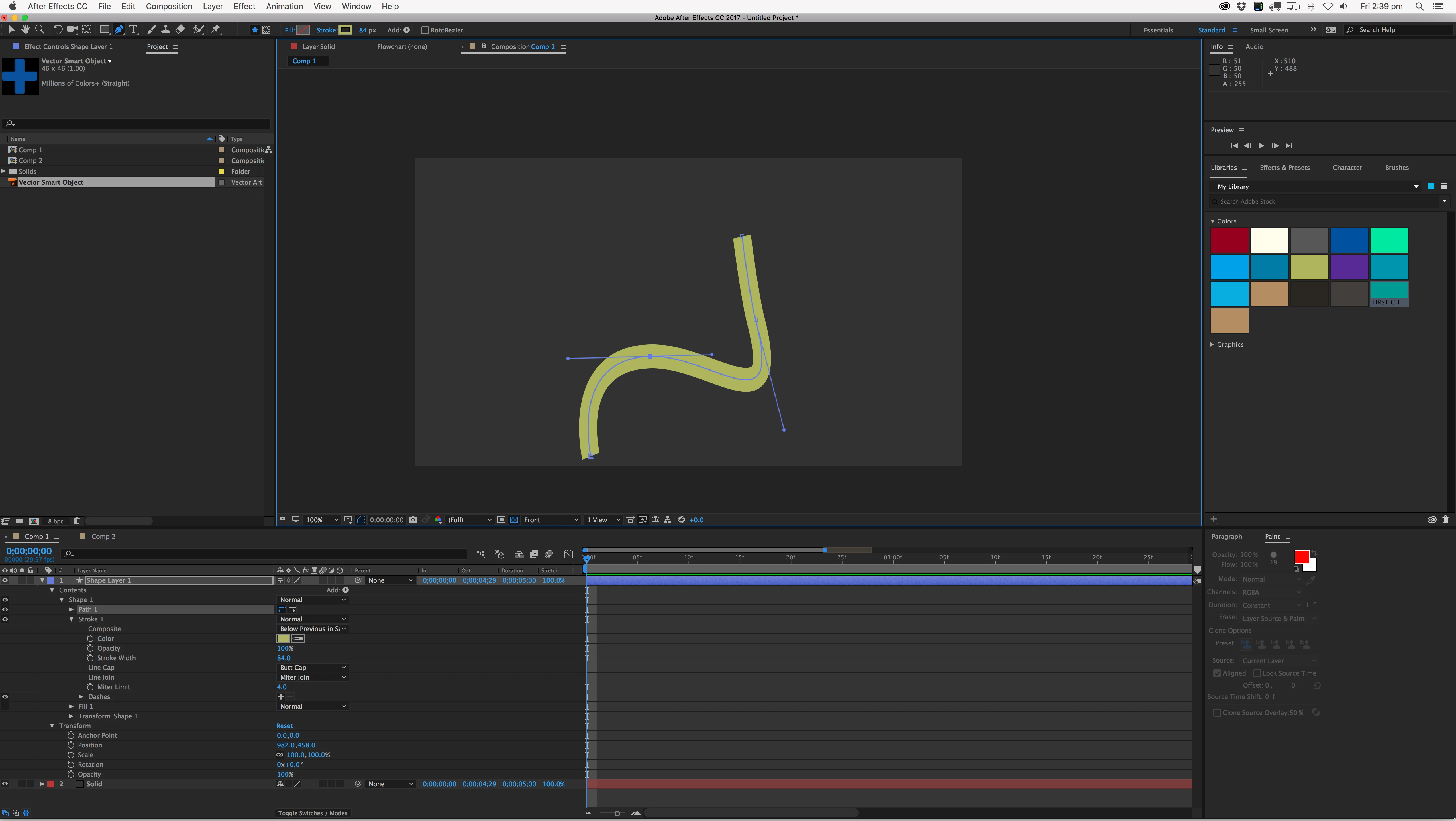
Stroke weight not consistent when using pen tool

  • February 24, 2017
  • 3 replies
  • 531 views

Hi, I've been using Adobe products for a long time, but only just started to learn AE.

Using CC 2017, I've started watching some tutorials on Lynda.com.

I'm struggling with a simple line using the pen tool. The stroke weight is not consistent. It starts off one width, becomes wider in the bend and returns to a thinner width.

Anyone tell me where I'm going wrong?

Thanks in advance.

Chris.
    This topic has been closed for replies.
    Correct answer LesnaikSwann

    Thanks for all the suggestions.

    Managed to figure it out, in my comp, I'd got 'Pixel Aspect Ratio' set to wide screen 1.46 instead of 'square pixel'.

    3 replies

    LesnaikSwannAuthorCorrect answer
    Participant
    March 1, 2017

    Thanks for all the suggestions.

    Managed to figure it out, in my comp, I'd got 'Pixel Aspect Ratio' set to wide screen 1.46 instead of 'square pixel'.

    Szalam
    Community Expert
    Community Expert
    March 1, 2017

    Thanks for letting us know what it was!

    Inspiring
    February 24, 2017

    Also, you might want to delete the fill modifier seeming as it is redundant in this case.

    Also maybe try putting down the miter limit to 0, it usually only does things when it comes to corners in shapes, but maybe you found the rare case where it does more than you want it to.

    Szalam
    Community Expert
    Community Expert
    February 24, 2017

    Check the scale under Transform: Shape 1

    Participant
    February 24, 2017

    Thanks for the reply, both units on the scale for Transform: Shape 1 are 100%

    Mylenium
    Legend
    February 24, 2017

    I'm not seeing any issues in your image beyond AE's not so great antialiasing playing tricks on your eyes on combination with teh equally not so great handling of Bezier overshoot.

    Mylenium