Inspiring
October 21, 2017
Answered

Stuck with this 'keyframes to checkbox controls' script I'm writing

  • October 21, 2017
  • 1 reply
  • 3631 views

Hi, I started a thread here about the project I'm working on: https://forums.adobe.com/thread/2398912

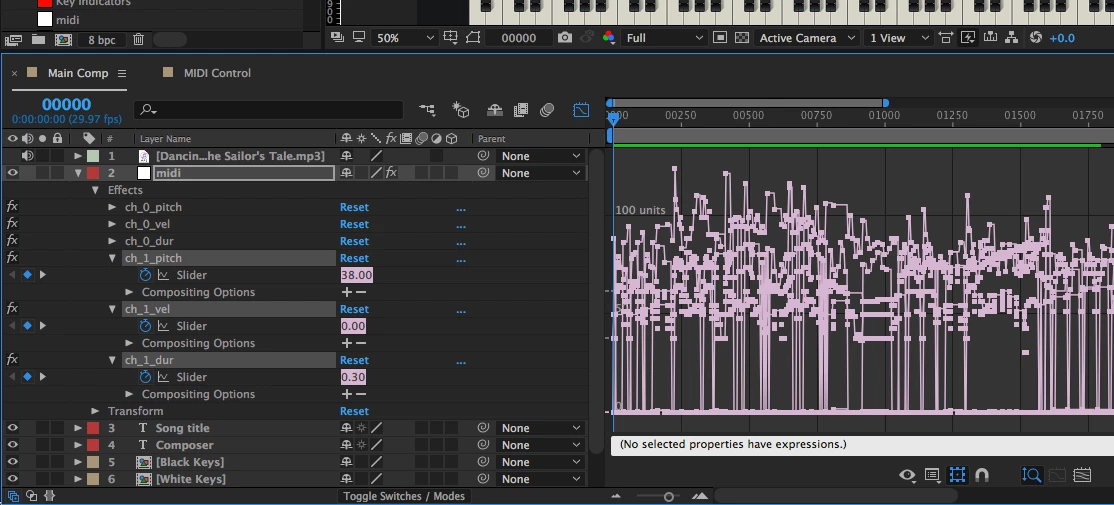
As Dan Ebberts suggested, I should create a script out of what I was trying to achieve. My project structure looks like this.

Main Comp (which is the active comp):
MIDI Control comp:
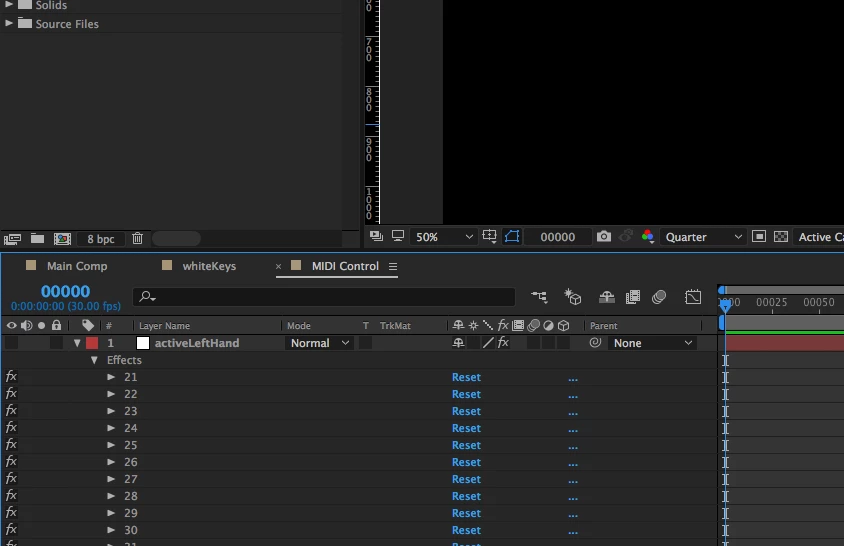
Here's the expression I was using on each individual checkbox control for activeLeftHand and activeRightHand layers if it's of any use. Also modified from something Dan Ebberts helped me out with a while back:

midiNote = comp('Main comp').layer( 'midi' ).effect( 'ch_0_pitch' )( 'Slider' );

midiNum = thisProperty.propertyGroup(1).name;

n = 0;

for (i = 1; i <= midiNote.numKeys; i++){

  if (midiNote.key(i).time > time) break;

  if (midiNote.key(i).value == midiNum) n++;

}

if (n%2) 1 else 0

I've got this far but need to complete the section for lines 26-27:

var proj = app.project; // The Application Object is at the top level followed by the Project Object.

var comp = proj.activeItem; // Set the comp variable to the active composition.

var midiLayer = comp.layer("midi"); // Set the 'midi' layer of the active composition to a variable.

var leftHandKeys = midiLayer.effect("ch_0_pitch")("Slider"); // Get channel_0_pitch values - used for left hand notes.

var rightHandKeys = midiLayer.effect("ch_1_pitch")("Slider"); // Get channel_1_pitch values - used for right hand notes.

var midiControlComp = comp.layer("MIDI Control").source; // Set the 'MIDI Control' composition to a variable.

var leftHandController = midiControlComp.layer("activeLeftHand"); // Get the checkbox control layer for the left hand.

var rightHandController = midiControlComp.layer("activeRightHand"); // Get the checkbox control layer for the right hand.

// TODO: At the end use the following to run the function.

// midiDataToControlComp( leftHandKeys, leftHandController );

// midiDataToControlComp( rightHandKeys, rightHandController );

function midiDataToControlComp(channelPitchSlider, checkBoxControlLayerName) {

    // If there are keyframes available, continue.

    if (channelPitchSlider.numKeys > 0) {

        for (k = 1; k <= channelPitchSlider.numKeys; k++) {

            // Break loop if the keyframe's time more than the current time.

            if (channelPitchSlider.key(i).time > app.project.activeItem.time) break;

            // TODO: Get keyframe(s) value and assign it to the corresponding checkbox(es) on the checkBoxControlLayerName layer.

            // IMPORTANT NOTE: There may be MIDI chord data at a given time which means there will be multiple keyframes stacked. Get all values out.

        }

    // If there are no keyframes availble, display an error alert.

    } else {

        alert("There are no keyframes in " + channelPitchSlider + " within the midi layer.");

    } // End if statement.

} // End midiDataToControlComp() function.

Not sure if line 24 is also doing its job too.

If anyone can help me out here that would be brilliant.

Thanks!
This topic has been closed for replies.
Correct answer pr0jectile

Still struggling with utilising all the data that's been provided in the midi layer.

Currently, the custom script is doing a great job, but I'm just not getting the key releases when the same key is being pressed again (such as the same chord being played 2 times in a row).

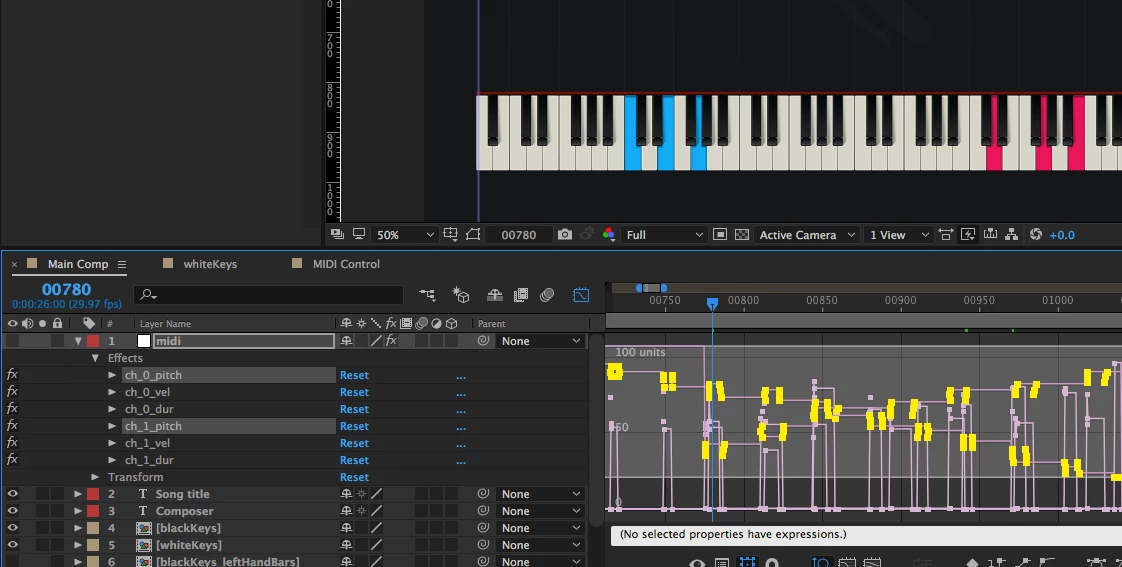
Here's the screenshot from the project:

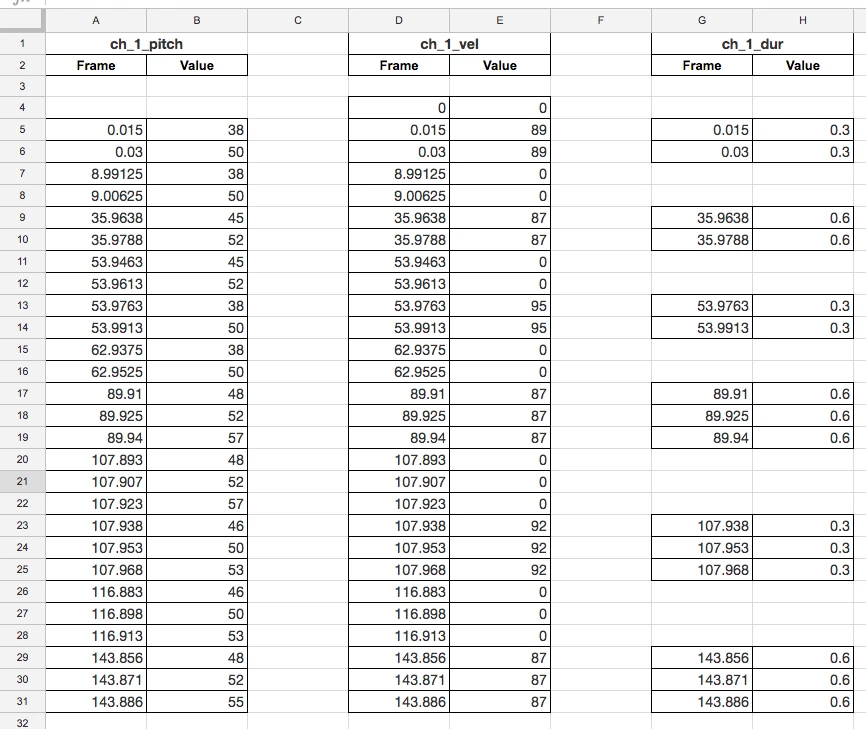
I've copied keyframe data for the highlighted sliders above, pasted it into a spreadsheet and aligned each data row with the corresponding frame to visualise the data better.

I can see that is has an 'on' state and 'off' state for each midi note, looking at the pitch and velocity values.

For example:

- Cell B5 is midi number 38. Since the velocity is not 0 (in this case it's 89), this is the on / pressed state.

- Cell B7 is midi number 38 again. This time it is showing velocity of 0. It would mean the note is in the off / released state.

I don't understand how the duration channel is working with the value given, but the values only appear where there is an 'on' state for a midi number.

I want to somehow make use of all this data and make the keyframes a bit more accurate.

Anyone able to help here?

Thanks.


Might have figured out but not in a clean way.

app.beginUndoGroup("MIDI Keyframes to Control Layers"); // Create undo group for ease undoing should something go wrong.

     // Swap 'Left' and 'Right' below if colours come out opposite for both hands.

     midiDataToControlComp( "1", "Left" );

     midiDataToControlComp( "0", "Right" );

app.endUndoGroup();  // End undo group.

function midiDataToControlComp( channelNumber, checkBoxControlLayerHand ) { // Usage example: midiDataToControlComp( "[0/1]", "[Right / Left]" );

     var proj = app.project, // The Application Object is at the top level followed by the Project Object.

     comp = proj.activeItem, // Set the comp variable to the active composition.

     midiLayer = comp.layer( "midi" ), // Set the 'midi' layer of the active composition to a variable.

     midiPitch = midiLayer.effect( "ch_"+channelNumber+"_pitch" )( "Slider" ), // Get channel pitch.

     midiVelocity = midiLayer.effect( "ch_"+channelNumber+"_vel" )( "Slider" ), // Get channel velocity. Not making use of yet.

     midiDuration = midiLayer.effect( "ch_"+channelNumber+"_dur" )( "Slider" ), // Get channel duration. Not making use of yet.

     midiControlComp = comp.layer( "MIDI Control" ).source, // Set the 'MIDI Control' composition to a variable.

     handController = midiControlComp.layer( "active"+checkBoxControlLayerHand+"Hand" ), // Get the checkbox control layer for the hand.

     totalNotes = 88, // Total number of keys on the piano.

     startNote = 21, // Starting MIDI note.

     notes = []; // Create the notes array.

     for (var i = 0; i < totalNotes; i ++) notes = 0; // Initialize the notes array.

     var curKeyTime, curKeyValue, curNoteIdx, curCB, checkCB, iFirstKey; // Set up couple of variable to use for 'Main Comp' > 'midi' keyframes and 'Midi Control' > 'active[Left/Right]Hand' checkboxes.

     for (var i = 1; i <= midiPitch.numKeys; i++){ // Loop through the keyframes.

          curKeyTime = midiPitch.keyTime(i); // Get current keyframe's time.

          curKeyValue = midiPitch.keyValue(i); // Get current keyframe's value.

          curNoteIdx = curKeyValue - startNote; // Get current keyframe's note index.

          if (curNoteIdx >= 0 && curNoteIdx < totalNotes){ //

               notes[curNoteIdx] += 1; //

               iFirstKey = 0; // Set up variable for later use on checking if there are keyframes.

               checkCB = ( notes[curNoteIdx]%2 ) ? "On" : "Off"; // If current note index notes is odd, say it is 'on' - if it's even, say it is 'off'.

               curCB = handController.property("Effects").property(curKeyValue.toString()).property("Checkbox"); // Get current key value's corresponding checkbox in 'Midi Control' > 'active[Left/Right]Hand'.

               if ( checkCB == "On" ) { // If checkbox is 'On'...

                    curCB.setValueAtTime(curKeyTime,(1)); // Set a keyframe at current time to 1.

                    curCB.setValueAtTime((curKeyTime-0.05),(0)); // Set a keyframe at current time minus 0.05 to 0. Useful for when the same midi key is being pressed twice.

               } else { //... Otherwise if checkbox is 'Off'

                    curCB.setValueAtTime(curKeyTime,(0)); // Set a keyframe at current time to 0.

               } // End if statement for checkCB.

               while ( iFirstKey < 1 ) { // If there is a first keyframe and while iFirstKey is less than 1...

                    curCB.setValueAtTime(0,(0)); // ...set a keyframe at 0 time for the checkbox to 0 so the key starts at an 'off' state.

                    iFirstKey++; // Increment iFirstKey by 1.

               } // End while loop for iFirstKey.

          } // End if statement for curNoteIdx.

     } // End looping through the keyframes.

} // End midiDataToControlComp().

Seems to be doing a good job with the effect I'm looking to achieve.

Thanks for everyone's help in the replies, especially Dan Ebberts for getting me almost there!

Learnt a fair bit from this as it was my first ever script

1 reply

Dan Ebberts
Community Expert
Community Expert
October 21, 2017

There are a number of ways to approach it, but one way that should only require the pitch channel would be to set up an array to count keyframes for each key (so you can use the odd/even test to see if your checkbox should be on or off). Initialize the array to all zeros, and then as you loop through the pitch keyframes, for each keyframe, increment the appropriate array value for the key, and create a checkbox keyframe at the same time, setting the value based on whether the note count is currently odd or even for that key.

I'm not sure what your line 24 is about, but I think you'd want to process all the pitch keyframes.

Dan

Inspiring
October 22, 2017

I don't really know how to start the looping process especially when it involves arrays and creating objects.

I can see how it worked within the expression but when it comes to writing this all in the script, I feel lost.

Would you be able to help me out here? I'd really appreciate your time.

So far I've tried this but don't know if I'm doing this right.

var keyframesArray, totalKeys, prop, curKeyIndex, curKeyValue, inin, outin;

keyframesArray = new Array, // Create an empty array to store the keyframe data.

totalKeys = channelPitchSlider.numKeys, // Total number of keyframes in channel pitch.

if ( totalKeys > 0 ) {  // If there are keyframes available, continue.

     for ( k = 1; k <= channelPitchSlider.numKeys; k++ ) { // Start looping through the keyframes

          curKeyIndex = k;

          curKeyTime = channelPitchSlider.keyTime(i);

          curKeyValue = channelPitchSlider.keyValue(i);

          inin = channelPitchSlider.keyInInterpolationType(curKeyIndex);

          outin = channelPitchSlider.keyOutInterpolation(curKeyIndex);

          keyframesArray[keyframesArray.length] = {

               'curKeyTime':curKeyTime,

               'curKeyIndex':curKeyIndex,

               'curKeyValue':curKeyValue

          };

     } // End looping through the keyframes

}

UQg
Legend
October 22, 2017

Not too sure whether i fully understood, but the follwing might work :

var initCheckboxValue = 0;

var checkboxControls = {};

var counts = {};

var midiNum;

for (midiNum=1; midiNum<=88; midiNum++){

    checkboxControls[midiNum] = // reference to the appropriate checkbox control

    checkboxControls[midiNum].property(1).setValueAtTime(0, initCheckboxValue);

    counts[midiNum] = 0;

    };

for (i = 1; i <= midiNoteSlider.numKeys; i++){

    midiNum = midiNoteSlider.keyValue(i);

    ++counts[midinum];

    checkboxControls[midiNum].property(1).setValueAtTime(midiNoteSlider.keyTime(i), counts[midiNum]%2);

    };

Xavier

Edit: Before the line ++counts[midiNum]; there should be a check that midiNum is indeed an integer in the range 1-88, else this will create an error