

Jarss
Participant
February 21, 2026
Question

TAO or MIR effects not working on AE

  • February 21, 2026
  • 1 reply
  • 23 views

I have been this issue for long enough but havent found a way to fix this yet !
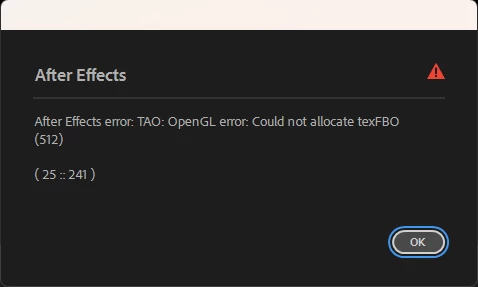
Im using AE 25,

My GPU is an AMD rx 9060 xt
All my drivers are updated
I tried to reinstall both Red giant and AE
I only have 1 monitor

If anyone could help me it will be very appreciated !! 🙏🏼

1 reply

OussK
Community Expert
Community Expert
February 23, 2026

The RX 9060 XT is a very new GPU and almost certainly the culprit here. TAO and MIR both rely on OpenGL/Metal (Mac) or OpenGL/OpenCL (Windows) for rendering, and Red Giant's compatibility with brand new AMD architectures typically lags behind the hardware release by several months.

A few things to try while you wait for an official fix:

Go to AE Preferences → Display and disable GPU acceleration, forcing software rendering — TAO and MIR should at least work that way, just slower. Also check Red Giant's compatibility page directly, as they sometimes release a quiet update that adds support before it's widely announced. Posting your issue on the Red Giant support forum specifically (not just Adobe's) will get it in front of the right engineers faster.

Short answer: it's almost certainly a driver/compatibility gap with the 9060 XT being so new, not a settings issue on your end.