
Participant
February 4, 2017
Answered

Text Effects in Effects menu missing!

  • February 4, 2017
  • 5 replies
  • 18825 views

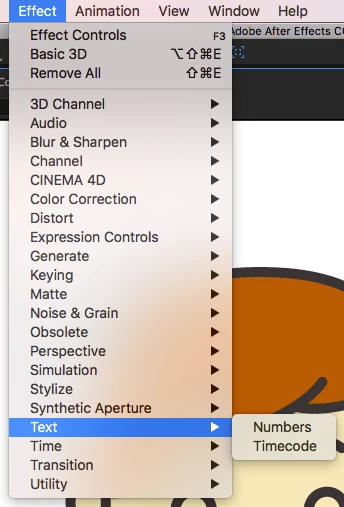
Hi! I went to use a text effect, typewriter specifically. Basically my whole effects menu for text (Effect>Text) is missing: there is only "Numbers" and "Timecode" options. The text presets are inside the right folder, just not showing.
So far I have tried:

1. Restarting After Effects (including checking if it's an issue in other file)

2. Restarting Mac

3. Deleting the Switchboard File

4. Moving text presets out of folder and back inside

5. Reinstalling AE entirely

Please help, thank you!
Correct answer shannontowell

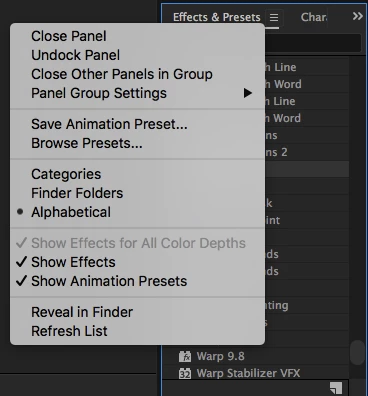
Inside the Effects & Presets panel, in options make sure "Show Effects" and "Show Animation Presets" are selected.

5 replies

Participant
March 27, 2023


It would helpful to you.


Participant
October 9, 2019

All of the options are displayed under Animation Presets then under the text dropdown. 

isabellel84365456
Participant
November 14, 2019

Hi, same problem here. No solution found yet. 
I don't have any folder in my Effect pannel, all the effects are just there. No animation presets, and of course, no text effects.  


I have the last version of After Effect. 

(Sorry for the bad English, french here...)

nataliem53067431
Participant
July 6, 2018

I am having the same issue and none of these answers solved my issue.  any other ideas?

shannontowellAuthorCorrect answer
Participant
February 4, 2017

Inside the Effects & Presets panel, in options make sure "Show Effects" and "Show Animation Presets" are selected.

Participant
March 5, 2017

Same Problem here. Show Effects and Show Animations is active of course. But in the Effect and Animations Tab under Text, there is only Timecode and Numbers.

Community Expert
March 5, 2017

You are looking in Effects. What you are looking for are the animation presets for text. This is an entirely different thing. They are not accessed through the Effects menu. You find them by looking in the Animation menu. You can browse or find them by name using the first four options, find them in Bridge (Bridge / AE interface may be buggy) or by looking at the Effects and Presets Panel which is found in several of the standard workspaces on the far right side of the UI or opened by using the Window>Effects & Presets menu or, as shown there, by using the Ctrl/Cmnd + 5 keyboard shortcut:

Animation Presets are right at the top of the Effects & Presets Panel:

You have to spin them open to find the text animators or search for them using the search field:

Then you have to spin open the folders:

There are hundreds of animation presets.

If you plan on using After Effects spend you need to spend some serious time becoming intimate with the UI. Just like your lover, it has it's own set of problems, but the really good stuff can only be found if you spend some serious time paying attention.

If you are new please start here: Basic AE​ and start using the Search Help field at the top right corner of the UI. It's more friendly than Google and way more efficient than the user forums.

Dave_LaRonde
Inspiring
February 4, 2017

There's an effects & presets pane in the standard AE layout.  Check it out.  You'll find the presets there.  You won't find them in the dropdown menu.

Participant
February 4, 2017

The typewriter effect isn't in the Effects & Presets panel either unfortunately.

P.M.B
Legend
July 7, 2018

It's under Presets>Text>Animate In

Try using the search bar in the effects and presets panel.  Start typing in "typewriter"

~Gutterfish