
Rawsthorn
Participating Frequently
August 6, 2019
Answered

text fade in this video

  • August 6, 2019
  • 4 replies
  • 2627 views

HIGHER GROUND | Mont Blanc Massif on Vimeo
from 3.23
I`d like to emulate the creator`s text fade in and out style here.
The fade are  diagonally from upper left and are feathered.

Slow fade on/out in AE is a simple left to right hard-edged fade.
How do I do this? Thanks for your help
    This topic has been closed for replies.
    Correct answer Katie Houghton

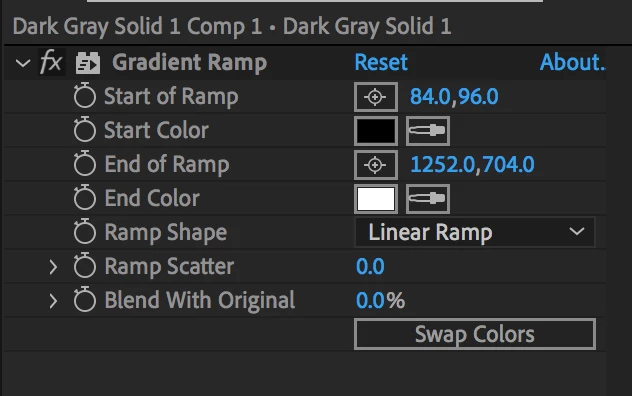
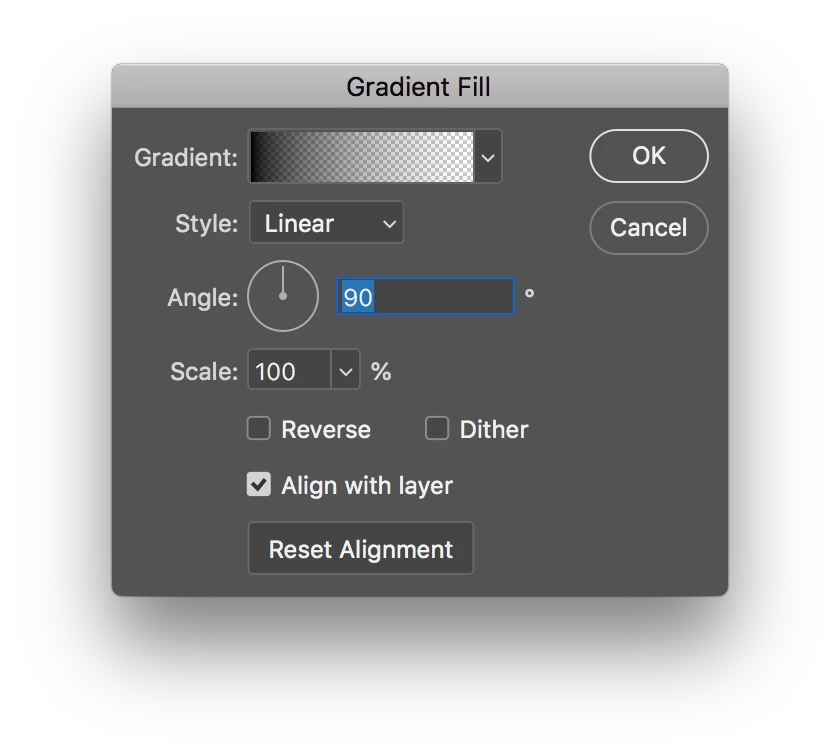
    The gradient is the direction. So if you use the Gradient Ramp in the nested layer as the Compound effect layer then the gradient would have a start of the ramp and the end of a ramp. If you made the gradient in Photoshop as a Gradient Fill layer then it would have an angle. In After Effects just click on the bullseye icon then click where you want the Start and End of the ramp. In PS use the Gradient Fill layer or use your gradient tool. (Let me know if that works.)

    From AE

    from photoshop

    4 replies

    Katie HoughtonCorrect answer
    Inspiring
    August 6, 2019

    The gradient is the direction. So if you use the Gradient Ramp in the nested layer as the Compound effect layer then the gradient would have a start of the ramp and the end of a ramp. If you made the gradient in Photoshop as a Gradient Fill layer then it would have an angle. In After Effects just click on the bullseye icon then click where you want the Start and End of the ramp. In PS use the Gradient Fill layer or use your gradient tool. (Let me know if that works.)

    From AE

    from photoshop

    Rawsthorn
    RawsthornAuthor
    Participating Frequently
    August 6, 2019

    ah great thank you! That`s what he used in the video.

    The gradient wipe is presumably a wholly different effect to gradient ramp?

    Inspiring
    August 6, 2019

    Two keyframes still control the speed: The further apart the slower and the closer together faster. The Gradient controls where you are in the wipe. Black goes first and white is the last to wipe. So the gradient controls the wipe though you can still further control the wipe via the Graph Editor. Remember you have 5 keyframe types: Linear, Auto, Bezier, Continuous Bezier, and Hold. (Try a Easy-Ease to have it start slow or end slow… tapering out)

    Rawsthorn
    RawsthornAuthor
    Participating Frequently
    August 6, 2019

    please pardon my ignorance Katie but the gradient wipe seems just to fade in the text layer at a rate of my choosing. I don`t see any tool offering directionality (eg my desired wipe from top left of the word) in the Gradient Wipe menu.

    Inspiring
    August 6, 2019

    Try the Gradient Wipe Effect then you can create a gradient to control your transition better. I used a nested comp that held a Gradient Wipe as my Gradient Layer. But you can also create a gradient in Photoshop. (You could also try to control the linear wipe with the graph editor but I think the Gradient Wipe is easier.)

    Rawsthorn
    RawsthornAuthor
    Participating Frequently
    August 6, 2019

    I can`t see a speed control in that menu Katie, nor a wipe angle, but thanks

    Jose Panadero
    Community Expert
    Community Expert
    August 6, 2019

    You can do it easily using the Linear Wipe Effect. You can find it in Effects > Transitions. You can set the angle and the feather for the transition progression.

    Rawsthorn
    RawsthornAuthor
    Participating Frequently
    August 6, 2019

    thanks for your reply Jose.
    I`m trying that now. I`m just having a problem making the wipe slow as in the video.

    You would think that with two keyframes the wipe would ramp from the first to the second in a linear curve. So that spacing the keyframes further apart would create a slower ramp. However the ramp is occuring at about the midpoint between the keyframes and that suddenly. I`m confused.
    Also, although I set the wipe angle at ten or five to twelve on the clock it`s doing a straight wipe from left to right. Double confusion

    Jose Panadero
    Community Expert
    Community Expert
    August 6, 2019

    Transition completion refers to the edges of your comp. You need to adjust to the boundaries of your text layer. Probable the Animation will not be 100 to 0 but 70 to 30 of something like this. This way you can set the speed simply by adjusting the timing of your keyframes.