
ericsten
Inspiring
May 18, 2017
Answered

Text layer handles missing in edit mode

  • May 18, 2017
  • 1 reply
  • 9234 views

Had this issue a few times and it's really starting to bug me. Haven't been able to find any existing topics on any of the forums for it.
This is only affecting certain existing text layers in some of my older projects.

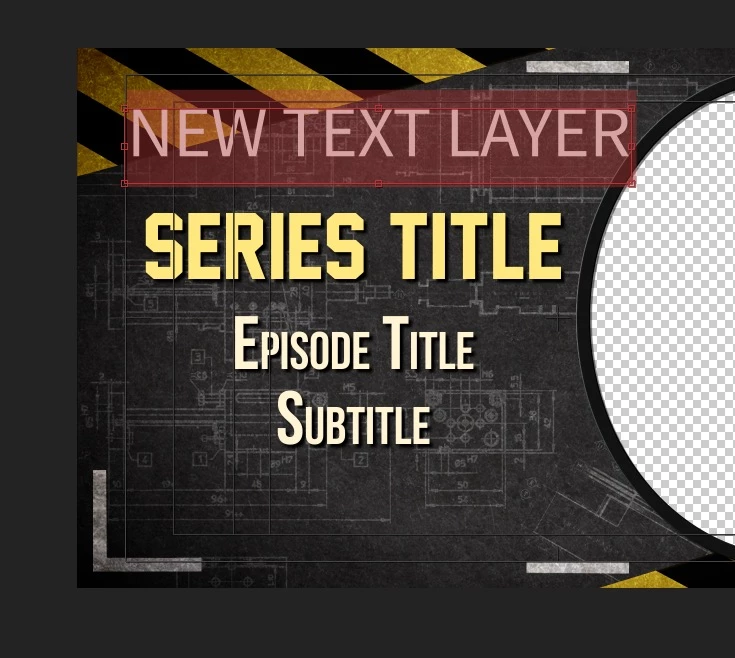
When going into edit mode on the text layer, none of the bounding box handles appear. I do see the layer handles when not in text edit mode, however I want to stretch the bounding box so that the text doesn't wrap when I replace the text.

This is what I expect to see when I go into text edit mode.
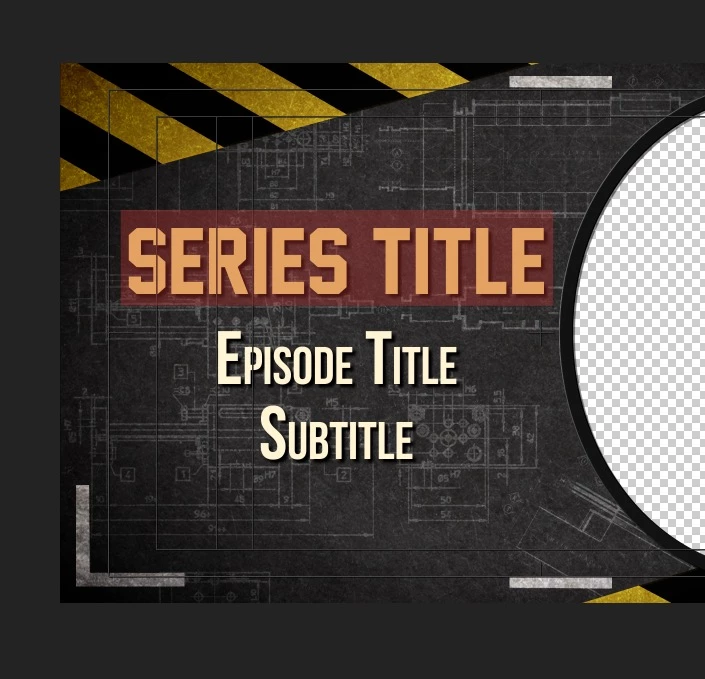
However on certain existing text layers, this is all I see. Note that the handles are completely missing, and no these are not the layer handles, but are the text box handles. (and yes, I have zoomed out to check if the handles are stretched very far.)
Any help would be much appreciated.

This topic has been closed for replies.
Correct answer Horshack

Gotcha. It's because your text is point text rather than paragraph text. You can convert it to paragraph text by right/control-clicking the text and select "Convert to Paragraph text".

1 reply

Horshack
Legend
May 18, 2017

If by edit mode you mean being able to edit the source text then the bounding boxes aren't supposed to appear - you'll get what you see, the text selected, allowing you to replace the source text. Edit mode is entered by double-clicking on the layer in the timeline. To get the bounding box you'd want to single-click on the text layer in the timeline.

ericsten
ericstenAuthor
Inspiring
May 18, 2017

I'm able to see the bounding box while not in edit mode, (aka stretch, squash, move around the layer etc) however I'm referring to the actual text box itself, which controls text-wrapping, number of visible lines etc while in the text edit mode.

Horshack
HorshackCorrect answer
Legend
May 18, 2017

Gotcha. It's because your text is point text rather than paragraph text. You can convert it to paragraph text by right/control-clicking the text and select "Convert to Paragraph text".