Participating Frequently
July 26, 2018
Answered

Text loses color attribute after selecting Alpha Matte

  • July 26, 2018
  • 1 reply
  • 1401 views

Hi,

I've been using the new Essential Graphics panel to create a lower 3rd motion graphic so I can use the motion graphic in Premiere.

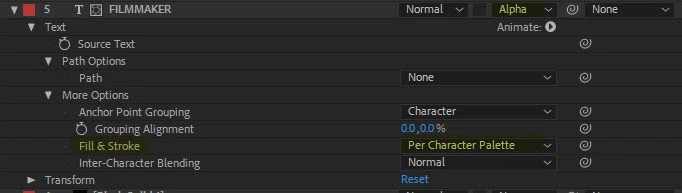
I am using solid layers to reveal the text in my animation, which is common.  However, after applying the Alpha Matte to the text, I can no longer add the text color attribute to the Essential Graphics panel because it is no longer there.  In place of the text color, there is a Fill & Stroke attribute which cannot be used.

Perhaps I need to reveal the text using a different method?  I'm not sure.
This topic has been closed for replies.
Correct answer Warren Heaton

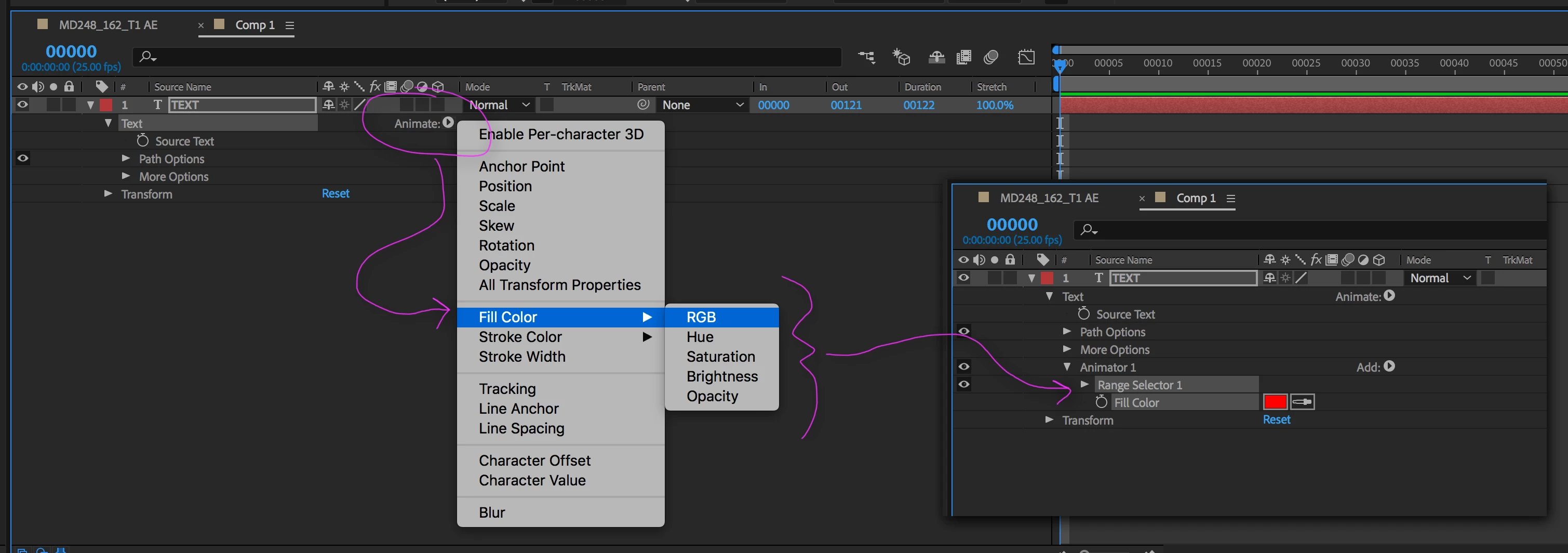
Click on the Animate pop-up menu and choose one of the Fill Color options to add a Fill Color Text Attribute.

1 reply

Mylenium
Legend
July 27, 2018

Add a fill color text animator. Applying effects changes the internal rendering order and can nullify some built-in controls that don't have per-component property streams.

Mylenium

Participating Frequently
July 27, 2018

Mylenium,

That sounds good but I'm not sure how to perform that.

Thanks,

Carl

Warren Heaton
Community Expert
Warren HeatonCommunity ExpertCorrect answer
Community Expert
July 27, 2018

Click on the Animate pop-up menu and choose one of the Fill Color options to add a Fill Color Text Attribute.