
Inspiring
November 28, 2023
Question

Text with faux bold creates too large "sourceRectAtTime()" bounding box

  • November 28, 2023
  • 5 replies
  • 467 views

While working with expressions a noticed something strange going on with my box sizes when a text used faux bold & sourceRectAtTime().

After investigating I discovered that at 100pt, faux bold always ads 10.8 ... px to the initial bounding box.

The measured actual difference was 4px in the case of Time New Roman. 
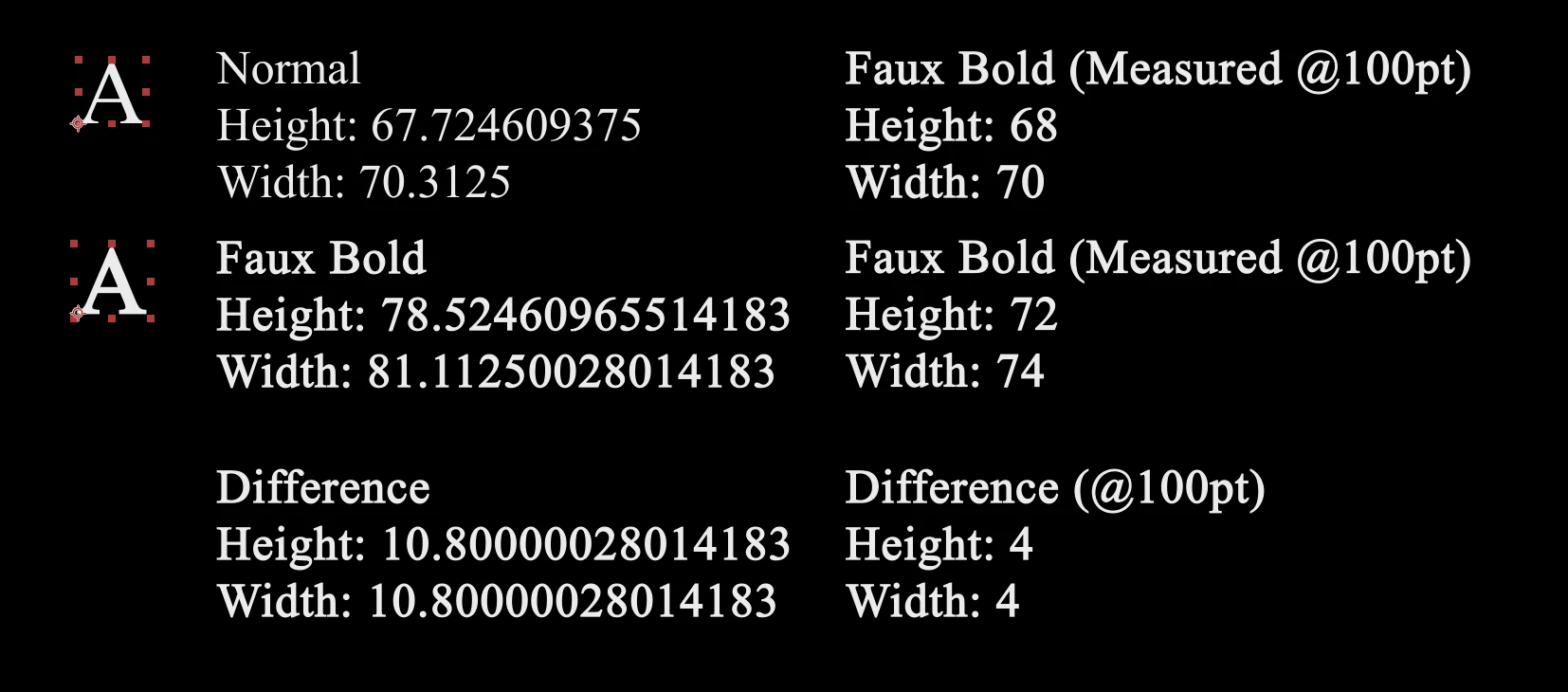
I can reproduce this behavior in both the latest AE 23.3 version and the AE Beta 24.2.0.


I added a sample AE files that describes this issue.

Why is this an issue? I wanted to create a rectangle around text with faux bold that reacts to / sclaes with the fonts used in the text. 

Is this intended behavior or an actual bug?

This topic has been closed for replies.

5 replies

nishu_kush
Community Manager
Community Manager
April 12, 2024

Are you still having the issue? Let us know.

I am moving this thread from Bugs to Discussions for now.


Thanks,

Nishu

Inspiring
April 13, 2024

Hey Nishu,


thanks for getting back to me. I just tested this again in both latest After Effects and Beta versions. I can comfirm that this is still happening.

Inspiring
November 28, 2023

Yes exactly. Which makes it hard to get a fitting bounding box.


I'm sorry for being not clear enough here. English isn't my first language.

Adobe Employee
November 28, 2023

So the issue for you is that the bounds are overly generous and exceed the actual stroked difference?


Douglas Waterfall

After Effects Engineering

Inspiring
November 28, 2023

Thanks for your reply!
Yes, I was just using it to get a new bounding rectangle for a text with faux bold.

So they are in accurate - for a lot of fonts I tested they are always 10.8px off vertically and horizontally from normal text, when you use font size 100pt. The correct behavoir, I'd assume, would be to just give the size like i measured. Which seems to be ~4px bigger in every axis Times New Roman at least.


If this is old behavior - I guess it is saver to just override user inputs to never allow faux bold? (It is used in a MoGrT.)

Adobe Employee
November 28, 2023

Thanks for the detailed explanation...but I remain confused about what you think the correct behavior should be.


  • Were you wanting the faux bounds/size to remain unchanged relative to the non-faux version?
  • Are you saying the bounds are inaccurate for faux?


This is probably super old behavior as I know of no recent change.


You should be aware that faux does not work/do anything with Variable fonts.


Douglas Waterfall

After Effects Engineering