


Participant
Apr 19, 2021 7:45 PM UTC
Answered

Text wont add to MOGRT

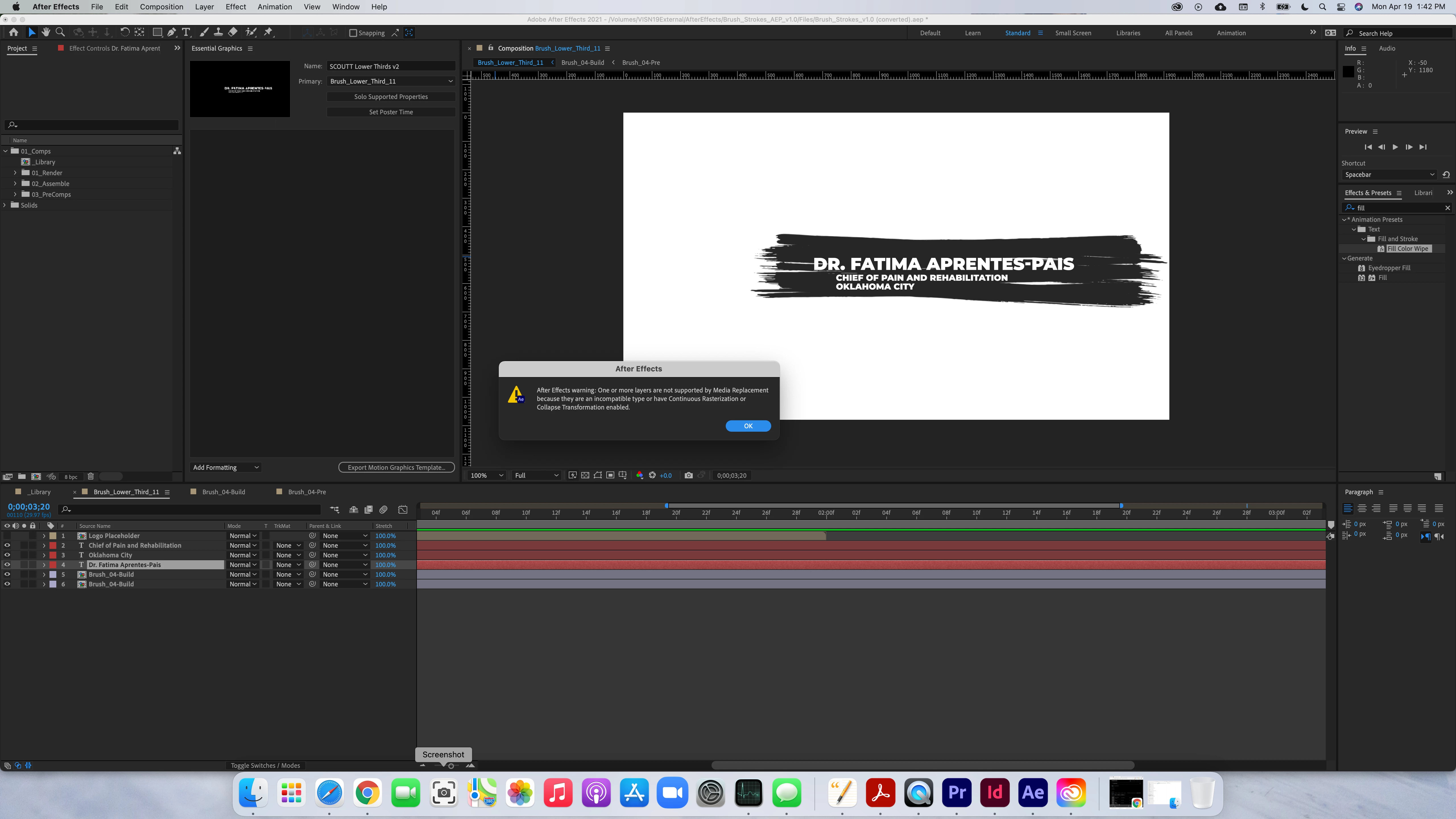
I receive this message when I try to place media replacement controls in the essential graphics window.  I am using a template that I purchased on Envato.  What am I doing wrong?


"After Effects warning:  One or more layers are not supported by Media Replacement because they are an incompatible type or have Continuous Rasterization or Collapse Transformation enabled."


I am trying to make the text editable in Premiere when i get it exported.


Roland Kahlenberg
Roland KahlenbergCorrect answer
Legend
Apr 20, 2021 7:44 AM UTC

You Selected and then Dragged the Text Layer into the Essential Graphics Panel - you can't do this as the Text Layer contains multiple properties – the Essential Graphics Panel (EGP) only allows multiple properties to be simultaneously dragged into the its panel. However, all seelcted properties have to be supported. When you drag a Text Layer, you're placing ALL of its properties into the EGP. Unfortunately, not all of a Text Layer's properties are supported in the EGP.

So ... select individual properties – this is what most users do. In your case, you mentioned wanting to allow a PPro user to change the text in PPro. For this use-case, select and drag the Text Layer's SourceText property into the EGP. HTH

Very Advanced After Effects Training | Adaptive & Responsive Toolkits | Intelligent Design Assets (IDAs) | MoGraph Design System DEV

5 replies

Participant
Sep 5, 2024 12:15 AM UTC

Dont drag the entire text layer, click to the arrow to see the text properties then go to >Text - "Source text" and drag to the Essential Graphics panel.

Translate
Participant
Dec 6, 2024 1:57 AM UTC

Omg thank so much! This helped me a lot. God bless

Translate
Roland Kahlenberg
Roland KahlenbergCorrect answer
Legend
Apr 20, 2021 7:44 AM UTC

You Selected and then Dragged the Text Layer into the Essential Graphics Panel - you can't do this as the Text Layer contains multiple properties – the Essential Graphics Panel (EGP) only allows multiple properties to be simultaneously dragged into the its panel. However, all seelcted properties have to be supported. When you drag a Text Layer, you're placing ALL of its properties into the EGP. Unfortunately, not all of a Text Layer's properties are supported in the EGP.

So ... select individual properties – this is what most users do. In your case, you mentioned wanting to allow a PPro user to change the text in PPro. For this use-case, select and drag the Text Layer's SourceText property into the EGP. HTH

Translate
Very Advanced After Effects Training | Adaptive & Responsive Toolkits | Intelligent Design Assets (IDAs) | MoGraph Design System DEV
Mylenium
Legend
Apr 20, 2021 5:44 AM UTC

There is no acrtual media to replace. It's as simple as that. All your content that could be replaced is apparently packaged in pre-compositions. You would have to untangtle the template and add the actual source footage links to the MOGRT, not try to add the comps.


Mylenium

Translate
