Inspiring
March 4, 2022
Answered

Text wrap inside box?

  • March 4, 2022
  • 3 replies
  • 479 views

Hello! I was wondering if there is a way to make a text wrap inside a path rather than around it. What I mean is, in Illustrator, you're able to do something like this:
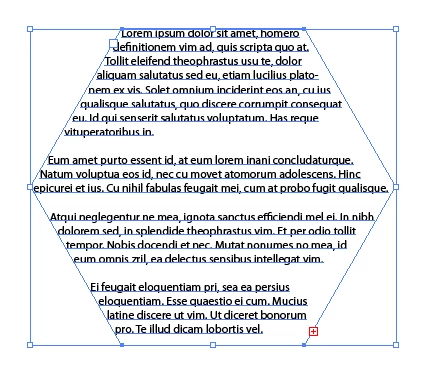
You draw a shape, and then type the text inside. I can't find a way to do this in After Effects. Is this a feature that's even possible? (Also, I work in Adobe CS5.5, so I may not have some of the features in CC.)

Thanks. 🙂

This topic has been closed for replies.
Correct answer Mylenium

AE does not support any form of object reflow. As already suggested, you have to do it in AI or ID and then import a PDF or graphic.


Mylenium

3 replies

nishu_kush
Legend
March 4, 2022

Feel free to create a feature request post on the After Effects UserVoice so that others can vote: https://adobe-video.uservoice.com/forums/911311-after-effects

Let us know if there are any other questions.


Thanks,

Nishu

Inspiring
March 7, 2022

Thank you!

I found that someone else had this same feature request that I was wanting. I'm surprised that only two people (including myself) have voted for it so far!

https://adobe-video.uservoice.com/forums/911311-after-effects/suggestions/41091526-text-wrap-feature-similar-to-illustrator

Mylenium
MyleniumCorrect answer
Legend
March 4, 2022

AE does not support any form of object reflow. As already suggested, you have to do it in AI or ID and then import a PDF or graphic.


Mylenium

Community Expert
March 4, 2022

Maybe your solution would be to create the text the way you like in Illustrator and then import that file into AE.