


Participant
Nov 29, 2022 7:34 AM UTC
Answered

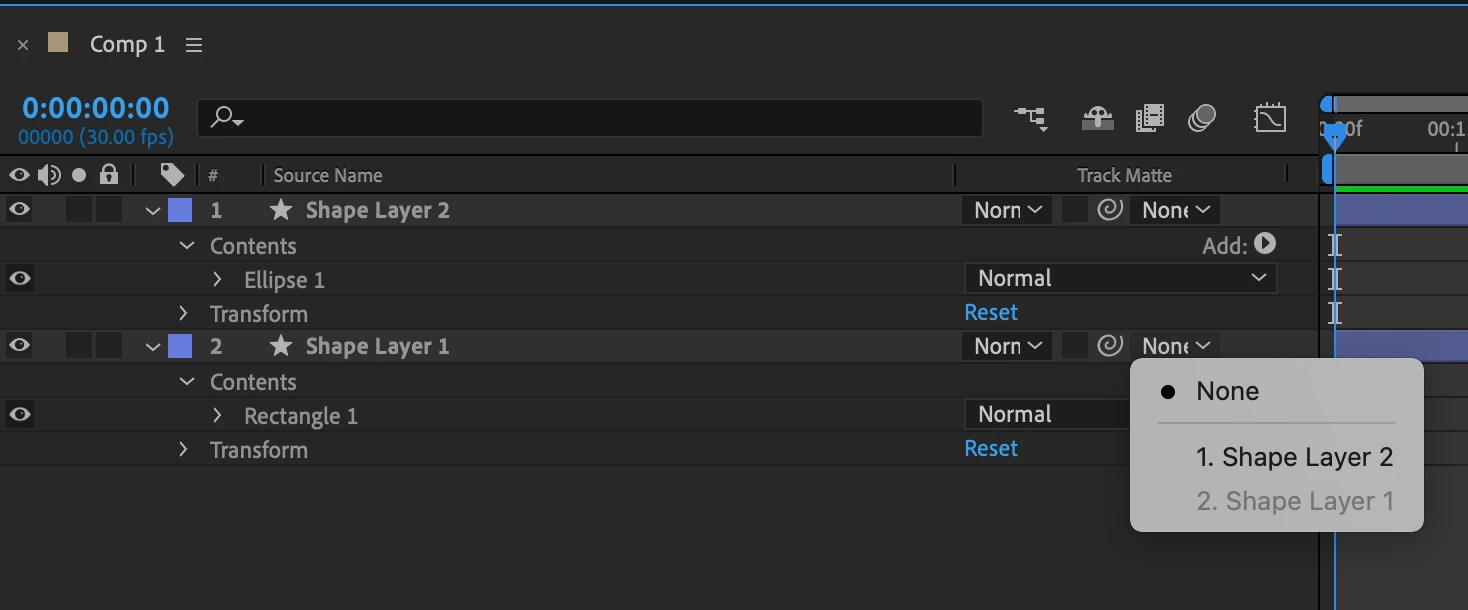
The alpha and luma options do not show up in the track matte drop down in After Effects

Hi!


The alpha and luma options do not show up in the track matte drop down in After Effects.


Track matte is where it use to be in After Effects, but the options for alpha and luma are gone.


What can I do to get them back? 


This is what the track matte dropdown looks like now:
Mylenium
MyleniumCorrect answer
Legend
Nov 29, 2022 7:39 AM UTC

You may want to read the online help on how this stuff has changed recently:


https://helpx.adobe.com/after-effects/using/track-mattes-and-traveling-mattes.html


Mylenium

14 replies

Participant
Oct 13, 2025 9:30 AM UTC

Alpha and Luma Matte Options Missing in After Effects (Solved)


 Problem:

I was facing an issue in the latest version of After Effects where Alpha Matte and Luma Matte options were missing.
Even after turning on “Toggle Switches / Modes” at the bottom of the timeline, I could only see the “Track Matte” column with layer names — not the traditional “Alpha Matte,” “Luma Matte,” or “Inverted” options.

 What I Tried:

  • Toggled between Switches and Modes

  • Enabled Columns → Modes

  • Reset the workspace

  • Tried adding layers above and below

But still, the old Alpha / Luma options didn’t appear.


Solution I Found:
       ALPHA MATTE:
                                       In the first screenshot, I have pointed out an option that’s called AlphaMat.
If you want to enable it, first click on the drop-down menu beside your layer (the second small drop-down). Then, select the option where your text layer name appears — just click on that. As soon as you do, the AlphaMat option will automatically appear, and it’ll be applied to your layer.
       LUMA MTTE:                             
                                  See the second screenshot,If you want to switch it to LumaMat, simply click on the pointed-out button again, and it will switch from Alpha to Luma.
     MATTE INVERT:
                                 See the third screenshot,  if you want to apply MAT Invert on Alpha or Luma MAT, you’ll notice there’s an empty box beside the AlphaMat option. Just click on that box — a new option will appear called MAT Invert.
If you have enabled AlphaMat, this will work as Alpha Invert, and if you applied LumaMat earlier, then it will be Luma Invert.

🗨️️ Final Note:

Hopefully this post saves someone else a lot of time!
If you’re new to the updated UI, don’t worry — it’s just a workflow change, not a missing feature.


Translate
Participant
Jan 2, 2025 4:54 PM UTC

This was good but seriously i didn't still understand can u make like a video tutorial. I've been stuck for months please help

Translate
Participant
Apr 1, 2025 3:41 AM UTC

I'm not sure if you still need this, but if you do: When you view your layers, right after the four icons, there will be three empty boxes. If you hover over the middle box, a half-filled and half-empty circle will appear. Select the middle box to turn on Alpha Matte, and click again to turn it off. I've provided a screenshot for a visual. 


Translate
Neon Tundra
Participating Frequently
Dec 1, 2022 4:16 AM UTC

If it helps, turns out there's an invisible checkbox for inverting alpha masks (check Screenshot 1). And it seems that alpha and luma have been moved to the Mode column (Screenshot 2).

Why Adobe keeps complicating things?

Translate
Mylenium
Legend
Dec 1, 2022 7:26 AM UTC
quote

Why Adobe keeps complicating things?


Because there's a million users out there that kept whining about the old system being too complicated for whatever reasons...


Mylenium

Translate
Mylenium
MyleniumCorrect answer
Legend
Nov 29, 2022 7:39 AM UTC

You may want to read the online help on how this stuff has changed recently:


https://helpx.adobe.com/after-effects/using/track-mattes-and-traveling-mattes.html


Mylenium

Translate
Participant
Nov 29, 2022 8:22 AM UTC

Thank you! This helps a lot 🙂

Translate
Participant
Jan 2, 2025 4:56 PM UTC

Can you please help me, I'm still stuck

Translate
