Participant
January 10, 2016
Answered

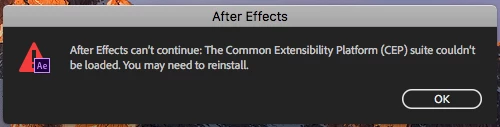
The Common Extensibility Platform (CEP) suite couldn't be loaded.

  • January 10, 2016
  • 21 replies
  • 84016 views

Does anyone know how to resolve this? I uninstalled and reinstalled and getting the same error. After Effects can’t continue: The Common Extensibility Platform (CEP) suite couldn't be loaded. You may need to reinstall. After Effects can’t continue: unexpected failure during application startup. I'm running (Mac) Yosemite 10.10.5, using After Effects CC 2015 v.13.6.1. Any help is appreciated!

    Correct answer Doc Shop Inc

    I had the same problem on a mac running After Effects CC 15.0.1.

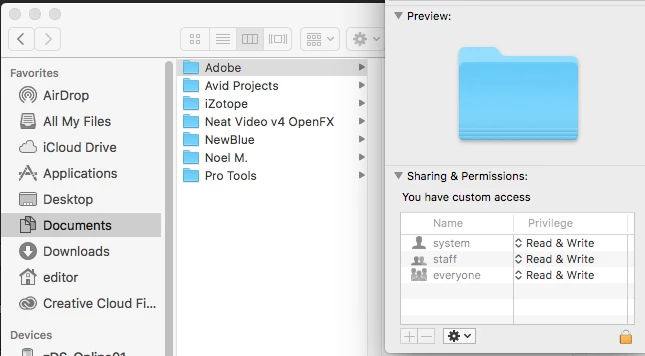
    The issue turned out to be faulty permissions on the "Adobe" folder inside the user "Documents" folder.  I changed the folder permissions to be "Read & Write" for all (be sure to "apply to enclosed items") and the problem was fixed.  Permissions should be as follows:

    21 replies

    Participant
    September 7, 2022

    SOLVED: If anyone still has the problem - I tried everything and nothing works... so only thing that works is to create new user on Mac with admin permissions and use from second user. Simple.

    Participant
    May 5, 2023

    How you do that?


    Participant
    April 10, 2022

    Hola la solución fue mas sencilla de lo que esperaba, resulta que yo tenia una carpeta llamada adobe en mi documentos de la mac y tenia otras cosas dentro de ella, por lo cual le cambie el nombre y cree otra carpera llamada "adobe" completamente nueva y verifique los permisos, y a todos los usuarios le di permisos completos y listo magicamente se abrio el after effects

    March 7, 2022

    Hi. So i managed to solve for myself. dont know if this will work for you guys. For Mac. The instructions are as follows: 


    1. uninstall after effects and media encoder. 


    2. Next, uninstall creative cloud from the folder they give you called creative cloud unistaller 


    3. then head over to adobe website and hit install After Effects from the website. it will give you download link so follow all the steps to download it. 


    4. Creative cloud will also be downloaded along with the After Effects. note you wont have to download After Effects from the creative cloud app. since you already downloaded it from the website. 


    5. once After Effects downloads launch it and it should be working without this metadata BS poping up.


    hope this helps. if this works for you please show your appreciation by subscribing to my youtube channel: HEAR 2 STAY 


    Participant
    November 3, 2021

    I tried all adviced but non of them did not work for me. 

    But I find another solution 

    for windows user Settings- Update and Security- Windows Security-Virus and threat protection- manage ransomware protection-Allow an app through Controlled folder access-please select after effects exe from installed win folder. and restart after effect 

    you can also watch from here to

    https://www.youtube.com/watch?v=9yRLd6gjZWU&ab_channel=RaTeX

    Participant
    December 11, 2021

    It's working

    Participating Frequently
    May 1, 2019

    For Mac OS user, following is the solution that solved my issue:


    Change permission on every single Adobe folder to everyone read write:

    Documents

    Applications

    Library Caches

    Library Preferences

    Library Application Support

    Delete Preferences on Startup (cmd – option – shift).

    Here we go!

    Participant
    May 25, 2020

    are you refering to general docs, application folders in mac? 


    tried all options, yours is the last hope. please help. 😞

    Participant
    April 24, 2021

    does u got the solution to this issue on mac


    Participant
    February 24, 2018

    This was it!!!

    I can't believe how many things  i tried that were all wrong and much more involved. Then this super simple thing was it.

    Thank you PAK1111!

    zuris98386622
    Participant
    April 23, 2020

    What exactly was it that solved your problem? Struggling with the same:/

    Participant
    December 26, 2017

    I have tried all of these solutions and still am unable to run AE.

    Participant
    January 19, 2018

    I need the answer to this issue too!!

    cissyy89702300
    Participant
    July 16, 2017

    Has anyone figured out how to fix it for the mac version? I'm struggling with this too. I've tried reinstalling and restarting but none of that works.

    Doc Shop Inc
    Doc Shop IncCorrect answer
    Participant
    February 20, 2018

    I had the same problem on a mac running After Effects CC 15.0.1.

    The issue turned out to be faulty permissions on the "Adobe" folder inside the user "Documents" folder.  I changed the folder permissions to be "Read & Write" for all (be sure to "apply to enclosed items") and the problem was fixed.  Permissions should be as follows:

    Participant
    August 22, 2018

    I can't find the sharing and permissions file

    Participant
    June 10, 2016

    Hey PAK, i'm having the same problem. Did you ever resolve the issue?

    OChrisJonesO
    Participant
    February 9, 2016

    I was experiencing the exact same issues you described. No amount of uninstall, reinstall, update, or even the CC cleaner tool was able to fix.

    The solution? For me, after ensuring that AE was running with full administrator rights in Windows 10 (right click > run as administrator) it opens up just fine for me.

    GhostAD
    Participant
    March 13, 2016

    Thanks That fixed it