


Participant
September 21, 2023
Question

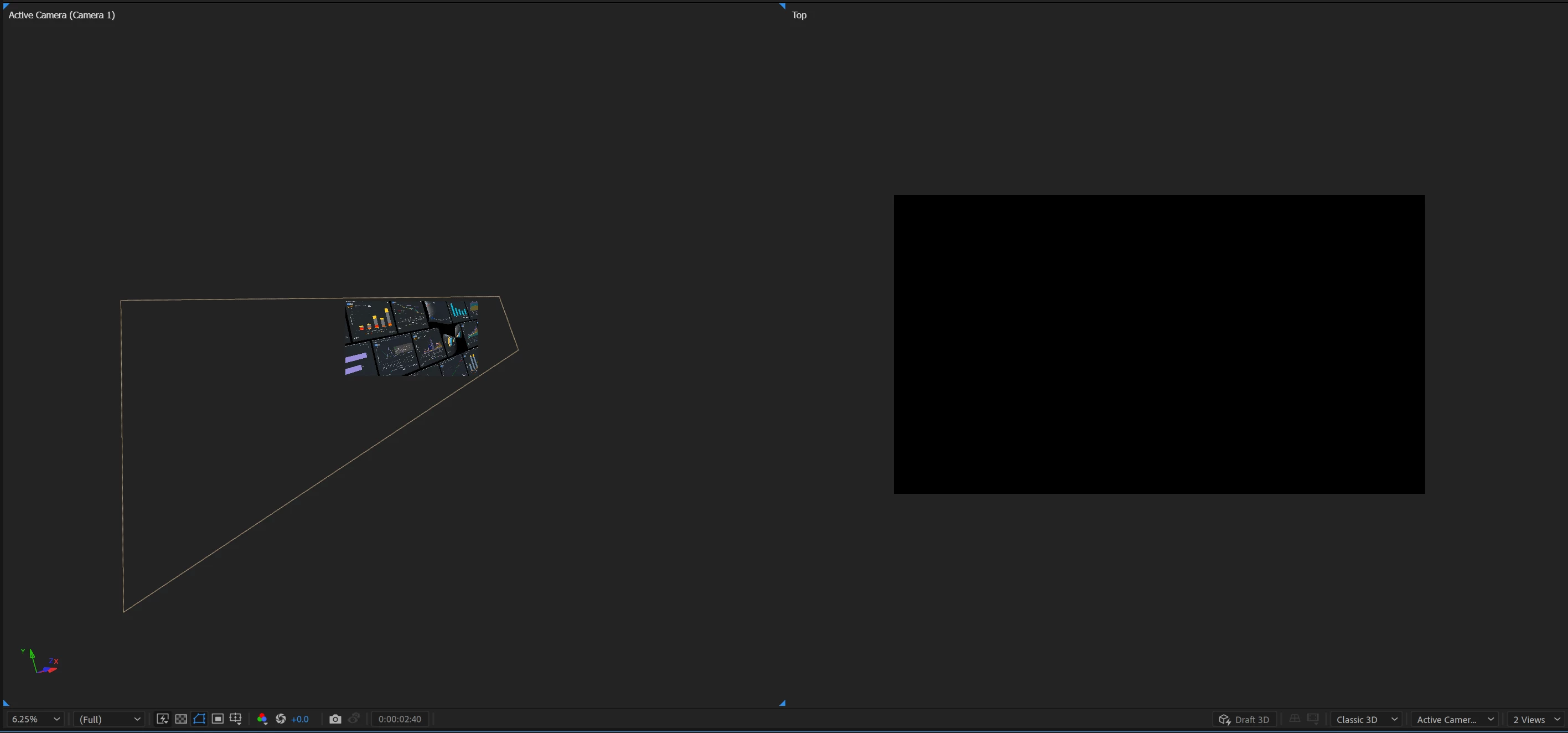
The Top view of the camera in the 3d scene is black/blank

  • September 21, 2023
  • 1 reply
  • 283 views

Greetings,

I'm facing a problem in one of projects. I want to see the possition of the camera in a 2 view vieport, but the top view is black. I have tried reseting the camera and turning off hardware acceleration. 


1.Version 23.6.0

2. Windows 11, Intel  i5-12500H, RTX 4060 Laptop GPU.

3. Can't reproduce in a new project.

4. I should see my camera and the 3d scene as a Top view.


This topic has been closed for replies.

1 reply

Community Expert
September 22, 2023

Select the top view, press "c" a couple of times to bring up the move up and down or pull back tool, then click and drag in the Top View until you see layers. It helps if you zoom out on the Comp Panel Top View using the Magnification ratio or Ctrl/Cmnd plus the minus key. It also helps if you have a layer selected so you can see the Layer Controls.

PavlomirMAuthor
Participant
September 22, 2023

Thanks for the reply. I was unable to find my camera and composition elements. I opened another project and the "Pan" and "Dolly" options worked correctly. In the broken project, I only see a "+" symbol while moving with the "Pan" tool.

There is a option at the view selection for reseting that did work in my second project. Just not sure why I don't see anything for the Top and Bottom view for the problematic project in question.