

Participant
November 19, 2023
Question

TIME LINE JUMP ONE SECOND WITHOUT ASKING

  • November 19, 2023
  • 1 reply
  • 131 views
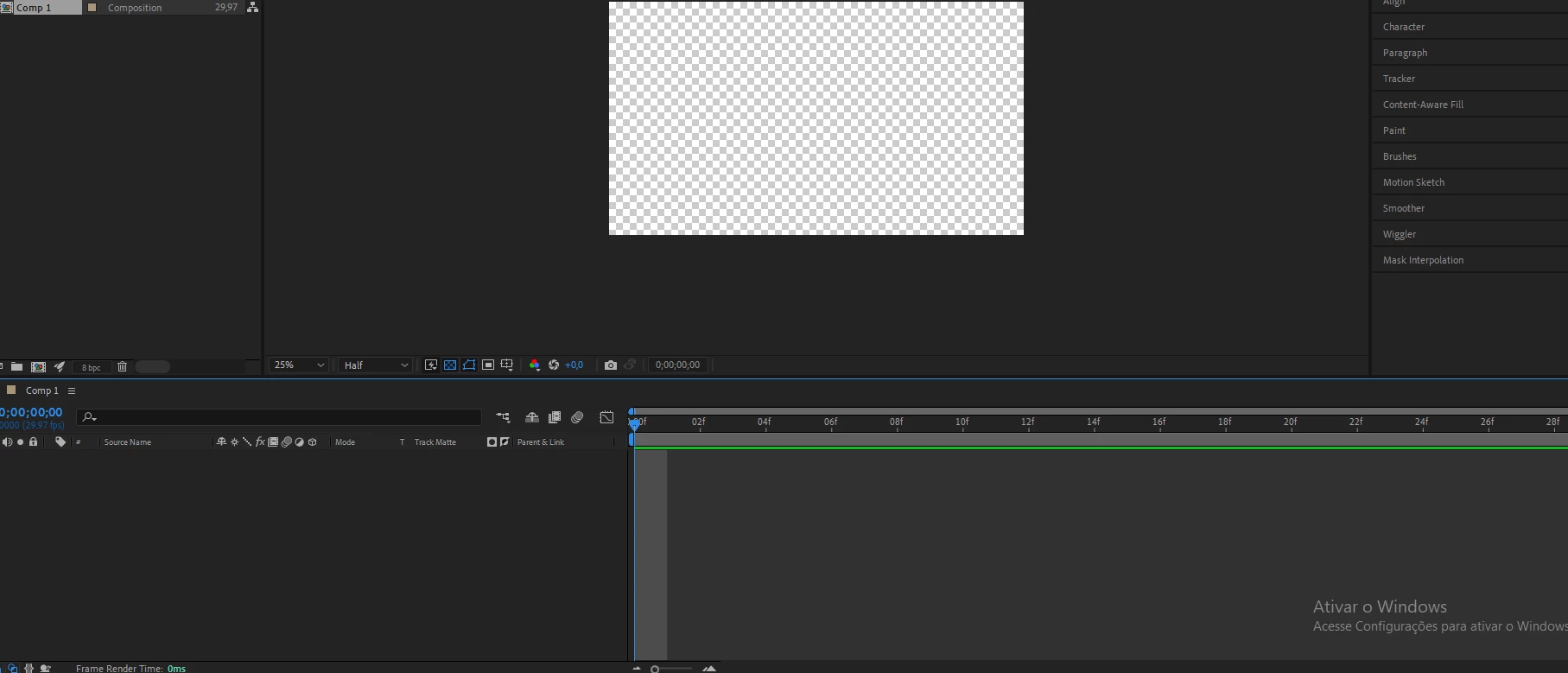
My time line every time I press to view it skips 1 second, it never plays from the beginning, this gray bar remains selected, can anyone help me?

 

This topic has been closed for replies.

1 reply

Community Expert
November 20, 2023

The CTI (Current Time Indicator) is always at the start of the current frame. The gray bar in your timeline screenshot shows only one frame, not one second. The gray bar will disappear if you make the composition longer and zoom out a bit.


In any editing, compositing, animation, or 3D app, the CTI is always at the start of the current frame. If you set an out-point in After Effects, it will always set the out-point on the frame you are looking at, so you will still see it. That is how it works in animation, 3D, and visual effects apps. If you cut a video editing app like Premiere Pro, the cut will show you the start of the next frame. If there are no more shots in the sequence, you will see nothing when you make a cut because that's a more efficient way to edit a movie, but seeing the last frame when you set an out-point is more intuitive and efficient because you need to see where the action is going to end, and you also need to see where the action is going to start. That is why you always see the start of the current frame in After Effects, but in Premiere Pro, you need to see the start of the next shot in the sequence when you go to a cut. After Effects is also not a video editing app; it is an animation, compositing, and visual effects app designed to create shots, not to edit movies. 


I hope that makes sense. There is nothing wrong. If you had a layer with text, a shape layer, or footage in the timeline, you would see something in the Comp Panel.