

Thaumar
Inspiring
March 13, 2023
Answered

Time Remap not using source timecode

  • March 13, 2023
  • 4 replies
  • 608 views

In the latest update of After Effects I noticed that when using Time Remap I don’t see the source timecode anymore, but only the time starting from 0 at the first frame.
Can anybody tell me where I can change this behaviour back to showing source timecode?
There must be some toggle somewhere, but I can’t find it.
In Interpret footage the option ‘Use timecode from source’ is selected, but I still don’t see it.
I’m doing a lot of VFX work with a lot of time remapping, and it’s essential to have access tot the timecode to match an edit.
I don’t want to put the timecode effect on all layers, that is a mistake waiting to happen.
Anyone knows where this toggle is?

Thanks!
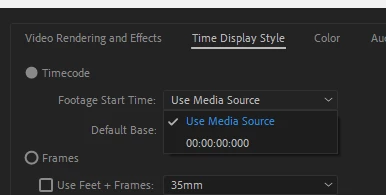
Correct answer jenkmeister17177426

If you go back to 23.2.1, check Project Settings -> Time Display Style and make sure it is set to Use Media Source.


4 replies

Thaumar
ThaumarAuthor
Inspiring
March 15, 2023

Thanks! That wat the the answer I was looking for!
Much appreciated!

jenkmeister17177426Community ManagerCorrect answer
Jenkmeister
March 14, 2023

If you go back to 23.2.1, check Project Settings -> Time Display Style and make sure it is set to Use Media Source.


Thaumar
ThaumarAuthor
Inspiring
March 13, 2023

Ok, I rolled back to AE 23.2.0, that one seems to actually use the source timecode.
Hopefully this will be fixed (or at least selectable via toggle in preference pane or something) in future updates.
Otherwise AE23.2 will be end of the road for me, the use of timecode is essential in my workflow, it will simply take too much time to change comps by hand and check every source layer via a plug-in (that I have to not forget to delete afterwards) every time.

Thaumar
ThaumarAuthor
Inspiring
March 13, 2023

Oh great... now when creating a new composition from a source it doesn't take the timecode from the source anymore, the comp just starts at TC 0:00:00:00.
Man, I have more than 700 VFX lined up, used to be a simple drop of the ref clips on the 'create composition' button and I'd have all my VFX comps ready to go with the right timecode.
So now I have to set every composition start timecode by hand?
Wauw, talking about a mayor dent in my workflow... 
Please somebody, tell me how to reverse this behaviour. Or what's wrong with my After Effects and how to fix it.
This can not be the intended behaviour, right? That would be silly and totally unprofessional.
Please, anybody?

Participant
January 31, 2025

I know it's a old post but still! You should read this, it's even worse then you think! https://www.creativeimpatience.com/the-strange-maths-of-after-effects-timecode/