Time Remapping leads to negative keyframe times on trimmed clips
Hey all,
I am completely new to After Effects, but I'm trying to use it as Premiere Pro won't let me combine speed ramping and scaling one clips and I read it should be much easier in After Effects. However, I don't get why the following is happening.
I have a long clip (~7 min) of which the final 20 seconds or so are interesting for my speed ramp. However when I trim the clip and enable time remapping, the beginning keyframe is placed at the beginning of the entire clip rather than the beginning of the trimmed clip, which I expected to happen.
I have tried numerous things (setting in and out, adjusting composition timelines, editing in Premiere Pro and switching to After Effects, and more), but nothing seems to prevent this from happening:
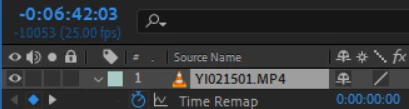
Is this in any way to be prevented? It is easy enough to create a new keyframe at the start of the trimmed clip as a workaround, but it just seems like undesirable behaviour in my opinion.
Thanks in advance!
 AdChoices