Inspiring
February 6, 2023
Answered

Timeline window help

  • February 6, 2023
  • 1 reply
  • 440 views

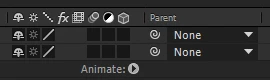
I am probably being a bit of an idiot here so please don't come at me for this but where have all my effects and options gone to adjust items in my timeline window


If anyone doesnt know which bit i mean Ive put an image below - cant remember the technical name for it at this moment in time

This topic has been closed for replies.
Correct answer Rick Gerard

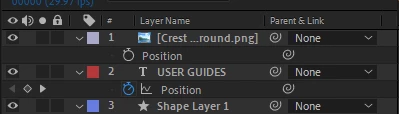
You have hidden the timeline columns. There are some icons in the bottom left corner of the timeline. The first one looks like a stack of squares. That one is the layer Switches Panel (column). That column contains the values for the properties in the Layer Name column. The next is the Transfer Controls panel. If either is selected, then the property values show up in the columns, but if both are selected, the property values appear only in the Layer Switches column. I prefer to work with both selected. Shift + F4 will bring up the Parent Link column and two other switch icons in the bottom left corner of the timeline will bring up other useful columns. 



1 reply

Rick GerardCommunity ExpertCorrect answer
Community Expert
February 6, 2023

You have hidden the timeline columns. There are some icons in the bottom left corner of the timeline. The first one looks like a stack of squares. That one is the layer Switches Panel (column). That column contains the values for the properties in the Layer Name column. The next is the Transfer Controls panel. If either is selected, then the property values show up in the columns, but if both are selected, the property values appear only in the Layer Switches column. I prefer to work with both selected. Shift + F4 will bring up the Parent Link column and two other switch icons in the bottom left corner of the timeline will bring up other useful columns. 


Inspiring
February 6, 2023

Thank you - been a while since I used AE I was driving myself bonkers trying to work out what I did!