Inspiring
February 23, 2017
Answered

To the Beat of Music

  • February 23, 2017
  • 3 replies
  • 1378 views

I still trying to figure out how to make a shape of whatever move horizontally ONLY to the beat of music.

I had been using a linear formula like this: linear(value,45,65,0,100) for other things, and understand a little bit.

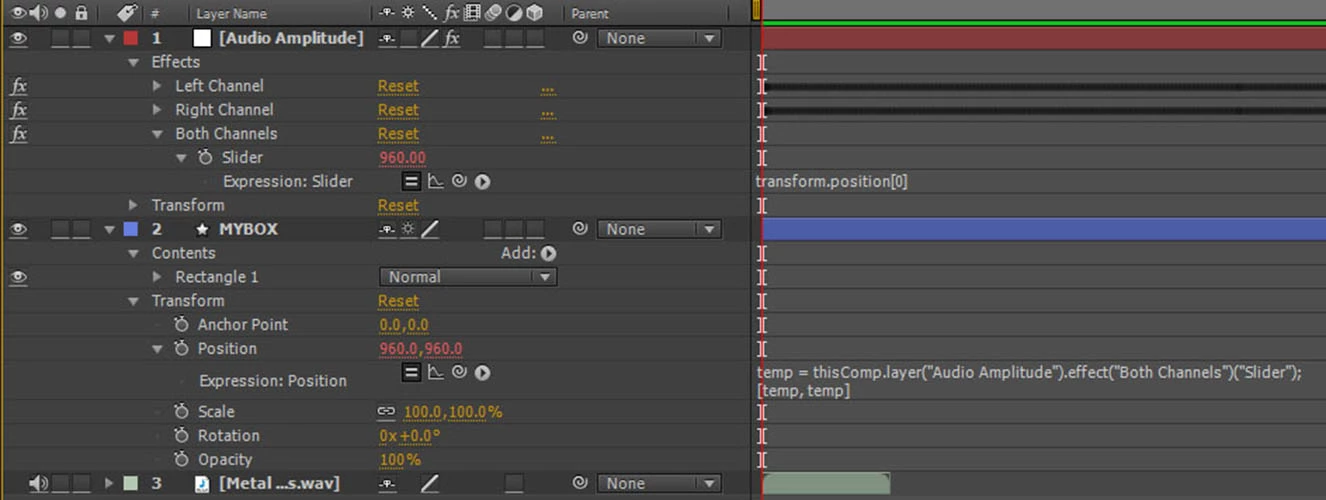
Reading a book I try something different ( Look at the photo ) but my box ( shape ) when down and stayed there LOL.

How can I make for example using vlaues from the Graph Editor, for example 45,65 as above, to move the shape horizontally?

I know I getting close, but may go crazy without the help of you folks here........
This topic has been closed for replies.
Correct answer phlexib

HI,

create a variable to store the Amplitude.

The position property needs to value for X and Y. It's called an array and it's written within [ ] and each values are separated with a ,

create a variable to store the position Y.

create a variable to store the Aposition Ymplitude.

To change values you use the linear function which needs 5 properties : first is the property you want to use as input, in you case the amplitude, then the minimum value from that amplitude, then the maximum value from the amplitude and finally the minimum value you want to output, and the maximum value you want to output.

In the following expression the output are (0,1920) , the size of my comp;

/////

amp = thisComp.layer("Audio Amplitude").effect("Left Channel")("Slider");

posX= linear(amp,0,50,0,1920);

posY = transform.position[1];

[posX,posY]

To choose the two input values, you could look at the graph of the amplitude layer and see what what is the value for the peak.

Ben

3 replies

Mathias Moehl
Community Expert
Community Expert
February 25, 2017

In case you ever need a solution for this where you don't have to write expressions code, take a look at my tools Beat Assistant or iExpressions:

Beat Assistant generates keyframes to move/rotate/whatever things in sync with the beat:

Tutorial Getting started with Beat Assistant

iExpressions generates expressions similar to the ones discussed above - but you don't have to write the code yourself. instead you control everything with intuitive interfaces. I have an entire tutorial series about using it for audio:

Animating to Music After Effects tutorial by Eran Stern

Tutorial Animation to Music in After Effects - Part 2

Tutorial Animation to Music in After Effects - Part 3

Mathias Möhl - Developer of tools like BeatEdit and Automation Blocks for Premiere Pro and After Effects
G-PersonAuthor
Inspiring
February 23, 2017

Progress:  Now we getting somewhere.

Look at the photo, everything seen to works ok.

Look at the formula: (amp,10,29,100,1920)

I tough the box will move from X=100 to X=1920

However look at the bottom of the photo, at min peak the box is completely to the left

while at full peek does not reach right border.

phlexib
phlexibCorrect answer
Inspiring
February 23, 2017

HI,

create a variable to store the Amplitude.

The position property needs to value for X and Y. It's called an array and it's written within [ ] and each values are separated with a ,

create a variable to store the position Y.

create a variable to store the Aposition Ymplitude.

To change values you use the linear function which needs 5 properties : first is the property you want to use as input, in you case the amplitude, then the minimum value from that amplitude, then the maximum value from the amplitude and finally the minimum value you want to output, and the maximum value you want to output.

In the following expression the output are (0,1920) , the size of my comp;

/////

amp = thisComp.layer("Audio Amplitude").effect("Left Channel")("Slider");

posX= linear(amp,0,50,0,1920);

posY = transform.position[1];

[posX,posY]

To choose the two input values, you could look at the graph of the amplitude layer and see what what is the value for the peak.

Ben

G-PersonAuthor
Inspiring
February 23, 2017

Thanks, do NOT get mad with me, I trying to understand, but some people post one way or another and in mean time I go nuts!!

Someone told me something like that, but did not give me much info.

For example, your lines:

amp = thisComp.layer("Audio Amplitude").effect("Left Channel")("Slider");

posX= linear(amp,0,50,0,1920);   posY = transform.position[1];    [posX,posY]

1:Do this lines replace the text on "Expresion Position" on the pic above?

2: I get confuse with this 2 lines... ( Remember I learning from you )

posX= linear(amp,0,50,0,1920);        posY = transform.position[1];

To me you moving X position for 50 1920, however in the bottom then you said transform.position[1];

which will be "Vertical Coordinates" Right?

3: create a variable to store the Amplitude.

amp is the variable created for the audio Amplitude.

Sorry for so many question and I don't mean others are good or no good

but I can understand what you trying to tell me, better than others.

phlexib
Inspiring
February 23, 2017

The Position is related to the Anchor Point of the layer.

You can either  offset your anchor point or changed the value you entered (100,1920) to something that fits your need better.

I would changed the anchor point position.