

Todd_Morgan
Legend
November 20, 2021
Answered

toggle through 3D axis constraints

  • November 20, 2021
  • 1 reply
  • 353 views

How does one toggle through xy, zx and yz axis constraints when looking to move a layer in 3D space? When I hover over the center of the layer to move it I only get XZ axis... and I can't seem to find what toggles through. Any help?
This topic has been closed for replies.
Correct answer Jose Panadero

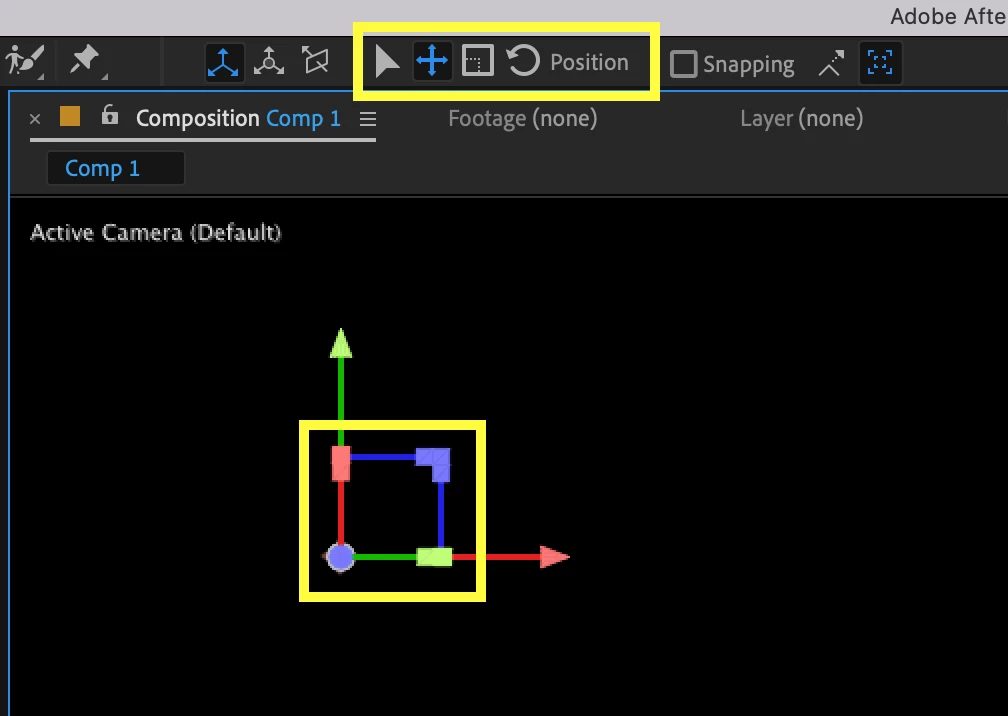
When using the selection Tool, you can select the option to move in any of the planes. Check attached image. The red rectangle moves the layer in the YZ plane, the green rectangle moves the layer in XZ plane, and the blue one moves the layer in XY plane.


1 reply

Jose Panadero
Community Expert
Jose PanaderoCommunity ExpertCorrect answer
Community Expert
November 20, 2021

When using the selection Tool, you can select the option to move in any of the planes. Check attached image. The red rectangle moves the layer in the YZ plane, the green rectangle moves the layer in XZ plane, and the blue one moves the layer in XY plane.


Todd_Morgan
Legend
November 22, 2021

AWESOME!!!! Been using AE for years and never realized that... many thanks!!