
May 28, 2026
Question

Too many Undo Groups when moving Items in the Project Panel
  • May 28, 2026
  • 2 replies
  • 19 views

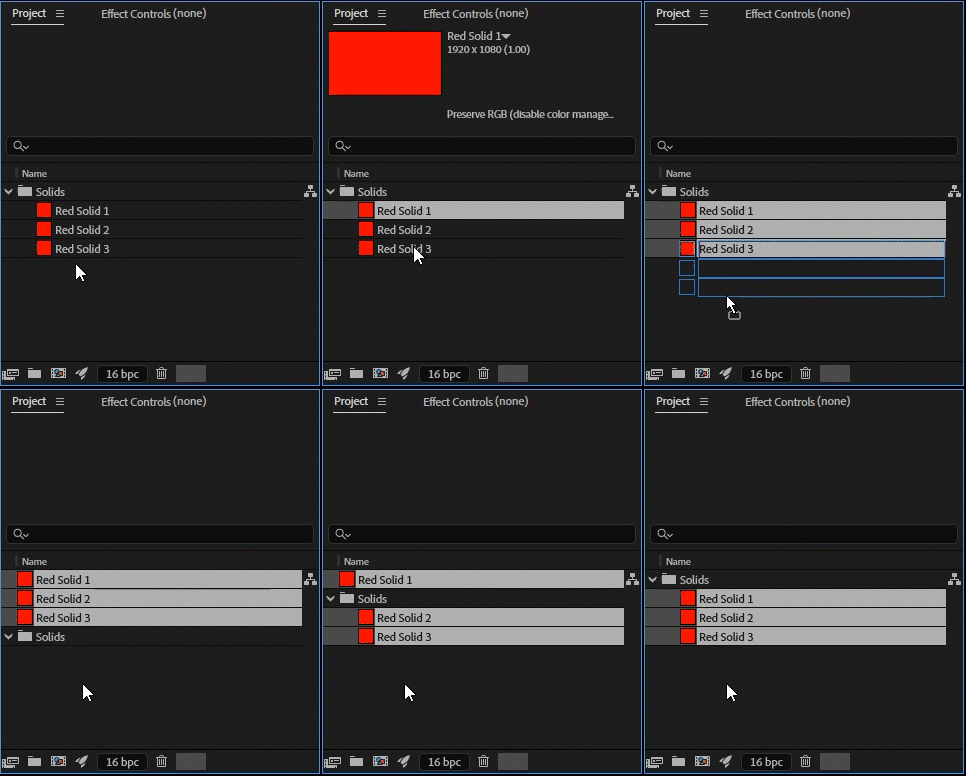
If you move multiple items at once in the Project Panel, you then have to Undo each item move one at a time. This could be really annoying if you accidentally move a bunch of items.
 

The expected result would be a single Undo Group for the entire move.
 

This bug is in the latest update as well as the Beta

    2 replies

    Warren Heaton
    Community Expert
    Community Expert
    June 1, 2026

    It depends on whether or not the action shows as Move Item or Move Items in the History.


    Moving three items to the root level of the project is Move Item.  Moving three items into a Folder or into a Composition is Move Items.

    It would make a good feature request to have an option to modify these.  Perhaps holding Option/Alt could change Item to Items and Items to Item.


    Nishu Kushwaha
    Community Manager
    Community Manager
    May 28, 2026

    Hi Mike,


    Thanks for flagging this. I tested on older versions and the Project Panel has actually behaved this way for a long time. Each item move is logged as its own undo step rather than being grouped. So it's not a recent regression, but rather long-standing behavior.

    I understand that it's frustrating, especially after an accidental multi-item move. I'll pass this along to the product team as workflow feedback so they're aware it's a pain point.

    Let me know if there are any other questions.


    Thanks,

    Nishu

    May 28, 2026

    Thanks Nishu,

    I guess it’s not that big of a problem if I just noticed it

    Mike

    Nishu Kushwaha
    Community Manager
    Community Manager
    June 1, 2026

    Thanks for reaching out. Feel free to write in if there’s anything else you need help with.

    Moving this thread from Bugs to Questions.


    Best,

    Nishu