October 20, 2022
Answered

Track Matte disapeared

  • October 20, 2022
  • 2 replies
  • 767 views

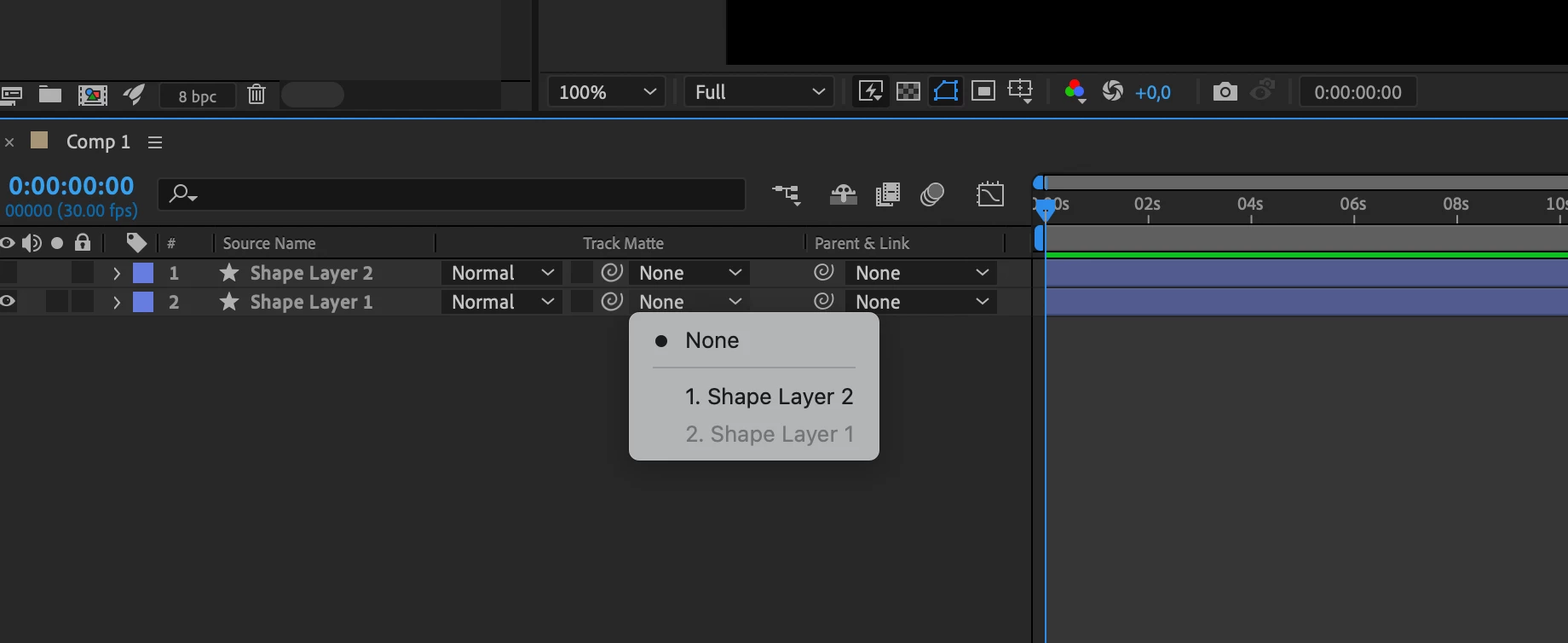
Hi! Can someone help and tell me what happened here? Where is Track Matte?

This topic has been closed for replies.
Correct answer Rick Gerard

Check the new feature notes. A track matte can now be used for more than one layer, and it does not need to be just above the layer you want to matte. No bug, just a greatly improved feature. There are also switches to the right to change the track matte from alpha to luminance and invert the matte. 


2 replies

Community Expert
October 20, 2022

You have hidden the Switches column and enabled the Parent Link Column. The trkMatte column is visible in your screenshot. 


You can enable both the Switches and Modes columns by activating the first two icons in the bottom left corner of the timeline panel. You can show/hide the Parent/Link column by pressing Shift + F4.


The User Guide has sections that go over the UI.

October 21, 2022

I clicked and checked all options i could. It looks like bug to me because there shouldn't be two Parent & Link windows/dropdowns. Especially when one is labeled Track Matte but works like parent & link. It's a bug

Rick GerardCommunity ExpertCorrect answer
Community Expert
October 21, 2022

Check the new feature notes. A track matte can now be used for more than one layer, and it does not need to be just above the layer you want to matte. No bug, just a greatly improved feature. There are also switches to the right to change the track matte from alpha to luminance and invert the matte. 


October 20, 2022

In place where should be Track Matte dropdown there is another one Parent & Link.