
Inspiring
November 11, 2025
Answered

Track Matte for eyes problem

  • November 11, 2025
  • 1 reply
  • 195 views

Hi, I'm trying to figure out one issue and unsuccessfully, so I'm turning my question to you.


I have layers for eyes, for this problem mainly Pupils - Iris - White as pictures
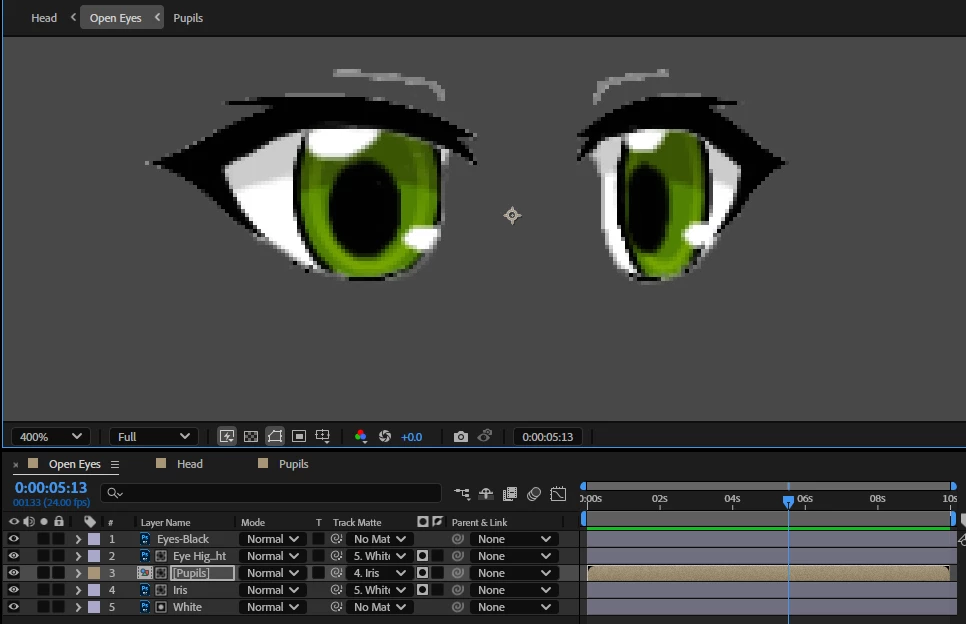
Pupils are in Iris and Iris in White. However the Iris slightly overlaps the White and if I put Pupils into the overlaping area, they are visible, which is not wanted factor as next picture


I'v tried to find a solution online, but non of them worked for me.


It¨s like I need mainly the Pupils to be in the Iris (which is working) and secondary in the White (which I dont know how to do)


Thanks for your time

Correct answer Yuriwexy

Fixed by Preserve Underlying Transparency


1 reply

Community Expert
November 11, 2025

If you need one object to recognize mutiple mattes, you can use two instances of the "Set Matte" effect rather than assigning a track matte to the layer. Add one set matte effect to the pupil layer pointing to the iris layer, and another Set Matte effect pointing to the white. 

YuriwexyAuthor
Inspiring
November 15, 2025

I'v tried, but whenever I change the Take Matte from layer, it always become invisible. Look at various videos and people do it this way, but for some reason, it's not working for me. AI also didn't help me. The only thing, which works in the Set Matte is Invert Matte, but then the pupil can travel wherever and the Matte becomes useless. Everything else in the Set Matte doesn't do a noticeable thing. Different orders of the layers doesn't change the result as well.


YuriwexyAuthorCorrect answer
Inspiring
November 17, 2025

Fixed by Preserve Underlying Transparency