
Inspiring
July 4, 2022
Question

Tracking an Object to end of Text OR Use a Shape Layer tracked to an Object to Uncover Text

  • July 4, 2022
  • 1 reply
  • 574 views

Hi! I'm a novice AfterEffects user, and I think this should be doable but I can't figure out how. 


I want to use a company logo to wipe across and reveal a lower-thirds text. See this video: https://vimeo.com/726817819/1760b41ac9


I will be using this for about 20 people's names, so I wanted to simplify my work and have the wipe follow the logo path/end position, so I don't have to reconfigure the wipe speed every time I use a different name. 


Here is my current setup: 
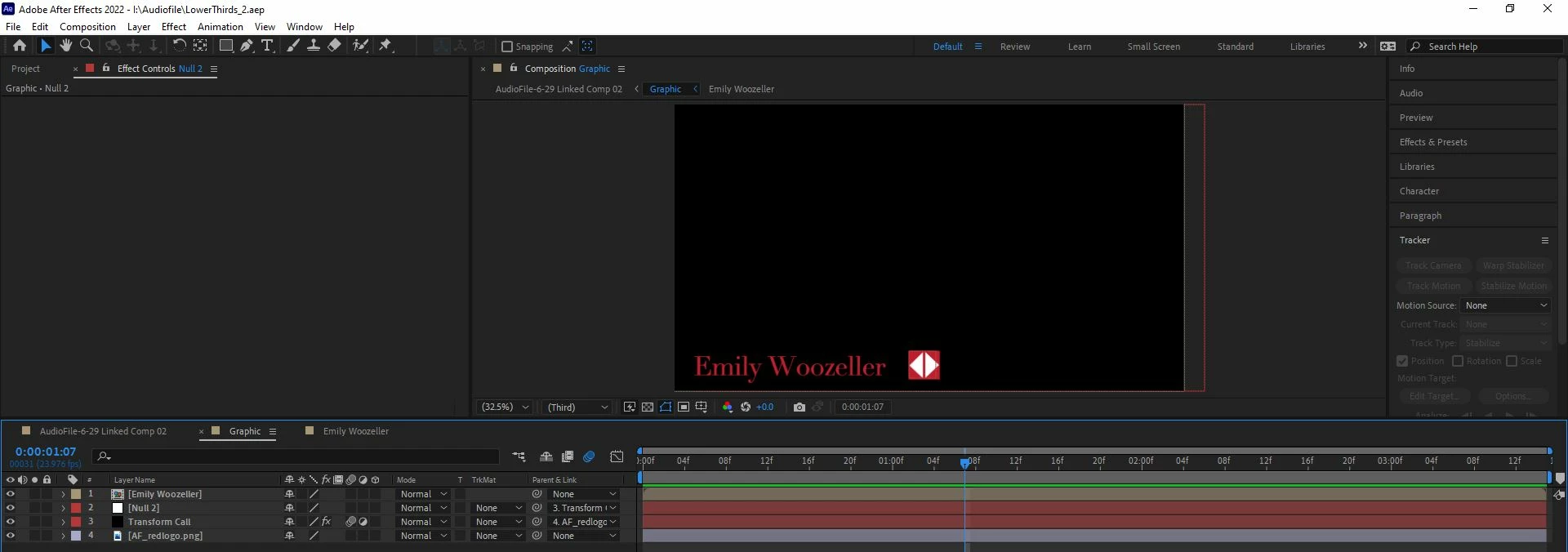
 

I linked the Null 2 layer to Transform Call, which is the layer that moves the logo to the right. I was hoping to link a mask on the text layer to the Null layer's movement so that the mask would follow the logo's movement, but I wasn't able to do that.


Thanks for any help! 


Gabbi

This topic has been closed for replies.

1 reply

Community Expert
July 4, 2022

You want to use an expression to control the movement of the logo and set its end position. You could also tie a track matte to the same expression. 


If your logo layer is the size of the logo and the anchor point has not been moved, this expression will position a layer on the left edge of the comp just out of view and move it to the right edge of the text layer in 1.5 seconds. 


// Controls
pad = 10; // end padding
t = time - inPoint;
tMin = 0; // Start move at layer in point
tMax = 1.5 // move time in seconds
// reference Layer
// set index + 1 if the text layer is below the graphic
ref = thisComp.layer(index - 1); 
refPos = ref.position;
refScale = ref.scale * .01;
refSize = ref.sourceRectAtTime(tMax + .2); 
yOfst = refSize.height / 2 + refSize.top;
//This layer defineProperties
lx = sourceRectAtTime().width / 2 * scale[0] * .01;
// Graphic alignment 
	xOfst = refSize.width + refSize.left;
	lx = lx;
	pad = pad;
// Scale Compensation
x = xOfst * refScale[0];
y = yOfst * refScale[1];
value1 = - ref.position[0] - lx;
value2 = x + lx + pad;
newX = easeOut(t, tMin, tMax, value1, value2);


refPos + [newX, y]


If you create a shape layer or mask a solid and position it correctly, set it as a track matte for the text layer, and parent it to the logo, it will reveal the text as the logo layer (graphic) moves in.


Scale, paragraph style, baseline shift, and scale of the graphic (logo) layer are all compensated for. 


The expression is from my soon-to-be-released tutorial on text animation and automation.


You can save the expression as an animation preset, then apply it to any graphic you want to move in from screen-left and end up on the right edge of a text layer.


I uploaded a sample comp for you. When the tutorial series is up I will post a link on the forum.

My After Effects Quick Tips

Inspiring
July 5, 2022

Wow, thank you!