Also what about the adjust track? Ive tried to correct the drift, but there I end up using multiple reffs. Should use just one reff or keep adding new reffs?
Take a look at this tutorial. It quickly shows you how to use a track matte in Mocha. This is the technique you should be using for this shot. I should emphasize that each shot presents different problems and each problem may require a different technique.
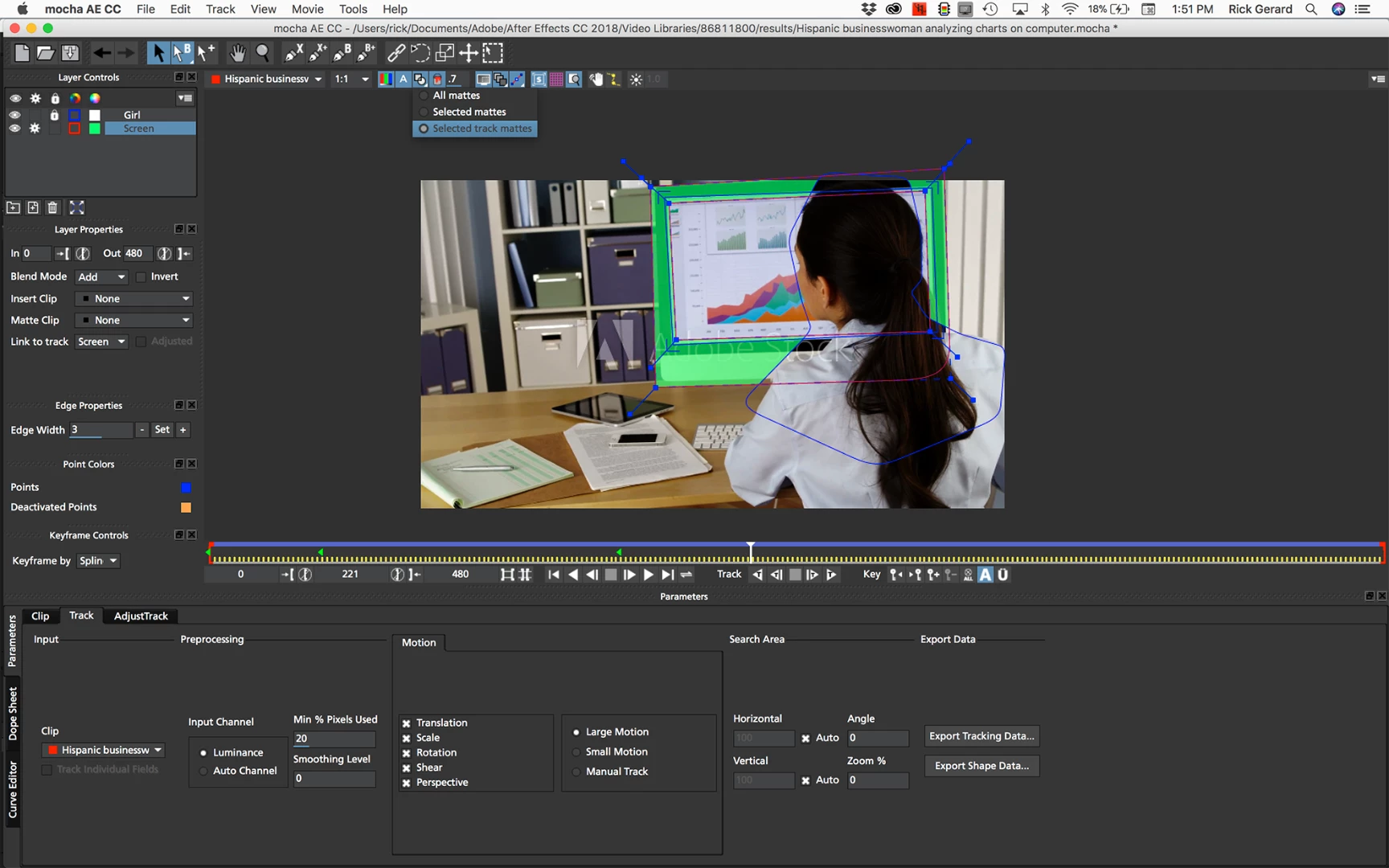
I tried your shot and got a good result with the following setup. Added a spline around the entire screen keeping it close to the edges of the computer. Added a second spline to the screen layer inside the frame that was just smaller than the screen. Added a new layer for the girl. Manually tracked the girl using just a few keyframes because it was faster than tracking her. Set view matte, edited matte color and set the matte mode for the bottom layer (screen) to track matte. I got a decent track with only 2 keyframes. Checked it using the 16 X 16 grid.
Here's what the tracking setup looks like:
You will also need to roto the girl so you would probably be better off tracking the girl and exporting a matte for her, but that is another lesson. You can find good tutorials on the Borris FX site that will help you create a decent matte for the girl. If you have a reasonable machine and have the technique down the Mocha work will probably take you about an hour.


 AdChoices