


Participant
April 7, 2025
Answered

Trapcode/Red Giant Form plugin not loading in After Effects 2025.2

  • April 7, 2025
  • 10 replies
  • 7171 views


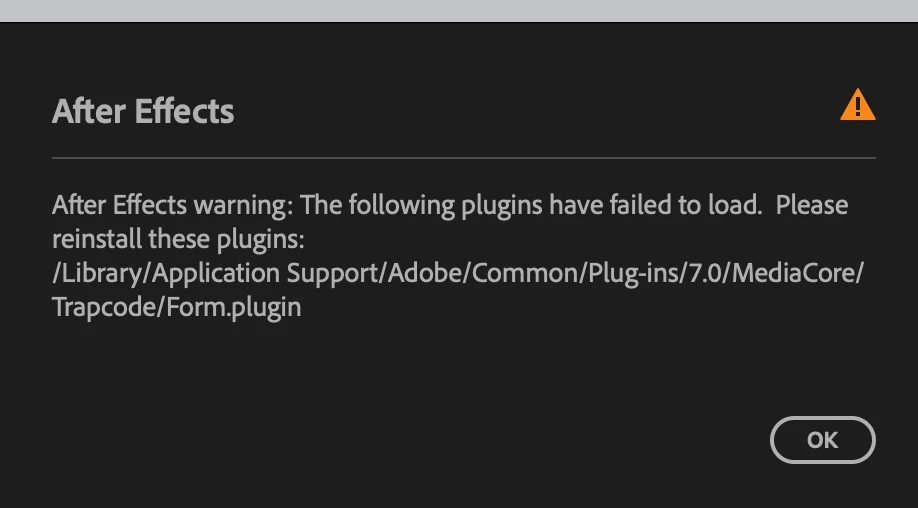
When launching After Effects 2025.2 I receive this error message. The most recent beta gave me this error as well. I reinstalled my Maxon Plugins but that didn't solve the problem. I'm on a M1 MacBook Pro. OS: Sonoma 14.0
 

Correct answer Paulius5FCA

I had the same issue but this solved the problem.

1. Go to
Mac HardDrive/Library/Application Support/Adobe/Common/Plug-ins/7.0/MediaCore
and delete all files inside "Red Giant Universe " and "Red Giant VFX" folders

2.Uninstall and reinstall Red Giant plug-ins on Maxon app.

3.Launch After Effects.

Hope that helps.

10 replies

Participant
January 27, 2026

Thank you, I’ve been trying to fix this all morning after removing old versions of Premiere and some old Maxon stuff got mad at me!

Paulius5FCACorrect answer
Participant
June 3, 2025

I had the same issue but this solved the problem.

1. Go to
Mac HardDrive/Library/Application Support/Adobe/Common/Plug-ins/7.0/MediaCore
and delete all files inside "Red Giant Universe " and "Red Giant VFX" folders

2.Uninstall and reinstall Red Giant plug-ins on Maxon app.

3.Launch After Effects.

Hope that helps.

Participant
April 22, 2025

If all else fails dropping down from 25.2 to 25.0 fixed the issue for me.

Suzie5EEDAuthor
Participant
April 21, 2025

Hmm, original poster here. It took me a minute to follow all the instructions that David provided but now Form is working just fine. No crashes. I don't remember but I may have had to go through all these steps a couple of times before I stopped having any issues. I may have also reset my AE preferences. 

Participant
April 21, 2025

Did you find any solution because i have the same problem in 2025 and I updated everything after and maxon, but noting fixed 
and particular have many sitting not working or visual muens settings 

David.Arbor
Community Manager
Community Manager
April 14, 2025

@Luis Natali, are you installing the latest version of the Red Giant plug-ins from the Maxon app (2025.4.0)? If you're getting a crash with Form, you'll have to contact Maxon support.


Thanks,
- David, After Effects Engineering Team

Participant
April 14, 2025

I tried all this, but the plugin makes AE crash after re-installing. I have to use Form for a project and now I'm stuck. Any ETA on this to be fixed? Thank you!

David.Arbor
Community Manager
Community Manager
April 9, 2025

Hi Suzie, and you're welcome!


Are you looking in the System Library folder and not the User Library? That folder is going to be in your Macintosh HD next to your Applications, System, and User folders. An easy way to get directly to it is to open a Finder window and use the menu command Go > Go to Folder (Shift+Cmd+G) and paste the following path:

/Library/Application Support/Adobe/Common/Plug-ins/7.0/MediaCore/Trapcode


I think this should do the trick for you.


Thanks,
- David, After Effects Engineering Team

Participating Frequently
July 11, 2025

this did it for me, i was going to the wrong folder

Suzie5EEDAuthor
Participant
April 8, 2025

Hi David,

Thanks so much for your prompt response.

I attempted following your helpful suggestions but ran into an issue.

The path listed in the error message doesn't seem to exist on my computer. However, there is no "Plug-ins" folder so the trail ends there. 

When I follow the path, everything is there up to the "Common" folder. 

I was able to complete the other suggestions but am still getting the error on launch. 

Not sure what else to do . . . 

Thanks again,

Suzie


David.Arbor
Community Manager
Community Manager
April 7, 2025

Hi there @Suzie5EED,


I recently ran into this myself and brought it up with the Maxon / Red Giant team. They're aware of the issue and are investigating it. 

In the meantime, an easy workaround is to go to the folder referenced in the error, delete "Form.plugin" and run the Red Giant installer again.


You might also want to go into your After Effects app folder and remove the "TrapcodeOBJ.plugin" as well before running the installer again. This plugin can be found at

"/Applications/Adobe After Effects 2025/Plug-ins/Format/Trapcode/TrapcodeOBJ.plugin"


Thanks,
- David, After Effects Engineering Team