
fabiojorge
Participant
September 16, 2022
Question

Trigger opacity by a path progression

  • September 16, 2022
  • 3 replies
  • 722 views

Hi, everyone!


I want to know how can i trigger opacity animation in a shape layer by the progression of a trim path. I am creating a line graphic that will be used everyday and i need this graphic to be the most quickly effort as possible.


Here is my graphic:
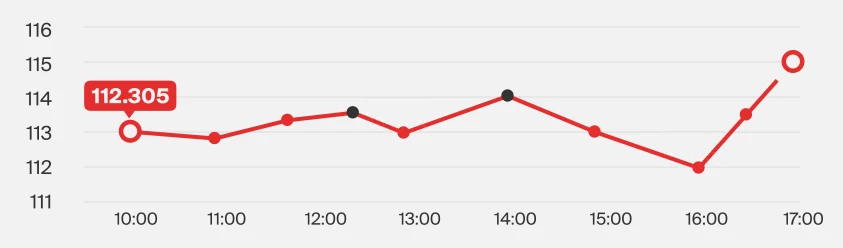
 

I need the points opacity goes 0 to 100 when the path pass by then. Its possible?


Thanksss and sorry for my english rs

This topic has been closed for replies.

3 replies

Community Expert
September 16, 2022

The simplest way to turn each dot is to duplicate the layer with the animated line, make the line wide enough to cover the dots, and set it as a Track Matte for the dots. A little blurring, some round caps, and a couple of frames of animating the offset are all that is required. 


Mylenium
Legend
September 16, 2022

Since the segments are linear, one would calculate the absolute distance between the points and correlate it to the percentage of the trim paths based on the absolute length of the line, which is simply based on accumulating the lengths of the individual segments. Then you can define a "fade in distance" and likewise correlate it to the actual path coverage. Perfectly doable, just a bit of code.


Mylenium

Jose Panadero
Community Expert
Community Expert
September 16, 2022

Using the linking option for the opacity parameters. Link Opacity parameter to the End parameter.

Mylenium
Legend
September 16, 2022

That's not going to work because the path length does not equate to the distance between the points.


Mylenium

Jose Panadero
Community Expert
Community Expert
September 16, 2022

He is talking about the trim path operator and as you have exaclty the same type of parameter you can link opacity to end parameter on the trim path operator. So it works as I have explained.