kfirb33535315
Participant
January 31, 2019
Question

Trim path slows down and crushes Ae problem

  • January 31, 2019
  • 2 replies
  • 1047 views

Hi there,

I try to make a Trim path animation and every time it ridiculously slows down my computer.

The process I do:

Start a new composition and then import and AI file as composition (it tried to do it also as path before - crush and slowing down all the same).

Then I click "Create shapes from vector layers". After adding the Trim Path the prgram become really really slow and almost unfunctional.

any suggestions?
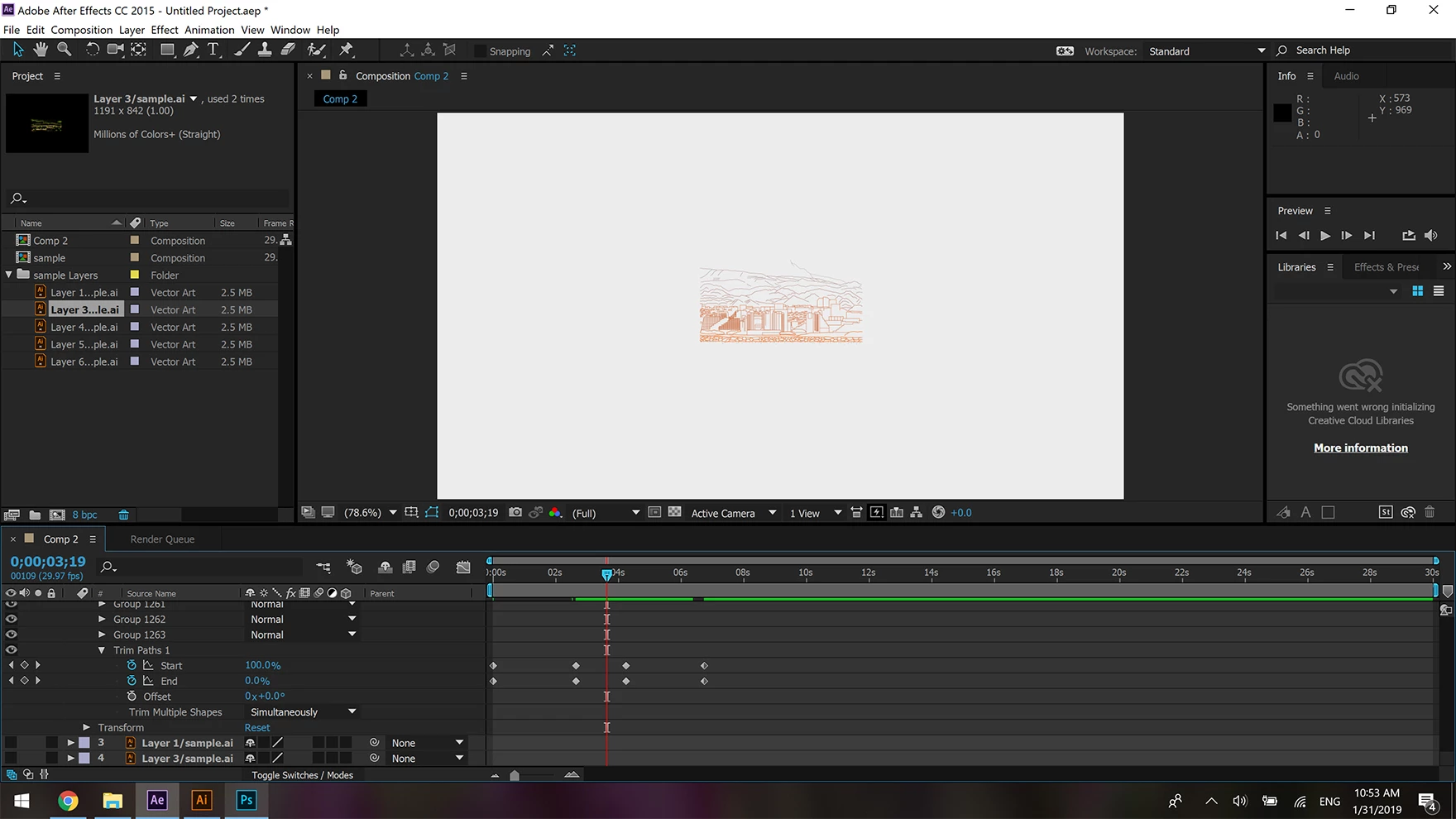
picture attached.

Best,

Kfir

    This topic has been closed for replies.

    2 replies

    P.M.B
    Legend
    January 31, 2019

    You're trying to trim path 1300 paths simultaneously.  Splitting it into smaller pieces & switching the method from simultaneous to sequential might speed it up a tiny bit,  but probably not by much.  Also let go any desire preview it at full res.  Switch the resolution to half or third or quarter, make sure the timing works and move on.  You might even want to pre-render it. 

    ~Gutterfish
    kfirb33535315
    Participant
    January 31, 2019

    Thanks. I tried to have it run individually but a you said it still really slow. so does when i lower the resolution.

    I tried to import the files as EPS and not AI and to merge all the paths to 8-10 groups and it works much faster. I think ill stick to this solution unless there are some cons I'm not aware of?

    Thanks.

    P.M.B
    Legend
    January 31, 2019

    I googled the specs to your computer.  It's really not anywhere close to "pretty powerful" when it comes to After Effects.  AE requires serious power & optimization to do complex tasks at real time,  or even close to real time speeds.   You're trying to get AE to perform a pretty beastly task with single 2.3ghz core & a relatively low amount of ram. Also you're not using a dedicated cache drive and who knows what type of shape your primary drive is in.  I'd also bet your cache is full.  As has already been suggested you should probably break your artwork up (prior to importing it) Then pre render each chunk and composite them back together if you need to see your artwork unfold in real time.  Most of the time it's not really necessary.  Time is money for some.  You just want to get the timing right is all.  If you want to see what it will look like rendered take a screenshot of a single frame.

    Bottom line:  you're trying to do computationally complex work on a single core of a 4 year old laptop with no dedicated cache and a low amount of RAM.

    And you're hoping to preview it at more then a frame every one or two seconds.  It's just not a realistic expectation.

    ~Gutterfish
    Martin_Ritter
    Legend
    January 31, 2019

    What are your computer specs, what version of AE are you running?

    I see that there are 1263 path-groups in your shape layer. Maybe this is just to much for your computer.

    Split your artwork into smaller pieces and retry trim-path with them.

    kfirb33535315
    Participant
    January 31, 2019

    Thanks for the fast answer.

    Im using DELL M3800, workstation, its pretty powerful computer. and working with AE 2015.

    Martin_Ritter
    Legend
    January 31, 2019

    Oh dear... a laptop!

    No, it's not powerful enough to fulfill this task, as I can see from the spec-sheet. CPU and RAM are kind to slow/low.

    Split your artwork into smaller pieces, do what Gutterfish said and give the PC time to render everthing.