
Known Participant
October 22, 2022
Answered

Trim paths controlling stroke size.

  • October 22, 2022
  • 3 replies
  • 705 views

I'm making a trim paths to show a line and on the tip I have 2 circles that I also making with trim paths that are linked to the main line.

So the position and shapes are already as I want.
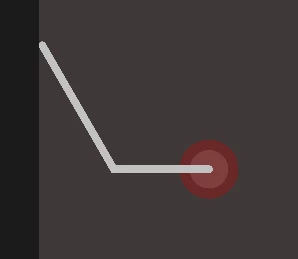
Now, is there a way to make the size of those balls start at Zero on the beggining and in the end and increase to the defined stroke size in the middle?


If I'd make a graph with its size it would be something like this:
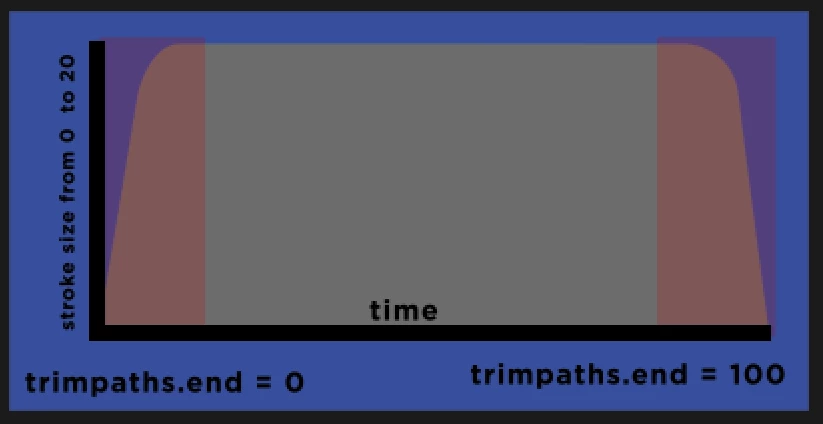
Where the red area would be the stroke increasing/decreasing and the grey it would be the number defined on the stroke value.


It will aways start at 0 but, sometimes the trim path will stop at 40 or 60. Is there a way to account for its final value?


Is there a way to have this kind of result using expressions? I'd like to automate this part bc there's a lot of lines to do this.

This topic has been closed for replies.
Correct answer Dan Ebberts

This may give you some ideas, depending on how you have things set up and what you're after exactly:

L = thisComp.layer("Shape Layer 1");
wMax = L.content("Shape 1").content("Stroke 1").strokeWidth;
pct = L.content("Trim Paths 1").end;
pctMax = pct.numKeys > 0 ? pct.key(pct.numKeys).value : 100;
pct < pctMax/2 ? ease(pct,0,10,0,wMax) : ease(pct,.9*pctMax,pctMax,wMax,0);

3 replies

Dan Ebberts
Community Expert
Dan EbbertsCommunity ExpertCorrect answer
Community Expert
October 22, 2022

This may give you some ideas, depending on how you have things set up and what you're after exactly:

L = thisComp.layer("Shape Layer 1");
wMax = L.content("Shape 1").content("Stroke 1").strokeWidth;
pct = L.content("Trim Paths 1").end;
pctMax = pct.numKeys > 0 ? pct.key(pct.numKeys).value : 100;
pct < pctMax/2 ? ease(pct,0,10,0,wMax) : ease(pct,.9*pctMax,pctMax,wMax,0);
ricar2Author
Known Participant
October 23, 2022

Tks Dan, that's amazing as aways.

Not gonna lie, I don't understood the whole picture but it does fit my needs and I even figure out how to tweek it a bit.

Tks again.

Mylenium
Legend
October 22, 2022

As already mentioned this can be set up in a million ways and could be changed. The real question to me is how you want those arbitrary values to be defined. Apparently there would be no benefit if you just dial them in via sliders. Any expression-based solution needs a fixed frame of reference like the trim always being 100%, a fixed duration or speed at which the swirls draw, a fixed number of keyframes. If everything is variable there can never be a proper result. You'd have to explain how you envision it to work before anyone can sit down to create more elaborate code.


Mylenium 

Mylenium
Legend
October 22, 2022

https://helpx.adobe.com/after-effects/using/taper-shape-strokes.html


Correlating the actual timing to the taper is an entirely different exercise, though. One would likely fetch the keyframes of your dots and then remap the percentages to that in a manner like this:


mPoint=thisComp.layer("Point").transform.position;

mStart=mPoint.key(1).time;
mMid=mPoint.key(2).time;
mEnd=mPoint.key(3).time;

mDur=mEnd-mStart;
mDiff=mMid-mStart;

linear(mDiff,0,mDur,0,100);


Apparently this makes several assumptions about keyframes and how they are ordered in time. If there are more keyframes things won't work, which could be a problem if you draw complex shapes, in particular curves. In such a case one would have to use a loop which figures out what the last and its previous keyframe actually are and bass the calculation on that and one would potentially also need to decouple the actual path generation from the keyframes if you want the tapers to look even and not be tied to keyframe spacing...


Mylenium

ricar2Author
Known Participant
October 22, 2022

Hi Mylenium, tks for the imput but it doesn't quite get me the result because my "mPoint" is actually a trimPahts and I got only 2 keyframes that goes from 0 to 100, sometimes 0 to 60.

Is there a way for example to add a slider to define the time transitio for the control?
Like if I could set it to 3 frames on the begginig and end, it might just do it. Might be a simpler?