MahaB82A
February 23, 2022
Answered

Trim Right Side Layer

  • February 23, 2022
  • 2 replies
  • 460 views

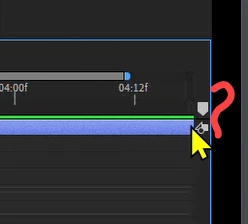
I am unable to Trim Right Side Layer.

 

This topic has been closed for replies.
Correct answer Jose Panadero

Your layer is length that your composition or you have zoomed into your timeline. This is why you can trim yout layer. ANyway you can plave the playhead over this particular frame and go to Edit > Split Layer. Then you can trim as you want.

2 replies

Community Expert
February 23, 2022

Pon el playhead y presiona el siguiente atajo de teclado:

macOS: Shift + Cmd + D

Windows: Shift + Ctrl + D


De esta manera vas a hacer una especie de corte pudiendo borrar lo que no necesites (Split Layer).

Byron.
MahaB82A
MahaB82AAuthor
February 23, 2022

It is only triming LHS of the layer

Jose Panadero
Community Expert
Jose PanaderoCommunity ExpertCorrect answer
Community Expert
February 23, 2022

Your layer is length that your composition or you have zoomed into your timeline. This is why you can trim yout layer. ANyway you can plave the playhead over this particular frame and go to Edit > Split Layer. Then you can trim as you want.

MahaB82A
MahaB82AAuthor
February 23, 2022

Thanks