Inspiring
January 29, 2014
Answered

Trouble formatting my resource string in general

  • January 29, 2014
  • 1 reply
  • 684 views

Dear all,

After using AE for ten years and writing some script for other purposes than AE I decided to finally get into scripting for AE (CC) to make my life and the lifes of my co-workers more easy. Using David Torno's tutorials and Peter Kahrel's ScriptUI pdf I created some pretty useful dockable panels which import regular used templates, shapes, render-settings, watchfolders et cetera, using dropdownmenu's, buttons and checkboxes. Works smooth and let's us work far more efficient and consistent then before.

All acomplished using resource strings as seen in David Torno's Episode 12.

But now! The more functionality I want to add to my panels, the more I stumble across the problem were I don't now how to translate 'regular' script to a resource string and I just don't know if going the resource string-path is the right one. For example, in regular code I know how to add a custom iconbutton:

var importIt = myButtonGroup.add("iconbutton", undefined, myIcon, {style: "toolbutton"});

..where myIcon is a var with a long string which creates the image. This works as expected.

However, in my resource string I really don't know how to format the string. Where do I put the string to the image?

myIcon: IconButton{style: 'toolbutton'},\

I think my real question is, where can I find the various properties or format for the resource string? Do I miss something obvious?

Really stuck here, hence my first post, and hope someone can give me a push in the right direction. Many thanks in advance.
This topic has been closed for replies.
Correct answer David Torno

However, in my resource string I really don't know how to format the string. Where do I put the string to the image?

myIcon: IconButton{style: 'toolbutton'},\

At time 37:00 in expisode 12 Part 1 I explain how to input the "image" property for the iconButton.

http://provideocoalition.com/pvcexclusive/video/after-effects-extendscript-training-ep-12

I think my real question is, where can I find the various properties or format for the resource string? Do I miss something obvious?

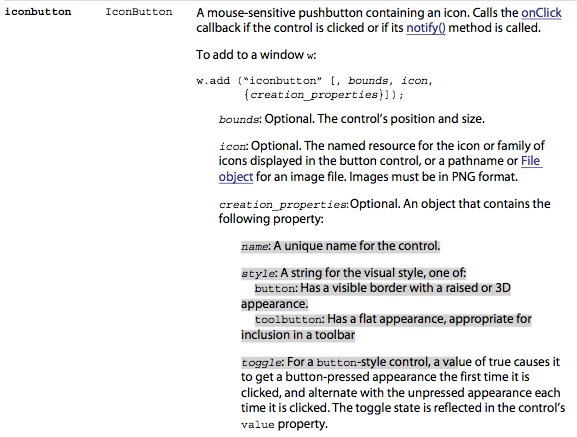
JavaScript Tools Guide CC.pdf Pg. 127 explains iconButton creation properties options like Name, Style (button, toolbutton), and Toggle. Peter Kahrel's pdf is a great resource, but you do want to also make sure you have Adobe's pdf. While it can be confusing to read sometimes, it does hold answers like this.

Hope that helps.

1 reply

David TornoCorrect answer
Legend
January 29, 2014

However, in my resource string I really don't know how to format the string. Where do I put the string to the image?

myIcon: IconButton{style: 'toolbutton'},\

At time 37:00 in expisode 12 Part 1 I explain how to input the "image" property for the iconButton.

http://provideocoalition.com/pvcexclusive/video/after-effects-extendscript-training-ep-12

I think my real question is, where can I find the various properties or format for the resource string? Do I miss something obvious?

JavaScript Tools Guide CC.pdf Pg. 127 explains iconButton creation properties options like Name, Style (button, toolbutton), and Toggle. Peter Kahrel's pdf is a great resource, but you do want to also make sure you have Adobe's pdf. While it can be confusing to read sometimes, it does hold answers like this.

Hope that helps.

Inspiring
January 29, 2014

Dear David, but ofcourse! I was reading the Javascript Tools Guide already and didn't know what I was looking for. I don't no how I missed that 37th minute. Probably because of some over-enthousiasm. Both your anwsers tied it together, now I see how to find the elements properties. Pg. 68 was useful too. Many thanks for your tutorials and your help, this will keep me going for a while.

Legend
January 30, 2014

Glad to help and good luck.