


Participant
Feb 27, 2017 8:08 AM UTC
Answered

Trouble with 'Sequence layers' command

Hi! I'm making hand-drawn stop motion animation in AE. I've tried to put my pictures to a sequence but it won't work for me.

For example, I have a new composition, the duration of it is 10 frames and I've imported 10 pictures to it.

The duration for the layers is 1 frame, like this:
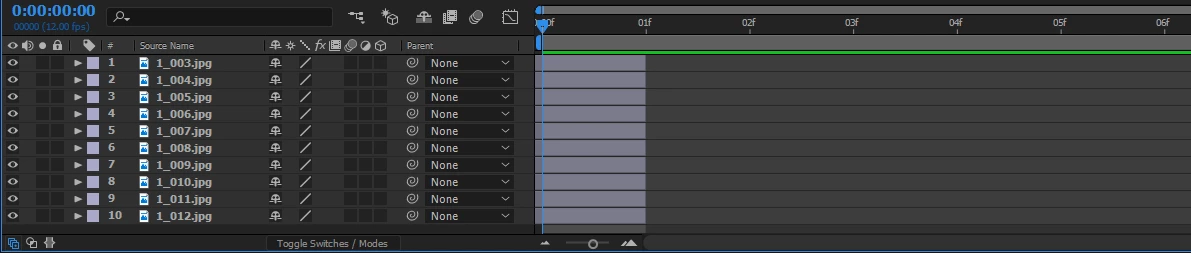
And when I select them all, right-click, go to keyframe assistant and sequence layers, it will end up like this:

Can you tell me what am I doing wrong? I'm new to AE so it could be something very stupid.

This topic is closed to new replies. Start a new post to keep the conversation going.
Rick GerardCorrect answer
Community Expert
Feb 27, 2017 9:25 AM UTC

You have shifted your layers to the left. What you should have done is set an in and an out point for each layer. You can select all layers (Ctrl/Cmnd + A) move the CTi to the first frame of the comp and then press Alt/Option + [ to set the in point. Then press Alt/Option + ] to set the out point.

If you duration is only one frame and you want to end up with a movie you should be importing your images as a sequence. All you wold have to do is go to File>Import, pick one of the images and then make sure that the image sequence option is selected. This is a much more efficient way to handle the animation unless you need to make different adjustments or effects on each frame. You just need to make sure that your comp frame rate matches the frame rate of the image sequence. Check that by going to File>Interpret Footage>Main. Set the default frame rate for image sequences in Preferences>Import.

4 replies

Participant
Jul 10, 2024 11:10 PM UTC

The layers are shifted to the left. To trim layer to the left Use shortcut Hold alt and click ]. To trim to right alt [

Translate
Rick GerardCommunity ExpertCorrect answer
Community Expert
Feb 27, 2017 9:25 AM UTC

You have shifted your layers to the left. What you should have done is set an in and an out point for each layer. You can select all layers (Ctrl/Cmnd + A) move the CTi to the first frame of the comp and then press Alt/Option + [ to set the in point. Then press Alt/Option + ] to set the out point.

If you duration is only one frame and you want to end up with a movie you should be importing your images as a sequence. All you wold have to do is go to File>Import, pick one of the images and then make sure that the image sequence option is selected. This is a much more efficient way to handle the animation unless you need to make different adjustments or effects on each frame. You just need to make sure that your comp frame rate matches the frame rate of the image sequence. Check that by going to File>Interpret Footage>Main. Set the default frame rate for image sequences in Preferences>Import.

Translate
maripoomAuthor
Participant
Feb 27, 2017 4:27 PM UTC

Thank you!
Setting in and out point did the thing.

Also I'll try importing my images as a sequence next time.

Translate
P.M.B
Legend
Feb 27, 2017 9:22 AM UTC

IDK....What are the settings (if any) you're punching into the sequence layers dialogue box?   I could be relevant.

Translate
~Gutterfish