
Participant
September 28, 2024
Question

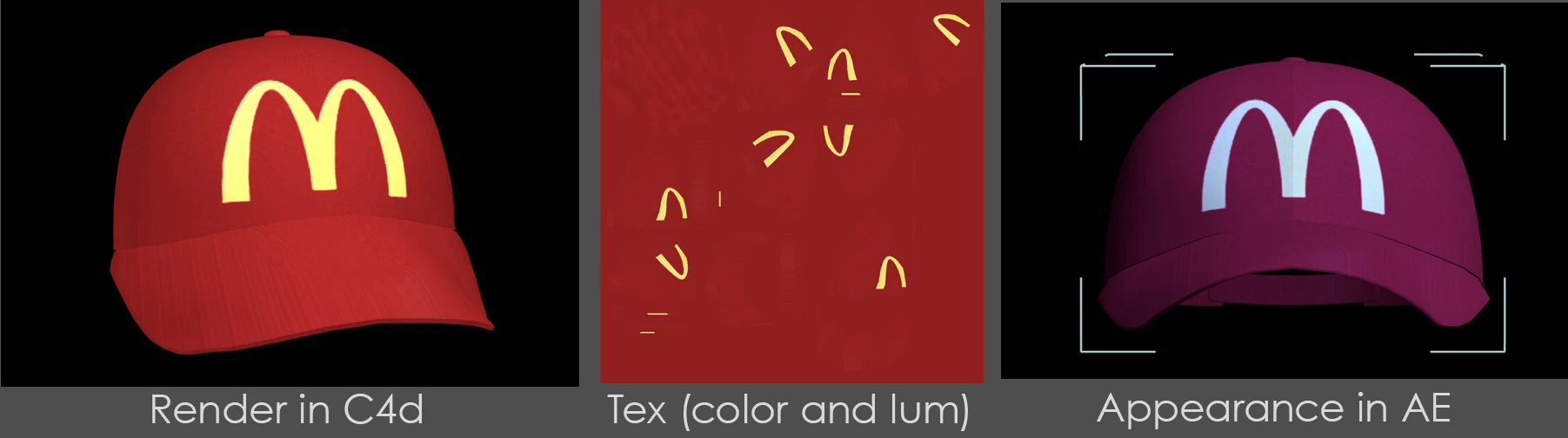
Trying out the new 3d .glb file and color is wron

  • September 28, 2024
  • 1 reply
  • 602 views

Built and textured in C4d. Export as .glb. When I import into AE the color is all wrong. Using the latest AE and even tried the latest AE beta. Tried different color spaces and texture file types. Thoughts?
This topic has been closed for replies.

1 reply

Mylenium
Legend
September 28, 2024

Different renderers operate differently. You cannot simply assume it would look the same everywhere. This in particular extends to advanced material channels like luminance. This will never work smoothly. You need to try to make things look good using basic channels liek Diffuse and Specular and then add refinements based on that.


Mylenium

KolinizedAuthor
Participant
September 28, 2024

Yeah, I only added the luminance to boost the color. I tried without first and it had the same hue shift but was much darker. I tried a number of lights and environment options but always the same hue issue.  This is a super simple use case and I have seen demos of much more complicated material setups. I have tried this pipeline with a simple box and it seems to work fine so it seems to be a problem with the model. Ill keep experimenting and post if I figure it out.