Participant
November 29, 2023
Question

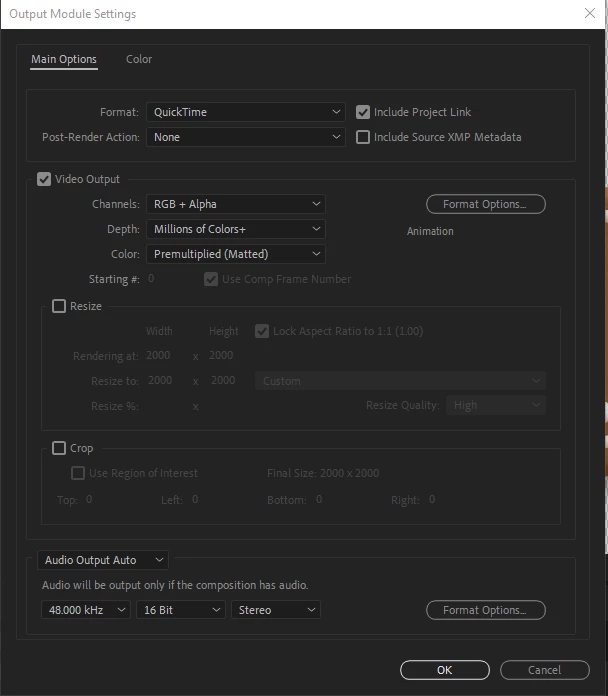
Trying to make transparent video, Tho my output is set Quicktime, Aphla + RGB

  • November 29, 2023
  • 7 replies
  • 363 views

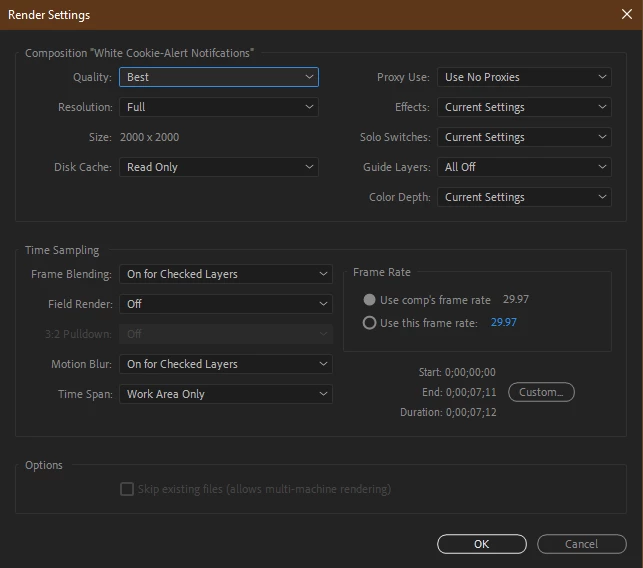
Hi, I've been looking tutorial after tutoria for probably 3 hours.... over how to export a video into a transparent video. as  shown how to do is file - Export - Add to redure queue - render setting: Best Settings - Output Modular: set to quick time, change RGB + Aphla - Queue in AME (media Encoder) but every time it does i still have the black background. when i put in adobe premiere pro  is something wrong with my setting what?  Please someone send help... T-T 

here is what my setting are. 
 

Thank you for your time. your amazing person. 

This topic has been closed for replies.

7 replies

thepixelsmith
Community Expert
Community Expert
November 29, 2023

Just for clarification your comp does in fact have transparent areas in it?

You can verify this with the transparency grid button at the bottom of the Comp panel.

Jerron Smith | www.thepixelsmith.com
Participant
November 29, 2023

yes, 


thepixelsmith
Community Expert
Community Expert
November 29, 2023

Try to render it directy from the AE Render Queue using the Render button.

Sending it to Media Encoder may be switching the export settings back to h.264.

Jerron Smith | www.thepixelsmith.com
Community Expert
November 29, 2023

Try using the High Quality with Alpha Output Module template from the dropdown list. 


Media players don't support Alpha Channels, so you will see black, but After Effects and Premiere Pro should recognize the alpha channel.

Participant
November 29, 2023

Thank you Ricky but sadly that didnt work. still got black background. 


Warren Heaton
Community Expert
Community Expert
November 29, 2023

How are you verifying the alpha channel?