


Participant
Jul 22, 2024 10:58 AM UTC
Answered

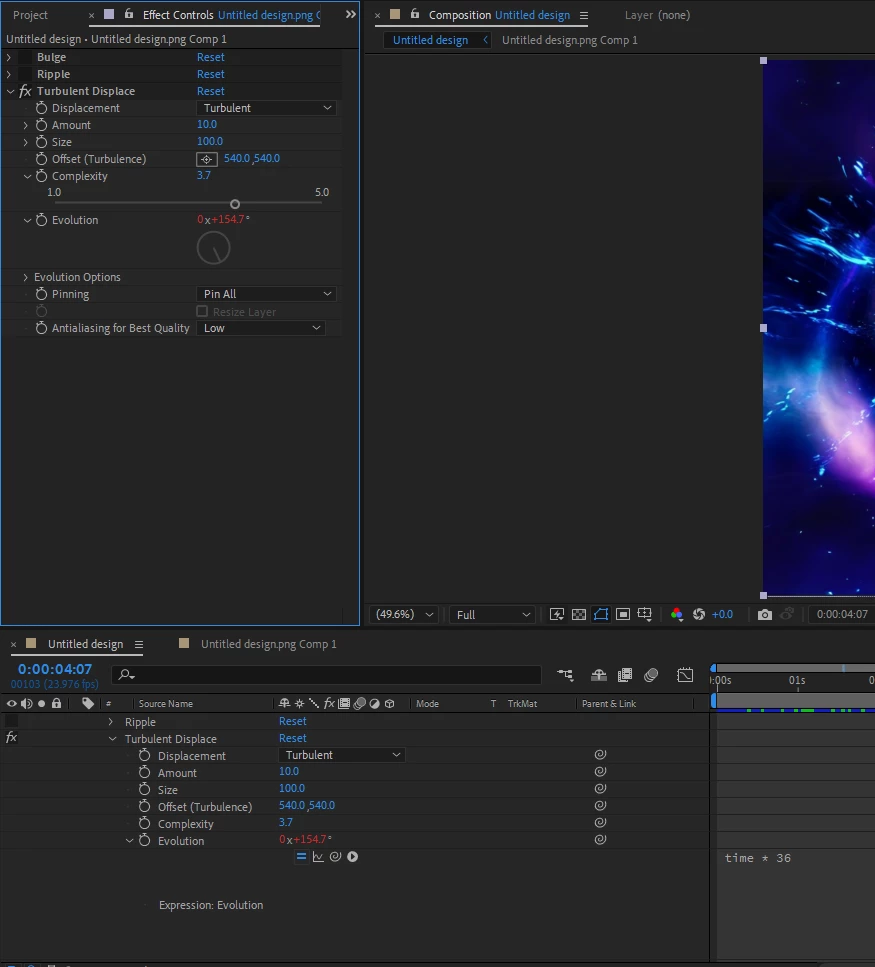
Turbulent displace seamlessly loop for 10s

I tried to make a seamless loop using Turbulent Displace. I added the following expression to the Evolution property: 


time * 36


 or


time * (360/10)


The Evolution does make a full circle from 0 to 360 degrees, but the animation is far  from seamless. 

Basically it starting from 0*+00°  and finishes 1*+00° 

Could somebody help me to create a real seamless loop from Turbulent Displace for 10s


Akira EndoCorrect answer
Participating Frequently
Jul 22, 2024 12:02 PM UTC

First tick "Cycle Evolution"-checkbox and set "Cycle (in Revolution)" to 1. This makes it loopable.

Also insert this expression at "Evolution". 

const myDur = 10; //duration in seconds
const increment = 360/timeToFrames(myDur); //amount to increment per frame
const endVal = 360 - increment; //calculate the maximum value

linear(time, 0, 10, 0, endVal); //linear blend between two values

4 replies

Akira EndoCorrect answer
Participating Frequently
Jul 22, 2024 12:02 PM UTC

First tick "Cycle Evolution"-checkbox and set "Cycle (in Revolution)" to 1. This makes it loopable.

Also insert this expression at "Evolution". 

const myDur = 10; //duration in seconds
const increment = 360/timeToFrames(myDur); //amount to increment per frame
const endVal = 360 - increment; //calculate the maximum value

linear(time, 0, 10, 0, endVal); //linear blend between two values

Translate
Participant
Sep 19, 2025 8:19 PM UTC

I would love to buy you a beer one day! Thank you for this great tip, I always meant to figure out how to get turbulent displacement looped, this works like magic! 

Translate
Dan Ebberts
Community Expert
Community Expert
Jul 22, 2024 11:43 AM UTC

Instead of Evolution, could you animate the Offset (Turbulence) to move in a closed loop over 10s?

Translate