Participant
July 13, 2020
Question

Turning reference image into reality

  • July 13, 2020
  • 1 reply
  • 208 views

Hey guys,


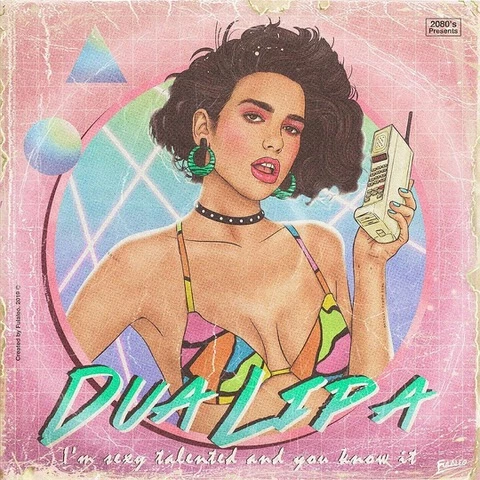
I have a reference image that I'd like some help turning from an image into opening titles to a video. I understand this sounds vague but I'm just trying to figure out how to capture the essence of it in Motion (i.e how to capture the dusty/worn 80s feel, not worrying so much about the woman in the middle).


I am using a AE video titles template that I downloaded and I'm trying to figure out how to make it look more like the attached image.


The template is here - https://elements.envato.com/new-80s-VG3KFAN


The desired aesthetic image is below. Any advice appreciated.


Cheers,


Andy
 

This topic has been closed for replies.

1 reply

Community Expert
July 14, 2020

I am assuming that you want to know how to do the color grading to the image of the girl in your image because there is nothing in the template that looks like the design. 


One approach would be to duplicate the footage layer with the actor, apply Cartoon and Exposure to the duplicate, try various blend modes and see what you get. You want to flatten out the color resolution, like going from 8 bit to 4, then add some edges. This is from a screenshot of the template and your sample image:

Cartoon and exposure settings are shown.

Overlay blend mode and all layers. Whatever you do it's going to take some experimentation and the settings depend entirely on the source footage. There are probably a dozen ways to approach this look, this was just one of them.