
Noyster2
Inspiring
February 13, 2023
Answered

Tutorial shows non-existent motion path curve handle

  • February 13, 2023
  • 2 replies
  • 637 views

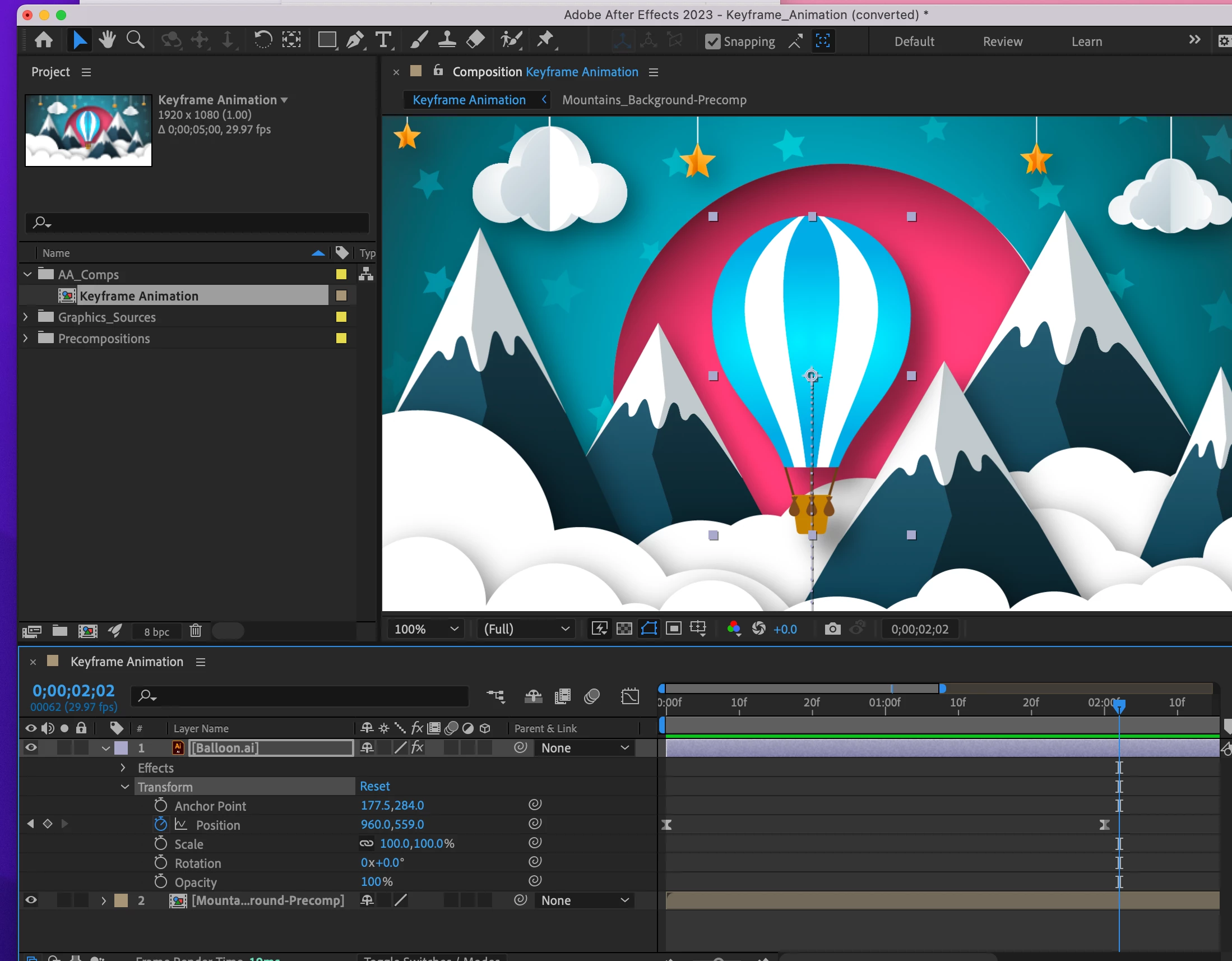
Hi After Experts... I am doing the Adobe tutorials and the on screen motion path shows a handle for a bezier curve which is not coming up for me. Search on line to much frustration.


 Please see the below screenshots and minute 4 in the tutorial: 

https://helpx.adobe.com/after-effects/how-to/keyframe-animation.html?playlistPath=/services/playlist.helpx/products:SG_AFTEREFFECTS_1_1/set-header:animating-essentials/learn-path:key-techniques/playlist:topic/en_us.json


Tutorial SS: handle right at bottom of balloon

My Screen (no circle)

 My whole workspace if that helps
 

This topic has been closed for replies.
Correct answer Mylenium

Check the display options in the composition viewer and of course actually select the keyframe in the timeline.


Mylenium

2 replies

Known Participant
April 6, 2023

Having the same issue, can you advise how you solved it? I have the keyframe selected and nothing can't see anything obvious in the composition view settings?

Mylenium
MyleniumCorrect answer
Legend
February 14, 2023

Check the display options in the composition viewer and of course actually select the keyframe in the timeline.


Mylenium