
Question
Tweak a simple script to select folder using default file explorer
Hi guys,
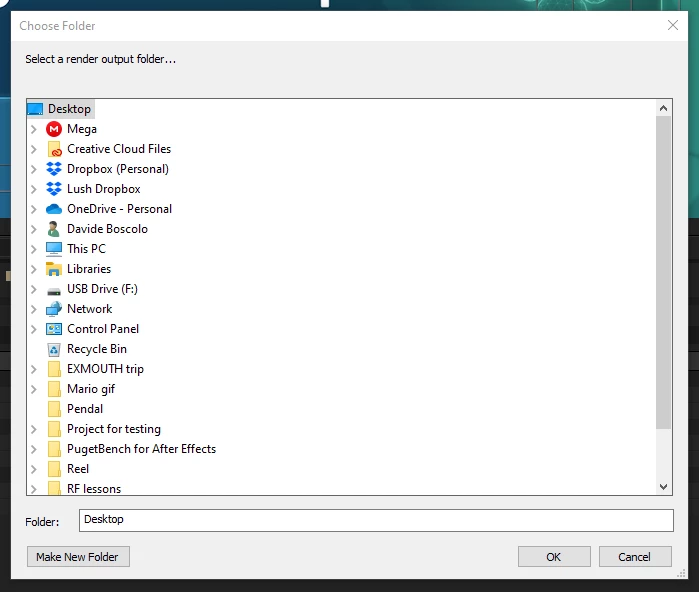
the following script has a huge problem for me: it opens up a file browsing dialog which is not the one I want and makes my life difficult everytime.
Is there any way to tweak the code so it opens up the usual Windows File Explorer?
{
  // Change Render Locations.jsx
  //
  // This script prompts the user for a new output folder to use for queued items in the Render Queue.

  function ChangeRenderLocations() {
    var scriptName = "Change Render Locations";
    var newLocation = Folder.selectDialog("Select a render output folder...");

    if (newLocation != null) {
      app.beginUndoGroup(scriptName);

      // Process all render queue items whose status is set to Queued.
      for (i = 1; i <= app.project.renderQueue.numItems; ++i) {
        var curItem = app.project.renderQueue.item(i);

        if (curItem.status == RQItemStatus.QUEUED) {
          // Change all output modules for the current render queue item.
          for (j = 1; j <= curItem.numOutputModules; ++j) {
            var curOM = curItem.outputModule(j);

            var oldLocation = curOM.file;
            curOM.file = new File(newLocation.toString() + "/" + oldLocation.name);

            alert("New output path:\n" + curOM.file.fsName, scriptName);
          }
        }
      }
      app.endUndoGroup();
    }
  }
  ChangeRenderLocations();
}
 AdChoices