Known Participant
August 15, 2019
Answered

Type reveal and remove presets using words

  • August 15, 2019
  • 2 replies
  • 798 views

Hi

I'm using range selectors to bounce words of a sentence (not characters) into frame, (an adaption of School of Motion's "Bounce") All fine on the way in as it lets the first word come in first. However, reversing the keyframes to remove the text, always starts with the last word's departure . How do I make sure the sentence leaves frame, word by word,  starting at the beginning? Really it should be an easy reversal.....

Thank you in advance.

El

This topic has been closed for replies.
Correct answer Roland Kahlenberg

One method is to key frame the position movement  in each range selector, and keyframe the next frame with the reverse positions (so, -199 become 199 and 20 becomes -20 etc), then slide the range select offset positions to the second position keyframe.

I'm sure it's not the correct method, but it does the trick for now. I shall have to investigate further. Thank you both for all your help!

Elliott


Here's an AEP which I think does what you want - use it as a guide to suit your needs. I've provided two comps with each showing a different route to get to your desired goal.

http://www.broadcastGEMs.com/mediaStreamer5/Reverse_TextAnimatorProperty_01.zip

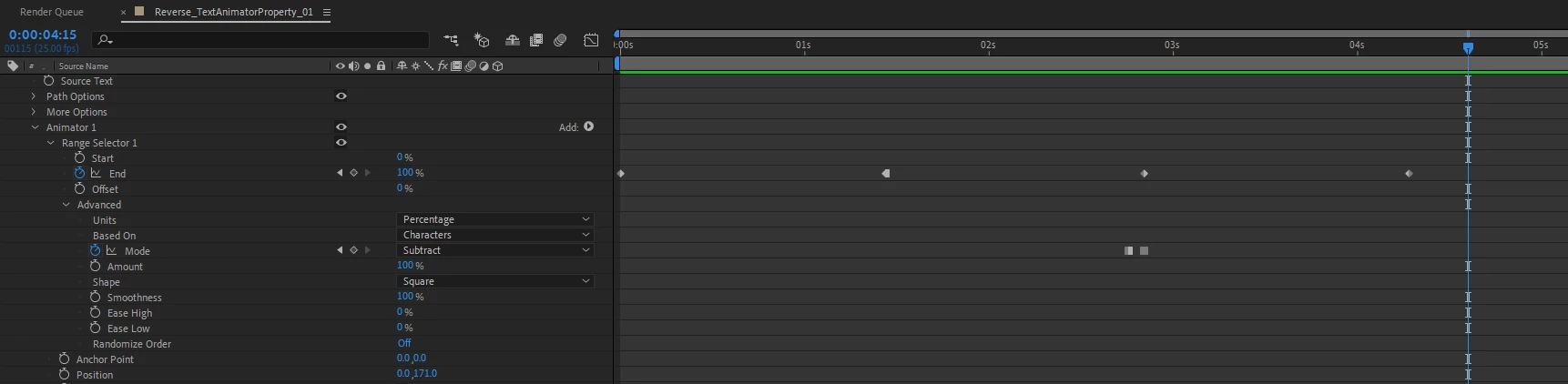
The screengrab below is from the AEP. There is no need to duplciate the Range Selector with this method. What you'll need to do is to copy and past the keyframes for the Range Selector and paste it further down the timeline, where you want the transition out to happen.

Then, you'll want to set the second KF for the Range Selector to a Hold KF. Lastly, you'll have to change the Mode from Add to Subtract and be mindful where the keyframe change occurs. Essentially, the Mode should be set to Subtract on the first frame where the transition out occurs.
2 replies

Roland Kahlenberg
Legend
August 15, 2019

Without looking at the innards of the Text Layer it's impossible to know what settings are required to achieve what you want. However, a while back, I wrote an article on using a Formulaic Approach to tackle a problem such as yours. Take note that you will want to have some experience with the Text Tool in order understand the mechanics of what I've written.

http://www.broadcastGEMs.com/mediastreamer/RolandK_TextTool_CustomizingPresets_aFormulaicApproach_June2018.pdf

Very Advanced After Effects Training | Adaptive & Responsive Toolkits | Intelligent Design Assets (IDAs) | MoGraph Design System DEV
Kyle Hamrick
Community Expert
Community Expert
August 15, 2019

It is indeed pretty easy, you're just misunderstanding how the text animators work. (To be fair, they are not particularly intuitive.)

Duplicate the Range Selector, set the Mode to Subtract, and scoot the keyframes to where you'd like the words to disappear. If you're using multiple Range Selectors, you'll need to do this for each.

Depending on how you've got this built, you can also potentially use the Amount property (which goes negative) to reverse an animator.

Known Participant
August 16, 2019

Hi Kyle

Thanks for your response. I did what you said and played around a bit but I'm still not able to get the simple desired effect.

Basically a sentence pops up from the bottom of the screen to the centre word by word. All fine. However when I follow your instruction, the words leave in the correct order, yet they rise up of the screen rather than drop off the screen.

What am I missing? (Apart from a deep understanding of text effects and expressions!)

Known Participant
August 16, 2019

One method is to key frame the position movement  in each range selector, and keyframe the next frame with the reverse positions (so, -199 become 199 and 20 becomes -20 etc), then slide the range select offset positions to the second position keyframe.

I'm sure it's not the correct method, but it does the trick for now. I shall have to investigate further. Thank you both for all your help!

Elliott