Inspiring
October 18, 2017
Question

UI Bug in AE 15.0.0
  • October 18, 2017
  • 7 replies
  • 2478 views


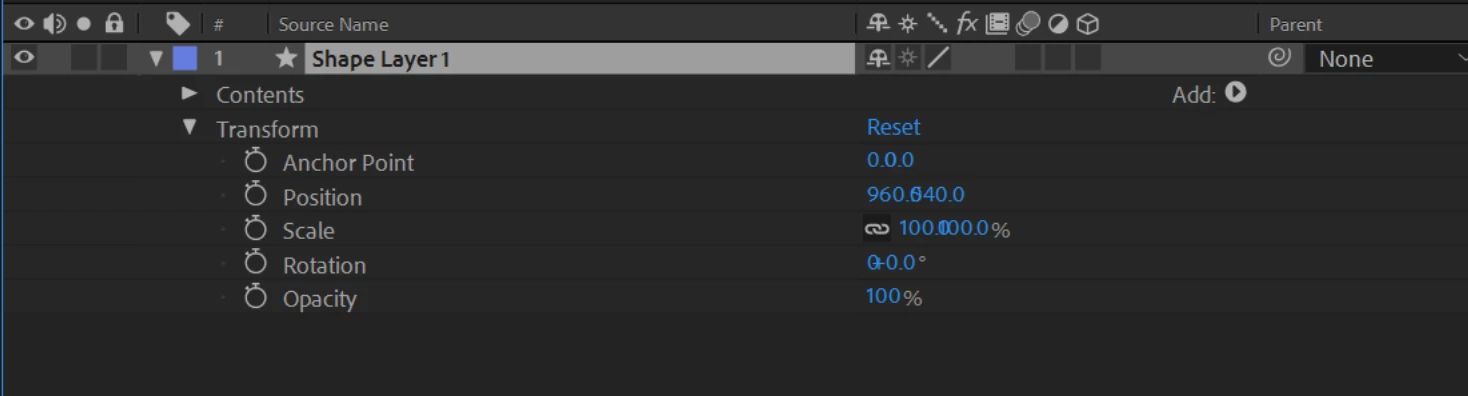
Not sure how this one slipped past the testers. As you can see, the transform channels with multiple values overlap in the UI.

My machine is a Wacom MobileStudio Pro running windows 10.0.15063

    This topic has been closed for replies.

    7 replies

    Szalam
    Community Expert
    Community Expert
    January 23, 2018

    The After Effects update that came out last night (might take up to 24 hours to propagate to Adobe's servers around the world) fixes this issue. (And several others - it also adds some new functionality.)

    Barchtic
    Participant
    December 10, 2017

    Seems odd how it isn't fixed yet...

    kulpreet singh
    Inspiring
    October 20, 2017

    Sorry for the trouble caused, we are working on a fix.

    Thanks,

    Kulpreet Singh

    Participant
    November 29, 2017

    Any update on when we can expect a fix? I see Photoshop had its first bug fix release for CC 2018 a couple weeks ago...

    Inspiring
    October 19, 2017

    Came here to report this as well. Thought I'd add my voice even though it's been pretty well covered already.

    UHD monitor with scaling at 150%.

    Alexey Tyulin
    Participant
    October 19, 2017

    I have the same problem. My monitor is 2560x1440 and 150% UI scaling (Windows 10). With 100% and 200% UI scaling It's displayed fine. I don't have this problem in previous versions of AE.

    Inspiring
    October 19, 2017

    I've since discovered that it's due to screen scaling and adobe's new UI font. If you set the scaling to 100 or 200 before launching AE, there's no problem. If you launch AE with the scaling between 100 or 200, the problem persists when you change the scaling with AE running. Apparently Adobe is aware of the problem but couldn't address it before launch. I was told this will be fixed in the next patch.

    The good news is that there's a workaround - set your scaling at 200%, launch AE, and then knock it back down to to your preferred scaling- the UI continues to display as it should.

    Peru Bob
    Community Expert
    Community Expert
    October 18, 2017

    You may want to file a bug report:

    Feature Request/Bug Report Form

    Inspiring
    October 18, 2017

    There's no option for version 15.0.0 in the bug report form yet. Where do I report that?

    Peru Bob
    Community Expert
    Community Expert
    October 18, 2017

    Spacecat66  wrote

    There's no option for version 15.0.0 in the bug report form yet. Where do I report that?

    Good question.  I guess they weren't expecting any bugs.

    I'll try to see if I can find out from a staff member.

    Inspiring
    October 18, 2017

    For troubleshooting, I've tried restarting, updating my GPU drivers, adjusting my screen scaling from everything from 100% to 300% (I normally have it at 150%). I don't have this problem in 14.2.1.34

    kulpreet singh
    Inspiring
    October 18, 2017

    Hi Spacecat66,

    Have you checked for the latest drivers? Drivers | Wacom

    Thanks,

    Kulpreet Singh

    Participant
    October 18, 2017

    Hello kulpreet,

    I'm afraid it is not just Wacom machines. I'm on an HP Z640 Workstation running Windows 10 and XYZ values are overlapping.